
How to Download the Signal APK Over Mobile Data
Published: October 7, 2026 · Updated: October 8, 2026
Yes, you can download the Signal APK over mobile data. The file is about 109 MB (114,758,484 bytes as served from Signal's server), so it is a large single download. On a 1 GB monthly plan that is roughly a tenth of your data. The download works fine on a 4G or 5G connection as long as your signal is steady, and Wi-Fi is still the better choice when you have it. This guide covers how to plan for the data cost, keep the download from breaking halfway, resume it if it does, and check the file before you install it.
How big the download really is
The Signal website-build APK is a full app package, not a small stub. Here is what you are actually pulling down:
| File served | Signal-Android-website-prod-universal-release-8.29.3.apk |
|---|---|
| Size | About 109 MB (114,758,484 bytes) |
| What that means on a 500 MB plan | Roughly a fifth of your monthly data |
| What that means on a 1 GB plan | Roughly a tenth of your monthly data |
| What that means on a 2 GB+ plan | Small enough to not think about |
| Downloaded once or many times? | Once per version. Updates download a fresh full file, not a patch. |
The important part: every update is another full download of roughly the same size. If you install the website build (the one from Signal's site rather than the Play Store), plan for one ~109 MB download now and one per future update. That is the real cost of skipping the Play Store, and it is worth knowing before you start.
Wi-Fi or mobile data: decide in 30 seconds
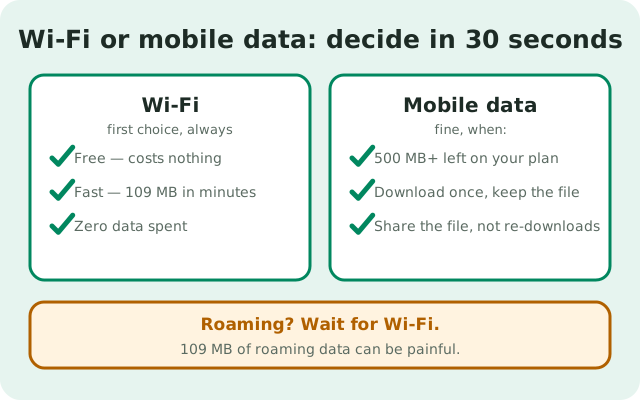
Use this table and stop guessing:
| Your situation | Best choice |
|---|---|
| You have Wi-Fi right now | Use Wi-Fi. Always. It is free and fast, and there is no reason to spend mobile data. |
| No Wi-Fi, but you have 500 MB+ data left | Mobile data is fine. Download once, then install. |
| No Wi-Fi, data almost gone, plan renews soon | Wait for the renewal or find Wi-Fi. A broken 80 MB partial download that you have to redo costs more than waiting. |
| Traveling, roaming | Wait for Wi-Fi. Roaming charges on 109 MB can be painful. |
| Phone is your only internet and data is tight | Download over mobile data once, then keep the APK file. If a friend needs it, share the file directly instead of them downloading it again. |
Before you tap download: quick checklist
Two minutes of prep saves you from a failed download at 97 percent:
- Check your data balance. Open your carrier app or dial your balance code. Make sure you have at least 150 MB free. The file plus a safety margin for retries.
- Check your signal. Download on 4G/5G or a strong 3G signal. One or two bars in a moving car is how downloads die halfway.
- Free up storage. You need the 109 MB file plus room for the install. Keep at least 300 MB free. Delete a few old videos or clear an app cache if you are tight.
- Charge or plug in. A phone that dies mid-download wastes the data you already spent. Stay above 20 percent or plug in.
- Close heavy apps. Video calls and streaming in the background fight the download for bandwidth and battery.
Download it step by step
- Open your browser and go to signal.org/android/apk/, Signal's own download page. Never download the APK from anywhere else.
- Tap the download link on that page. Your browser will ask where to save the file; the Downloads folder is fine.
- Confirm the download. On mobile data, Chrome may show a warning that the file is large. That is normal. Tap Download anyway.
- Pull down the notification shade. You will see the download progress with the file size. Leave the browser open in the background; do not force-close it.
- Wait for the "Download complete" notification. On a good 4G connection this takes a few minutes.
- Open your Files app, go to Downloads, and check the file is there and roughly 109 MB. The file name ends in
.apk.
Once the file is on your phone, the data part is over. Installing it costs no data at all. Our browser install walkthrough picks up exactly where this leaves off.
Data Saver and other things that can break the download
A few phone settings can quietly sabotage a big download:
- Android Data Saver. If Data Saver is on, Android limits background data. Your browser is usually allowed, but some phones are aggressive. If downloads keep stalling, go to Settings > Network & internet > Data Saver, and either turn it off for the download or add your browser to the unrestricted list.
- Battery saver / aggressive power modes. Some phones (especially from Chinese brands) kill background apps hard. Keep the browser in the foreground, or exempt it from battery optimization while you download.
- VPNs. A VPN adds overhead and can slow or stall large downloads on weak connections. Try without it if the download crawls.
- Download managers. Third-party download-manager apps can split downloads and resume them, which is genuinely useful. But only download the APK through a manager you trust, and only from Signal's own page. A shady manager is a worse risk than a slow download.
If the download breaks halfway
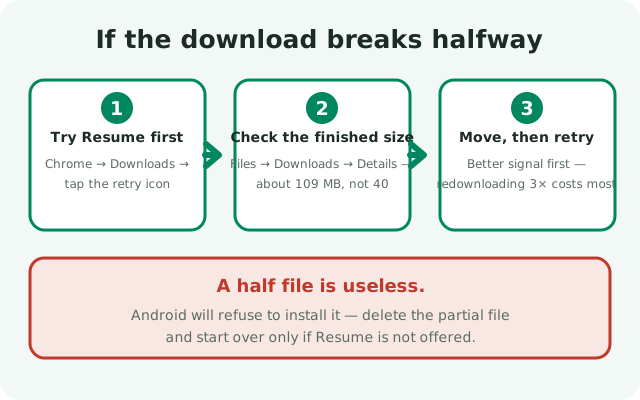
It happens: the train goes through a tunnel, the signal drops, the browser gives up at 60 percent. Do this:
- Try Resume first. In Chrome, open Downloads (three-dot menu), find the failed Signal download, and tap the retry/refresh icon. Chrome will try to continue where it stopped instead of starting over, which saves the data you already spent.
- If Resume is not offered, delete the partial file and start the download again. A half file is useless. Android will refuse to install it.
- Check the finished file's size. Open Files > Downloads, long-press the APK, tap Details. It should read about 109 MB. If it says 40 MB or 87 MB, the download did not finish even if the browser said it did. Delete it and download again.
- Move somewhere with better signal before retrying. Redownloading the same file three times on a weak connection is the most expensive way to get this done.
When the size matches, the file is complete. Android itself checks the app's signature when you install, so a tampered file would be rejected at install time. But size is the quick check you can do yourself first. The file details page lists the exact size and signature information to compare against.
A note on carrier zero-rating
Some carriers zero-rate certain apps or sites, meaning data used on them does not count against your plan. Be careful with assumptions here: we do not know of any carrier that exempts signal.org or Signal downloads from data charges, and you should not assume yours does. Treat the ~109 MB as fully billable data. If your carrier advertises free data for specific services, check their current list yourself. These offers change often and vary by country.
After the download finishes
The data spending is done. What is left costs nothing:
- Install the APK from your Downloads folder (see the install walkthrough).
- Keep the APK file for a while. If the install fails and you need to retry, you will not have to download it again.
- Think about updates now, not later: the website build downloads each update the same way. If data is tight every month, our auto-update guide explains how to handle update downloads on your terms.
- Want Signal to use less data day to day? The data-usage guide covers the settings that matter.
from Signal's official site — file hosted by Signal, not by us
Frequently asked questions
Can I download the Signal APK on mobile data?
Yes. The file is about 109 MB, so make sure you have at least 150 MB of data free before you start. Download it from signal.org/android/apk/ in your browser, keep the browser open until it finishes, and check the file size afterwards.
How much data does the Signal APK download use?
About 109 MB for version 8.29.3, the current website build. Each future update downloads a fresh file of roughly the same size, so budget for that if you stay on the website build.
Why did my Signal APK download fail halfway?
Usually a weak or dropping mobile signal, Data Saver or battery saver killing the browser in the background, or the phone running out of storage. Try Chrome's Resume in the Downloads list; if that is not offered, delete the partial file and retry on a stronger signal.
How do I know the APK downloaded completely?
Open your Files app, go to Downloads, and check the file details. A complete download is about 109 MB. Anything much smaller means the download did not finish, and Android will refuse to install it.
Is downloading Signal over mobile data free on my carrier?
Do not assume so. We know of no carrier that zero-rates signal.org downloads, so count the ~109 MB against your plan unless your carrier's current offer list says otherwise.
Keep reading
- the install hub: every install route for the Signal APK in one place
- install the APK from your browser: the next step after the file is downloaded
- APK file details: exact size, name, and signature facts to verify against
- cut Signal's data usage: settings that keep day-to-day data low