
“Signal support contacted me”: how to check if it's a scam
Published: October 7, 2026 · Updated: October 8, 2026
If "Signal support" contacted you out of nowhere, it is a scam. Signal's support team never messages users first. Real support only exists in one place: tickets that you open at support.signal.org. Every message, call, or email claiming to be Signal support and asking for money, verification codes, or remote access is someone trying to rob you. This page breaks down exactly how these scams work, how to check whether any contact is real, the correct way to reach actual support, and what to do if you already paid or shared a code.
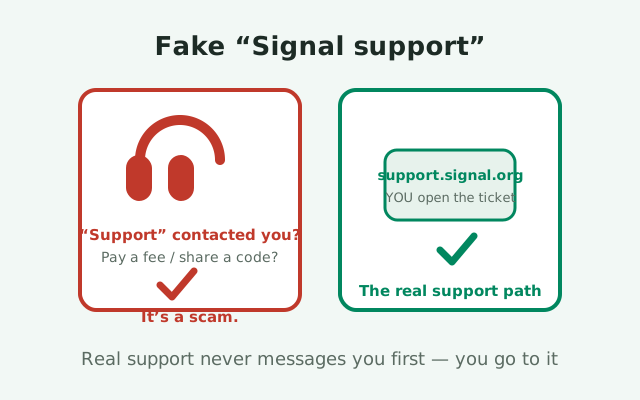
The one rule: Signal never contacts you first
This page has one load-bearing fact, and everything else follows from it: Signal's support team does not initiate contact with users. Not by text, not by phone call, not by email, not by WhatsApp or Telegram message. Support happens when you go to support.signal.org, open a ticket describing your problem, and wait for a reply. The direction is always you-to-them, never them-to-you.
Why is this structurally true and not just policy? Because Signal's support operation has no reason to know you need help until you tell them. They do not monitor accounts for "problems," they do not call about "suspicious activity," and they do not proactively reach out about updates or verification. Any unsolicited contact claiming otherwise contradicts how the system works, which makes the scam check trivial: did you open a ticket first? No? Then it is not support.
Memorize that rule and you are immune to the entire category. Scammers rely on the contact feeling plausible: a professional tone, the right logo, a ticket number that looks real. None of that matters. The direction of contact is the whole test, and it takes five seconds.
Anatomy of the fake-support scam
The scam usually starts with a problem you did not know you had. A text or a call: "This is Signal support. We detected unusual activity on your account," or "Your account needs verification," or "There is a problem with your registration." The opening is designed to do two things. It borrows authority (the word "support," the Signal name, sometimes a spoofed caller ID) and creates a task for you to complete.
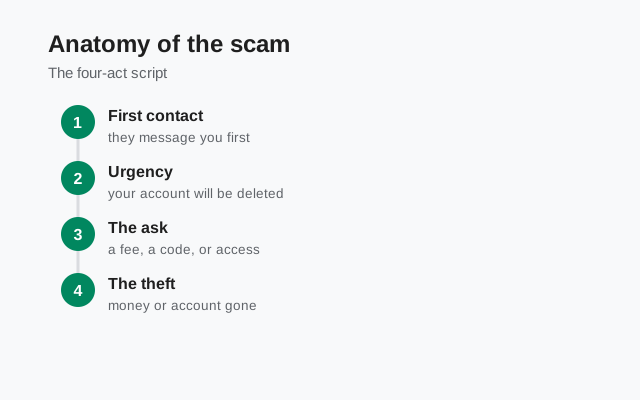
Then comes the pivot to the real goal, and it takes one of a few shapes. The agent asks for your verification code: the six-digit SMS code from a registration they triggered on your number moments ago. Or they ask for your Signal PIN. Or they direct you to a website to "verify your account," which is a credential-harvesting page. Or they ask for a payment. Each variant ends with the scammer controlling something of yours: the account, the credentials, or your money.
The performance is often convincing. Scammers use scripts, hold music, ticket numbers, and follow-up emails. Some run fake support websites that rank in search results for "Signal support phone number". There is no such number, which is exactly why the fake ones rank. The polish is the product; it exists to make the five-second direction-of-contact test feel unnecessary. Run the test anyway.
The verification-fee and refund variants
Two money variants deserve their own section because they catch even careful people. In the verification-fee scam, "support" tells you your account needs re-verification and there is a small fee: a dollar or two, deliberately trivial. They send a payment link. The amount is small because the goal is not the two dollars; it is your card details, which are worth far more. Signal is free. There is no verification fee, no premium tier, no paid support line. Any request for payment in Signal's name is fraud, full stop.
In the refund variant, the scammer claims you were charged by mistake, perhaps for a "Signal subscription" you never had, and offers a refund. To "process" it, they ask for remote access to your phone (via a screen-sharing app) or they "accidentally" refund too much and ask you to send back the difference. The overpayment is fake; the money you send back is real. This is a classic refund scam wearing a Signal costume, and it works because the victim believes they are being helped.
A third variant worth naming: the "support agent" who helps you "secure" your account by walking you through installing a "security app": remote-access software or spyware. Real support will never ask you to install anything, grant remote access, or change settings on a call. If someone does, hang up.
'Your account will be deleted' threats
The threat variant skips the helpful act entirely: "Your Signal account will be deleted in 24 hours due to a policy violation. Verify now to keep it." Or: "Your number has been reported. Contact support immediately." The mechanism is pure pressure. Threats compress your thinking time, and compressed thinking skips the direction-of-contact test.
Here is the reality check: Signal does not threaten users with deletion by text message. Account enforcement, to the limited extent it exists, does not arrive as a countdown text from a stranger. And nothing about your account can be "verified" by replying to a message or tapping a link. These threats are always fake, and the correct response is always the same: do nothing, block the number, report it as spam.
If a threat ever makes you unsure, there is a safe way to check: open the Signal app on your phone. If it works normally, and you can send and receive messages, nothing is wrong with your account, whatever the text said. The app itself is the ground truth. A text message cannot tell you anything about your account that the app contradicts.
How to check whether contact is real
The information-gain element for this page: the complete verification checklist.
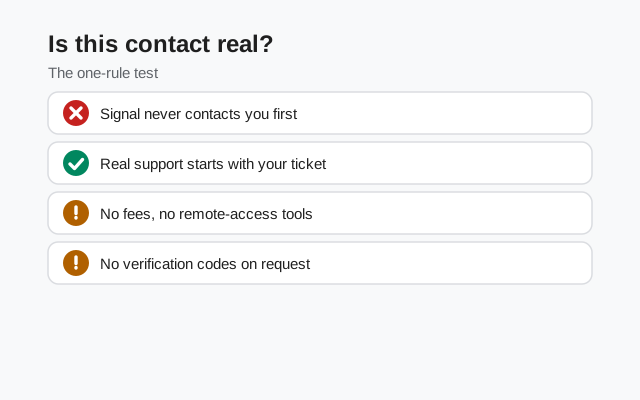
| Check | Real support | Scam |
|---|---|---|
| Who contacted whom | You opened a ticket first at support.signal.org | They contacted you out of nowhere |
| Money | Never asks for payment: Signal is free | Asks for a "verification fee" or payment details |
| Codes | Never asks for your SMS code or Signal PIN | Asks you to read back a code or share your PIN |
| Remote access | Never asks to control your screen or install apps | Pushes screen-sharing or a "security app" |
| Threats and urgency | None: tickets are calm and procedural | Countdowns, deletion threats, "act now" |
| Contact channel | Replies within your support ticket thread | Random texts, calls, WhatsApp/Telegram DMs |
| Links | Points to signal.org or support.signal.org | Points to lookalike domains or URL shorteners |
When in doubt, do the independent check: close the message, open your browser, type support.signal.org yourself, and look for your ticket. If there is no ticket you opened, there is no conversation. Do not use phone numbers, links, or email addresses from the suspicious message to "verify": those all lead back to the scammer.
The real way to reach Signal support
Actual Signal support lives at support.signal.org, and the flow is deliberately unglamorous. You visit the site, search the help articles (most common problems are already answered there), and if your issue is not covered, you submit a ticket describing what is happening. A support agent replies within the ticket thread. That is the entire channel. There is no support phone number to call, no live-chat widget run by Signal on random websites, no support account DMing users on social media.
Set your expectations honestly: Signal's support is a small team serving an enormous user base, so replies take time and the help articles are the fastest path for common issues. If you are troubleshooting the app itself rather than a scam, this site's own guides may get you there faster: for example our locked-out walkthrough or the hacked-account checklist. And if you want to reach the people behind this independent guide (not Signal), our contact page is the right place; we cannot fix Signal accounts, but we can fix our own pages.
One caution about search: fake "Signal support" phone numbers and websites buy ads and optimize pages to rank for support queries. When searching for help, navigate to support.signal.org directly instead of clicking the first result, and be skeptical of any page that lists a phone number. The absence of a phone number is the tell: the real support has none to list.
If you already paid or shared a code
If you are reading this section, do not feel foolish. These scams are engineered by professionals and they catch smart people every day. What matters now is speed.
- If you shared a verification code or PIN: assume the attacker registered your number. Re-register Signal on your own phone immediately with a new registration, then change your Signal PIN to something the attacker cannot guess. Check with important contacts whether strange messages went out from your account, and verify safety numbers again.
- If you paid money: contact your bank or card issuer right away and report the transaction as fraud. Ask about a chargeback. If you paid by bank transfer or crypto, recovery is much harder. Report it anyway: the report helps investigators and may help future victims.
- If you granted remote access or installed their app: uninstall anything they had you install, revoke any permissions it was granted, and consider a factory reset. Change passwords for important accounts from a different, clean device.
- If you entered card or banking details on their site: treat the card as compromised. Ask your bank to replace it and watch statements for unfamiliar charges for at least a few months.
- Report and document: report the number or account in your messaging app, file a report with your carrier's fraud team, and keep screenshots of everything: messages, numbers, links, payment receipts. If the loss is significant, file a police report; it creates the record insurers and banks ask for.
Then lock the doors behind you: enable registration lock if it was off, make sure your Signal PIN is strong and unique, and tell anyone the scammer may have contacted from your account what happened. The embarrassment fades; the lesson is permanent: always check the direction of contact.
from Signal's official site — file hosted by Signal, not by us
Frequently asked questions
Does Signal support ever call or text users?
No. Signal's support team never initiates contact by call, text, email, or DM. Support only happens through tickets you open yourself at support.signal.org.
Is there a Signal support phone number?
No. There is no official Signal support phone number. Any number claiming to be Signal support is a scam.
Signal support asked me to pay a verification fee. Is that real?
No. Signal is free and there are no verification fees. Any payment request in Signal's name is fraud. Do not pay and do not share card details.
How do I contact real Signal support?
Go to support.signal.org, search the help articles, and submit a ticket if your issue isn't covered. A support agent will reply within your ticket thread.
I gave a scammer my Signal verification code. What now?
Re-register Signal on your own phone immediately, change your Signal PIN, check with contacts whether strange messages were sent, and watch your other accounts for unauthorized access.
Keep reading
- SMS scams and SIM-swap protection: the attack that starts with a code text
- spotting fake Signal APK pages: the download-side version of the same trick
- checking whether your Signal was hacked: the full account-takeover checklist