
I Forgot My Signal PIN: What Can I Actually Do?
Published: October 7, 2026 · Updated: October 8, 2026
Forgot your Signal PIN? Nobody can reset it for you. Not Signal’s support team, not an SMS code, not reinstalling the app. Signal never learned your PIN, so Signal has nothing to send you. Your options depend on one question: are you still signed in on your phone? If yes, you can set a new PIN in about a minute.
What your Signal PIN actually protects
Before the fixes, it helps to know what you are actually locked out of. Your Signal PIN is not a screen lock and it is not your phone passcode. It is a code that unlocks two things:
- Your stored profile data. Signal keeps your profile info, settings, contacts, and block list encrypted on its servers using a system called Secure Value Recovery. Your PIN is what derives the key to that data. When you move to a new phone and enter your PIN, that is what restores your profile and settings without anyone at Signal being able to read them.
- Registration lock. This is an optional extra layer: with it on, nobody can register your phone number on Signal without also knowing the PIN, even with your SMS code. It is the thing standing between your number and a SIM-swap attacker.
Just as important is what the PIN does not protect: your message history. Signal says it plainly: a PIN is not a chat backup, your message history is not linked to a PIN, and a PIN cannot be used to recover lost chats. Forgetting your PIN never deletes messages already on your phone; it only blocks the two things above. One more term you will see: the recovery key. Today’s recovery key is a long 64-character code you can view in the app; the old 30-digit numeric passphrase is retired legacy. If you wrote down the 64-character key, it can stand in for the PIN in some recovery flows. That's exactly why you should have written it down.
The hard truth: nobody can reset it
Most apps have a “forgot password” link because they know who you are: your email, your account record, something to send the reset to. Signal has none of that. It never asked for your email, it never stored your PIN, and its own support page states the policy in one blunt line: we do not know your PIN and cannot reset or recover it for you.
This is not customer-service laziness; it is the design working as intended. If Signal could reset your PIN, then Signal, or anyone who compromised Signal, could unlock your encrypted profile data and bypass your registration lock. The whole point of the PIN is that only you hold it. That is cold comfort when you are the one who forgot it, but understanding why there is no reset button saves you from chasing support tickets that cannot help. Anyone promising to recover your Signal PIN for a fee is running a scam.
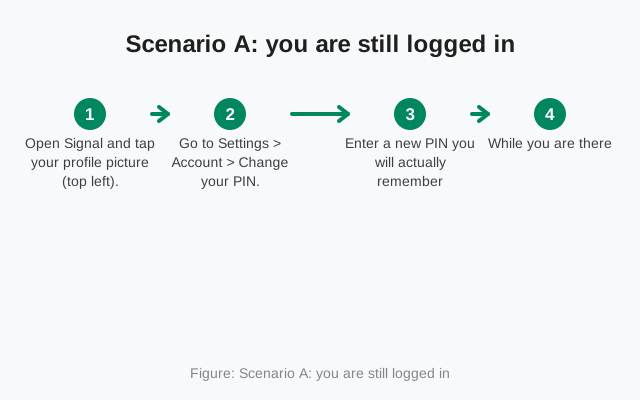
Scenario A: you are still logged in
This is the good scenario, and it covers most people reading this page: the app is open on your phone, everything works, you just cannot remember the PIN it keeps asking about. Fix it right now, before anything else changes:
- Open Signal and tap your profile picture (top left).
- Go to Settings > Account > Change your PIN.
- Enter a new PIN you will actually remember, twice.
- While you are there, check whether Registration Lock is on and decide deliberately. It is valuable protection, but only if the PIN behind it is one you can recall.
That is the entire fix. No waiting period, no support ticket, no data loss. The old forgotten PIN simply stops mattering the moment the new one is set. Do this today, because Scenario B is strictly worse. Phones get lost, broken, and factory-reset without asking permission first.
Scenario B: you are re-registering and Signal demands the PIN
This is the painful one: new phone (or fresh install), number verification done, and now Signal wants a PIN you do not have. Your options split on whether registration lock was enabled:
- Registration lock was ON: you cannot skip this screen. You must wait for the 7-day inactivity timer to expire: after seven days of the account sitting unused, the lock lifts and you can create a brand-new PIN. The old PIN, and the profile data encrypted under it, are gone at that point; there is no getting them back. During the wait, leave the account alone: repeated re-register attempts do not speed anything up and can burn through your limited PIN guesses, which produces an “Error connecting to service” message instead of progress.
- Registration lock was OFF: you get an escape hatch. On Android tap Skip > Create new PIN; on iPhone tap Need Help? > Create New PIN. You will lose the saved settings tied to the old PIN (profile details and preferences), but you are back in immediately with no waiting.
One warning that applies to both: do not factory-reset or wipe your old phone while waiting out the timer if that phone is still signed in. A signed-in device is a Scenario A device, and it can change the PIN for you. People throw away their best recovery path by wiping the old phone on day one of the wait.
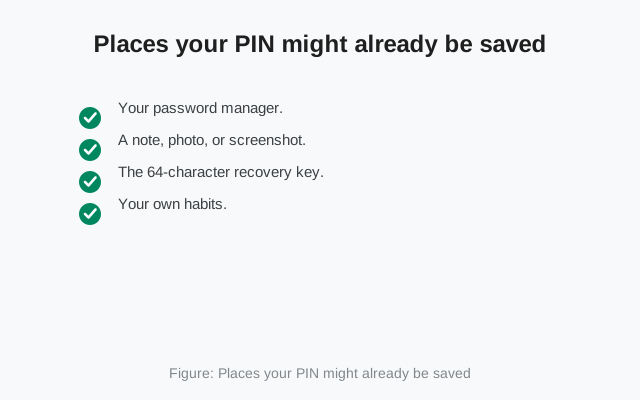
Places your PIN might already be saved
Before you resign yourself to the 7-day wait, spend ten minutes hunting. People find forgotten PINs more often than you would think:
- Your password manager. Signal itself suggests storing the PIN in your device’s password manager, and many people follow that advice once and forget they did. Check it: phone autofill, Google Password Manager, Samsung Pass, whatever you use. This is the single most common “I found it” story.
- A note, photo, or screenshot. Search your notes app and photos for “signal pin” or just “pin”. Plenty of people photograph the screen during setup.
- The 64-character recovery key. If you viewed and saved the recovery key in settings, it can substitute for the PIN in recovery flows. Check wherever you keep important codes.
- Your own habits. Many people reuse a pattern: the same digits as another app’s PIN, a memorable date, a short word. Try the obvious candidates calmly, a few at a time. Machine-gunning guesses only pushes you into the error state described below.
Things that will NOT get your PIN back
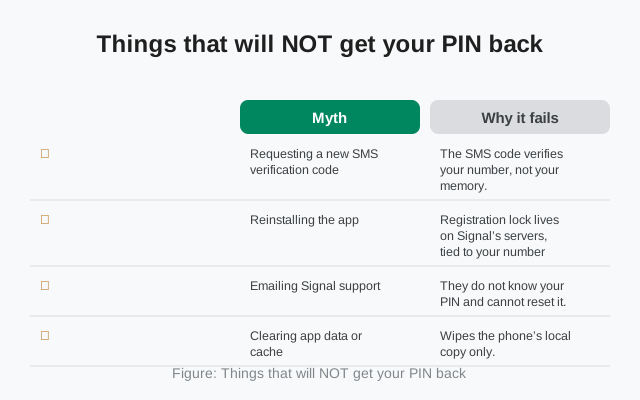
These come up in every forum thread on the topic. None of them work, and a few make things worse:
| Myth | Why it fails |
|---|---|
| Requesting a new SMS verification code | The SMS code verifies your number, not your memory. It has nothing to do with the PIN. |
| Reinstalling the app | Registration lock lives on Signal’s servers, tied to your number, not in the app install. A fresh install asks for the PIN just the same. |
| Emailing Signal support | They do not know your PIN and cannot reset it. Their support page says so directly. |
| Clearing app data or cache | Wipes the phone’s local copy only. The server-side lock is untouched. |
| Factory-resetting the phone | Same as above, plus you may destroy the one signed-in session that could have saved you. |
| Paying a “recovery service” | Scam, every time. There is no back door for them to use either. |
How to make sure this never happens again
Once you are back in control, spend five minutes making this a one-time problem:
- Store the PIN in your password manager today. Not tomorrow, today, while you remember it.
- Leave PIN reminders on. They are annoying for a reason: they are the only thing standing between you and forgetting again. The PIN reminder guide explains the rhythm and the snooze option.
- Save the 64-character recovery key somewhere durable. Written on paper in a safe place beats a screenshot in your camera roll.
- Pick a memorable PIN. Signal allows long alphanumeric PINs; a short phrase you will actually recall beats six random digits you will not.
- Decide about registration lock consciously. It is genuinely good protection against number hijacking, but it turns a forgotten PIN into a 7-day lockout. Keep it on only if the PIN is stored somewhere safe.
If the reminders themselves are what brought you here, the guide on PIN reminders explains why they appear and how to handle them. And if you are dealing with the wider mess (new phone, lost number, forgotten PIN all at once), the locked-out recovery paths rank every scenario from fixable to hopeless.
from Signal's official site — file hosted by Signal, not by us
Frequently asked questions
Can Signal support reset my PIN for me?
No. Signal states it directly in its support documentation: they do not know your PIN and cannot reset or recover it for you. There is no email-based reset because Signal never collected an email address.
I forgot my PIN but I am still logged in. Am I okay?
Yes. This is the easy case. Go to Settings > Account > Change your PIN and set a new one right now. The forgotten PIN stops mattering the moment the new one is set.
Will reinstalling Signal remove the PIN lock?
No. Registration lock is stored on Signal's servers and tied to your phone number, not to the app install. A fresh install will ask for the PIN exactly the same way.
What is the 7-day wait about?
If registration lock was enabled and you forget the PIN, the lock expires after 7 days of account inactivity. After that you can create a new PIN, but the old PIN and the profile data encrypted under it are permanently gone.
Is the Signal PIN the same as the SMS verification code?
No. The SMS code verifies that you control the phone number during registration. The PIN protects your stored profile data and acts as a registration lock. They are completely separate.
Can my PIN recover my old chat history?
No. Signal is explicit about this: a PIN is not a chat backup, message history is not linked to a PIN, and a PIN cannot recover lost chats. Chat history is restored from an on-device backup, not from the PIN.
Keep reading
- Why Signal keeps asking for your PIN: the reminder rhythm, snoozing, and turning them off
- Locked out of Signal entirely: every recovery path ranked from easy to hopeless
- Re-registering after a reinstall: what happens to sessions, devices, and history
- How Signal's Secure Backups work: what the PIN actually encrypts on Signal's servers
- Troubleshooting hub: every Signal fix guide in one place