
Can you use Signal without a phone number? The honest answer
Published: October 7, 2026
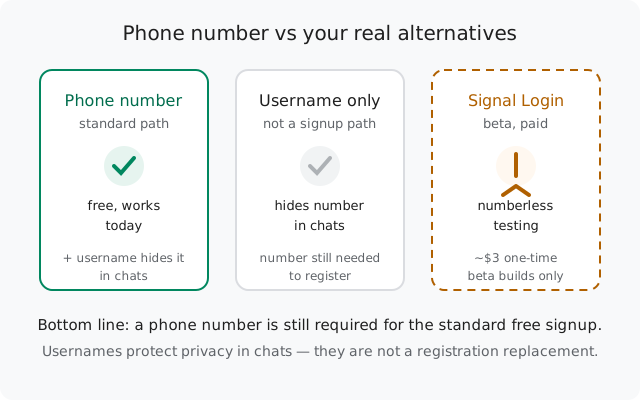
For the standard free signup, no. Signal still requires a phone number to register, including on the current stable builds. Usernames let you chat without revealing your number, but they don't replace it at signup. The real numberless path is "Signal Login," a paid (~$3 one-time) signup currently in Android beta testing. Not yet in the stable app. Your practical options today: a regular mobile number, a landline, or waiting for the beta to launch.
The direct answer
Every few months, headlines suggest Signal has dropped the phone-number requirement. Here's the ground truth as of October 2026:
- Standard signup still needs a phone number. Mobile or landline, but a number. This is the free, default path in the stable app, including the website APK build (8.29.3).
- Usernames don't change signup. They change what other people see. You still register with a number; you just don't have to share it to chat.
- Numberless signup exists: in beta. "Signal Login" is testing in Android beta builds: a one-time paid signup (a small fee; Signal's release notes do not name a figure) with no phone number. It's not in the stable release yet.
So if someone told you "Signal doesn't need a number anymore," they're early. The direction is real, the launch isn't finished. Everything below covers what you can actually do today.
What usernames actually do (and don't do)
Signal's username feature (rolled out in 2024) is the source of most of the confusion, so let's be precise about what it verifiably does:
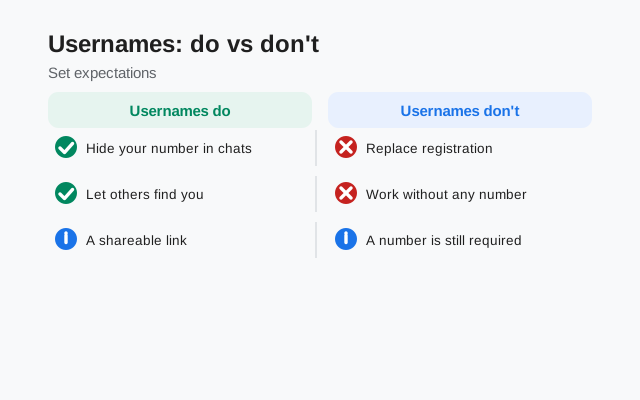
- What it does: lets you start chats and be found without handing out your phone number. Someone can message you knowing only your username. Your number stays hidden from them. Combined with the phone-number privacy settings, you can keep your number invisible to everyone except existing contacts.
- What it doesn't do: replace the phone number at registration. You still enter a number and verify it with a code to create the account. The username is a privacy layer on top of a number-based account, not a substitute for the number.
For most people asking "can I use Signal without a phone number," what they actually want is privacy from other users: not having their number visible. Usernames already solve that problem today, for free, in the stable app. Set one in Settings → Profile, and share the username instead of the number.
Your real options, compared
| Option | Needs a number? | Status | Catch |
|---|---|---|---|
| Regular mobile number | Yes | Works today, free | Your number is tied to the account (hide it with a username) |
| Landline number | Yes (landline) | Works today, free | Only where Signal can reach it by voice call; SMS-to-landline varies |
| Username for privacy | Yes, at signup | Works today, free | Not a signup replacement. Hides the number in chats only. |
| Virtual / app-based number | Sort of | Mostly rejected | Signal blocks most VOIP ranges as abuse prevention |
| Signal Login (numberless) | No | Beta only, paid | Small one-time fee; Android beta builds; not in stable yet |
Notice what's missing from the table: there is no free, working, numberless signup in the stable app today. Anyone selling you one is selling a workaround with real downsides, which the next sections cover honestly.
Option 1: register with a landline
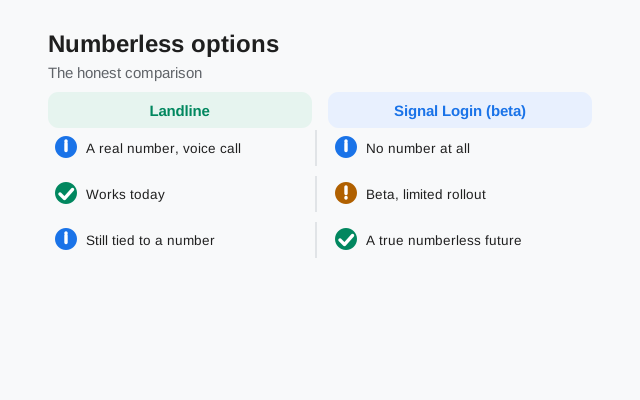
This is the oldest legitimate no-mobile-number path, and it still works. Signal's registration accepts landline numbers in countries where the verification can complete. In practice, this means the voice-call option, since landlines can't always receive SMS.
Enter the landline number
Type the full number in international format, exactly as you would a mobile number.
Wait for the SMS timer to expire
The SMS won't arrive (or can't be read). Let the countdown finish.
Take the "call me instead" option
Signal places an automated voice call to the landline and reads the verification code aloud. Answer it, write down the code, enter it.
Limitations to know: it depends on your country and carrier. In some regions Signal can't complete calls to landlines. And a landline-registered account works like any other Signal account afterward; the number is just the identifier. If the voice call never comes, your region likely isn't supported for this path, and you'll need a mobile number or the beta option below.
Option 2: the honest picture on virtual numbers
Virtual numbers (from free texting apps, online SMS services, or paid virtual-number providers) are the option everyone tries and almost everyone fails at. Signal's abuse-prevention systems reject most virtual and VOIP number ranges outright. The verification code is never sent; there's nothing to troubleshoot.
- Free texting-app numbers: essentially always blocked.
- Paid virtual numbers: sometimes work, usually don't. There's no public list of which providers pass, and a provider that works today can be blocked tomorrow.
- Temporary/disposable numbers: blocked, and dangerous even if one worked, because whoever gets the number next can take over anything registered to it.
Bottom line on virtual numbers: they're not a reliable path to a numberless Signal account, and the sketchier the source, the worse the security tradeoff. If privacy is the goal, a real number plus a username gives you more protection with none of the risk.
Option 3: Signal Login (numberless beta)
This is the real answer to "Signal without a phone number", with the caveat that it's still in testing. In September 2026, Signal began beta-testing Signal Login: an alternative signup flow that creates an account with no phone number at all. Here's what's been reported from the Android beta (version 8.28):
- It's paid, one-time. Instead of a phone number, you pay a small one-time fee (Signal's release notes do not name a figure). The fee exists to make mass fake-account creation expensive for spammers. Phone-number registration stays free.
- You get an Account ID and a recovery key. After payment, Signal issues a long Account ID and a recovery key that act as your credentials. Lose them and the account is gone. There's no other recovery mechanism, so they belong in a password manager.
- The payment is privacy-preserving. It uses the same zero-knowledge proof setup as Signal's donations, so the payment can't be linked to the account it creates.
- A username is strongly recommended. Without a username, a numberless account can't be found by anyone. You can only participate in chats you start yourself.
- Extra security is available. Beta reports mention TOTP two-factor authentication and passkey support (including hardware keys) for these accounts.
- It's beta-only for now. Reported in Android beta builds; no firm date for the stable release, and iOS isn't expected soon. Phone-number signup remains the default free path.
Coverage worth reading: Gizmodo's beta report and It's FOSS on numberless registration. Both confirm the same shape: paid, beta, numberless, with usernames doing the discoverability work.
A note for APK-build users
If you installed Signal from the website APK (the direct download) instead of the Play Store, you're on the stable channel, currently 8.29.3. Beta features like Signal Login roll out through Play beta enrollment first, so the website build gets them when they reach stable, not before. Everything in this guide's "works today" column applies identically to the APK build: standard number signup, landlines via voice call, and usernames for privacy all work the same.
One more thing worth knowing: the website build and the Play build use different signing keys, so you can't install one over the other without a backup. If you ever switch builds, back up your chats first.
from Signal's official site, file hosted by Signal, not by us
Frequently asked questions
Can I create a Signal account without any phone number today?
Not in the stable app. Standard signup still requires a phone number. The numberless option, Signal Login, is in Android beta testing (paid, small one-time fee) and hasn't reached the stable release yet.
Does a Signal username replace the phone number?
No. A username hides your number from other people in chats, but you still need a number to register the account. Usernames are a privacy feature, not a signup replacement.
Can I register Signal with a landline?
Yes, in supported regions: enter the landline number, let the SMS timer expire, and use the "call me instead" voice option. The automated call reads your verification code aloud.
Will a free texting-app number work for Signal?
Almost certainly not. Signal blocks most VOIP and virtual number ranges as an anti-abuse measure. The verification code is never sent. Paid virtual numbers sometimes work but fail often.
Is Signal Login free?
No. That's the point. The reported beta pricing is a small one-time fee (Signal's release notes do not name a figure), deliberately set to make spam-account farming uneconomical. Standard phone-number registration remains free.
What happens if I lose my Signal Login recovery key?
Beta reports are blunt: the account is gone. There's no other recovery mechanism for numberless accounts, which is why the key belongs in a password manager from day one.
Related: the missing SMS code checklist, fixing "too many attempts" failures, understanding rate limits, is the Signal APK safe, using Signal without a SIM card, and the troubleshooting hub.