
Disappearing Messages and Backups: What Actually Gets Saved
Published: October 7, 2026 · Updated: October 8, 2026
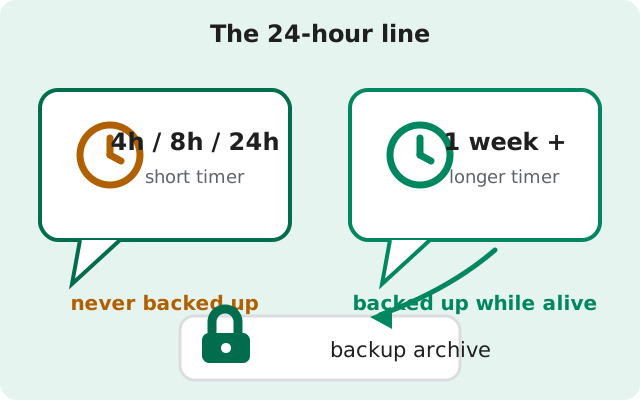
Disappearing messages and backups pull in opposite directions. A timer deletes a message. A backup saves it. So which one wins when a chat has both? The short version is in the box above: timers of 24 hours or less always win. Those messages never enter any backup. Longer timers lose to a backup taken early. This page walks through exactly where the line sits, why Signal drew it there, how it interacts with the free and paid backup tiers, and what to do when a disappearing chat holds something you actually need to keep.
from Signal's official site — file hosted by Signal, not by us
The 24-hour line
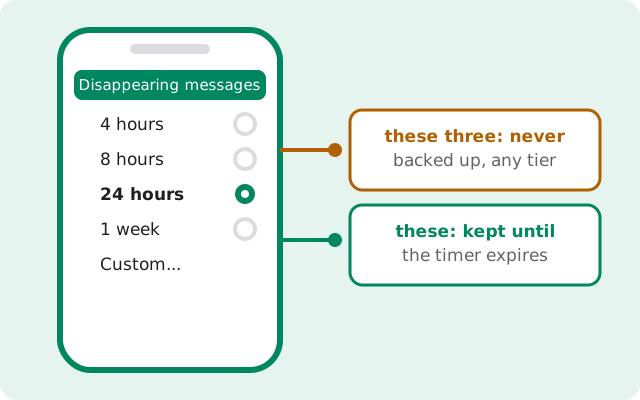
Signal lets you set a disappearing timer per chat: 4 hours, 8 hours, 24 hours, 1 week, or a custom length, plus a default timer that applies to every new chat. The backup rule is a hard cutoff: any message with a timer of 24 hours or less is left out of backups entirely.
It does not matter whether you use Secure Backups or a local on-device backup file. It does not matter whether you pay the $1.99 a month or use the free tier. The exclusion happens on your phone at the moment the backup is built. Messages inside the cutoff are simply not written into the archive.
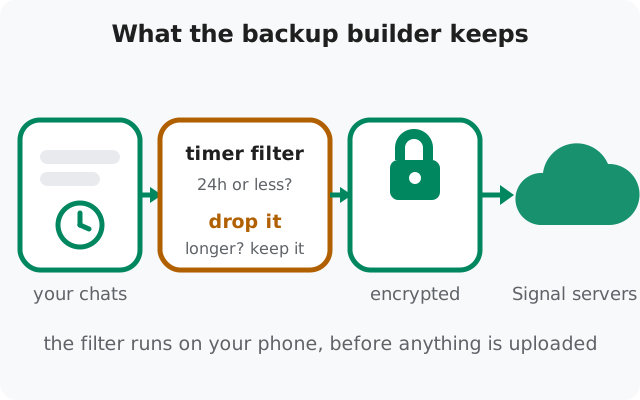
One detail worth knowing: the timer starts when the message is viewed, not when it is sent. A message sent at noon and first opened at 6pm with an 8-hour timer disappears at 2am. The backup filter checks the timer setting, not the clock. So an 8-hour message is excluded from the archive even in the hours before its timer fires.
Why the line exists
A 4-hour timer is a promise: this conversation should not exist anywhere after four hours. If a backup quietly saved those messages anyway, the promise would be worthless. And Signal's whole reputation rests on promises exactly like that one. The 24-hour mark is where the line sits between "this chat is sensitive" and "this is a normal chat that happens to expire."
There is a practical side to it as well. Short-timer chats tend to be the busiest ones: quick back-and-forth conversations with lots of photos. If all of that flowed into the archive, backups would balloon. That would hurt most on the free tier with its 100 MiB message cap, and it would slow the daily refresh for everyone on mobile data. Skipping short timers keeps the archive small and the upload fast.
The takeaway: the cutoff is not a bug, and it is not a limitation of the free plan. It is the design working as intended. If you want a message backed up, do not give it a short timer.
Longer timers: what gets saved
Messages with timers of one week, one month, or any custom length above 24 hours are treated like ordinary messages while they are alive. A backup taken before the timer fires includes them. Restore that backup on a new phone and the messages arrive with their timers still counting down.
The interesting part is what happens after the timer fires. Suppose a message expires on Friday and vanishes from your phone. If you then restore a backup made on Wednesday, the message comes back. The restore rolls your chats back to Wednesday's state, timers included. That is a rescue if the message mattered to you, and an unwelcome surprise if you assumed "deleted" meant deleted everywhere. The rule to carry with you: a backup file is a snapshot. It remembers everything that was alive when the snapshot was taken, including messages whose timers fired afterward.
| Timer setting | Backed up? | What happens |
|---|---|---|
| Off | Yes | Full message kept, inside your tier's media window. |
| 4h / 8h / 24h | Never | Excluded by design. Free, paid, and local backups alike. |
| 1 week | While alive | Kept until it expires; an older backup can bring it back past the deadline. |
| 1 month / custom (over 24h) | While alive | Same rule, longer window before expiry. |
How your backup tier matters
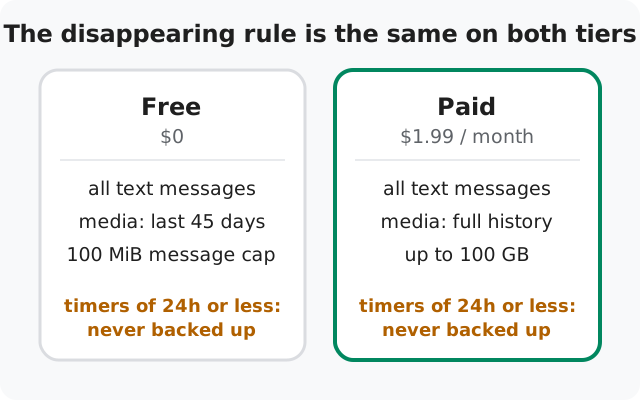
The disappearing rule is identical on every tier. Paying does not buy a single extra disappearing message into the archive. What changes with the tier is how much of the surviving chat fits in the backup.
Free Secure Backups hold all your text messages plus the last 45 days of media, inside a 100 MiB cap for the message data. That covers the words of every chat and the photos and videos from the last six weeks. Media older than that is simply not carried forward into new archives.
The paid tier costs $1.99 per month and removes the media window: all your texts plus your full media history, up to 100 GB of storage. If your Signal holds years of documents, voice notes, or family videos you would be heartbroken to lose, that is the honest difference between the plans.
Apply that to a disappearing chat. A one-week-timer conversation full of photos behaves very differently per plan: on free, the words are all there but only the last 45 days of its photos; on paid, the whole thing comes along. In both cases, any short-timer messages inside that chat were never in the archive at all.
Two backup eras, one key each
Two eras of backups exist, and mixing them up is the most common backup mistake people make.
The current era, Signal 8.30 and newer, has two backup options and one key: hosted Secure Backups on Signal's servers, and on-device backups that are a folder (message archive plus separate media folder) in a location you choose. Both are unlocked by the same 64-character recovery key, and both restore on Android, iPhone, and Desktop. Your on-device recovery key decrypts past backups wherever they are stored.
The legacy era is older Android versions that wrote single .backup files to the phone's storage, each unlocked by a 30-digit numeric passphrase. Those old files still need their 30-digit passphrase to open. The keys are not interchangeable: the 30-digit passphrase opens only legacy files, and the 64-character key opens only current-format backups.
One thing is identical across both eras: the disappearing rule. Legacy .backup files never contained messages with timers of 24 hours or less either. The cutoff predates Secure Backups. It is a property of how Signal builds an archive, not of where the archive is stored. If you find a .backup file on an old phone, our recovery key guide explains which key opens which system.
View-once messages
View-once photos and videos are a separate case, and a stricter one. They are designed to be opened a single time and then deleted from both phones. No backup carries them. Not Secure Backups on either tier, not a local file. If a photo arrives as view-once, assume your backup will never see it. Save it by other means (with the sender's okay) if you need it, because the archive is not going to rescue you.
Keeping an important disappearing chat
Sooner or later a chat with a short timer holds something you need: an address, a receipt, a confirmation number, a photo someone sent in the moment. Here is what actually works, in order of reliability.
Turn the timer off for that chat and resend the important part
A message sent with the timer off backs up like any normal message. This is the clean fix and it takes ten seconds: disable the timer, ask the person to resend the key detail, and it lands in the archive on the next backup.
Move the content out of Signal
A screenshot, a saved photo, a paragraph copied into your notes. Low-tech, but it does not depend on backup timing at all. And it works for view-once content too.
Remember the other phone
Timers run on both sides, but backups do not sync between phones. The other person may back up the chat on their own schedule, with their own tier. Or not back it up at all. You cannot count on their backup, and you cannot stop it either. If secrecy matters to both of you, say so before you trust the timer. Our disappearing-messages limits page covers everything timers cannot stop.
Do not gamble on a restore
Restoring an old backup can rescue a message only if the backup was taken before the timer expired. That is luck, not a system. And it only works if backups were running in the first place. Treat it as a lucky break when it happens, never as a plan.
FAQ
Do disappearing messages get backed up?
Messages with timers of 24 hours or less: never, on any tier or backup type. Messages with longer timers: yes, while they are still alive.
If I restore an old backup, do expired disappearing messages come back?
They can. A restore returns your chats to the state of the backup, including messages whose timers fired after that backup was made.
Does the paid tier back up more disappearing messages?
No. The 24-hour exclusion is identical on free and paid. The paid tier only widens the media window to your full history, up to 100 GB.
Are view-once messages in my backup?
Never. View-once photos and videos are excluded from every backup type.
Can the other person keep messages I set to disappear?
Yes. Screenshots, forwarded copies, and their own backups are outside your timer's reach. A timer deletes the chat copy, not every copy.
Keep reading
- How Secure Backups and the 64-character key work
- Local on-device backups, explained
- Your recovery key: storage, rotation, and loss
- Everything disappearing timers cannot do
- Restoring from a backup, step by step