
Signal Backup and Transfer: Every Guide in One Place
Published: October 7, 2026 · Updated: October 8, 2026
This section holds 25 guides in four groups. The basics group explains the two backup systems, the passphrase, where backup files live, how the encryption works, and the automatic daily archives. The new-phone group covers every way to move: the full transfer walkthrough, direct Wi-Fi transfer between two Androids, moving a backup file by hand over USB, restoring from a file, recovering when the old phone is gone, cross-platform restores, and moving history to a linked device. The troubleshooting group fixes what goes wrong: failed or stuck backups, missing files, a lost passphrase, oversized backups, missing media after restore, and disappearing messages. The last group covers the two moments people lose chats most often: switching between the Play and website builds, and changing phone numbers.
Here is the mental model that makes all of this click. Signal's on-device backup is a file on your phone, encrypted with a passphrase that only you hold. Signal cannot read it. That is the point. The hosted Secure Backups service keeps an encrypted copy on Signal's servers so you can recover even if your phone is gone, but hosted backups only keep media for a limited window (about 45 days for older media), so they are not a photo archive. Disappearing messages complicate both: content that expired before a backup ran is not in the backup, and that is by design, not a bug. If you understand those three sentences, every guide below will make sense on the first read.
The two moments that destroy chats deserve emphasis. First: switching between the Play Store build and the website APK requires an uninstall, because the two builds use different signing keys and Android treats them as different apps. Uninstalling without a backup deletes your message history. The backup-before-switching guide exists because this is the single most common way APK users lose everything. Second: reinstalling for any reason has the same effect, whether it is a crash, a "start fresh" urge, or a phone reset. Back up first, then touch nothing until the restore is confirmed working.
And the passphrase. Signal's encrypted backups are genuinely encrypted: the 30-digit passphrase (sometimes called the recovery key) is the only thing that unlocks them. There is no "forgot passphrase" reset, no support ticket that recovers it, no backdoor. The lost-passphrase guide is short because the answer is short: if the passphrase is gone, the backup is unreadable. Write it down on paper, keep it somewhere safe, and do it before you need it. Every other guide in this section assumes you have.
How to choose the right backup guide
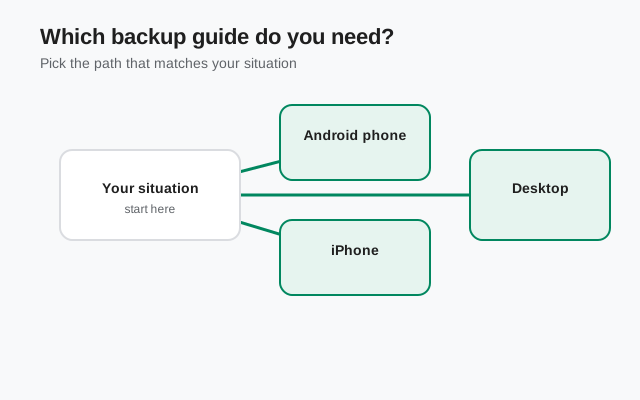
Start from your situation.
| Your situation | Start here |
|---|---|
| Both phones in your hands, moving now | Transfer to a new Android phone or direct Wi-Fi transfer |
| Old phone is lost, dead, or wiped | Restore without your old phone |
| Switching between Play build and website APK | Back up before switching builds. Read this first; it is mandatory |
| Reinstalling Signal for any reason | Back up before reinstalling |
| Backup keeps failing or getting stuck | Backup troubleshooting master guide |
| Backup file is huge | Shrink your backup |
| Old photos did not come back after restore | Media missing after restore (45-day limit) |
| Changing your phone number | Change your number and keep your chats |
| You just want to understand the system | Secure Backups explained and on-device backups |
A final practical note: test your restore path before you depend on it. The time to discover a missing passphrase or a corrupted file is not the night your old phone dies. Run a backup, confirm the file exists, and confirm you can read your passphrase. Five minutes of boring verification saves real grief later.
from Signal's official site — file hosted by Signal, not by us
Backup basics
Move to a new phone
When things go wrong
Switching builds and number changes
Three rules that prevent nearly all chat loss
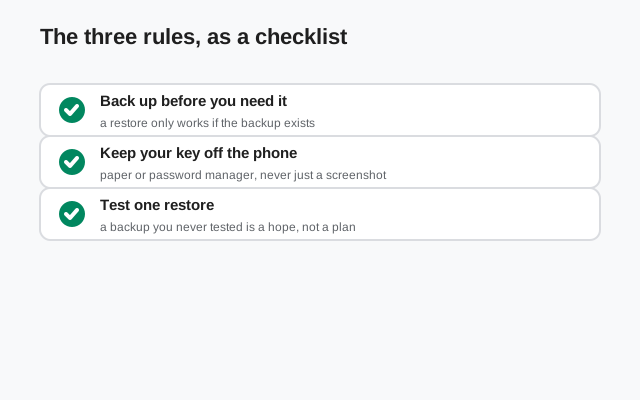
Always back up before you uninstall
Switching builds, reinstalling, resetting the phone: every one of these deletes local data. The backup comes first, the uninstall comes second. No exceptions.
Guard the passphrase like a house key
Write the 30-digit passphrase down on paper and store it somewhere safe. Screenshots in your camera roll and notes synced to a cloud account both defeat the purpose.
Do not trust a backup you have never restored
A backup file sitting on a dead phone's storage is not a backup. Confirm the file exists somewhere you can reach, and confirm your passphrase unlocks it.
Frequently asked questions
Do I need to back up before switching between the Play build and the APK?
Yes. Always. The two builds use different signing keys, so switching requires an uninstall, which deletes local data. See backup before switching builds.
What happens if I lose my backup passphrase?
The backup cannot be read by you or anyone else. There is no reset and no recovery. See lost passphrase, and write your passphrase down before you need it.
Why is old media missing after I restored?
Hosted Secure Backups only keep older media for a limited window (about 45 days). Text restores; very old photos and videos may not. See media missing after restore.
Can I transfer Signal to a new phone without the old one?
It depends on what you still have: the hosted backup, your number, your passphrase. Restore without your old phone walks through the recovery paths.
Does Signal back up my chats to Google Drive or iCloud?
No. Signal never uploads your chats to cloud backups. On Android you create an encrypted on-device backup with a 30-digit passphrase and move the file yourself. On iPhone you transfer chats device-to-device over a direct connection.
Will I lose my messages if I uninstall Signal?
Yes, unless you made a backup first. Messages live only on your phone — Signal's servers keep no chat history. Uninstalling deletes the app and its data together, so back up before you remove it.
Other guide sections: Safety guides · Comparison guides · Version guides · Troubleshooting guides
Sources
Official references we check against: