
Signal vs Zoom for Calls: an Honest Privacy Comparison
Published: October 7, 2026
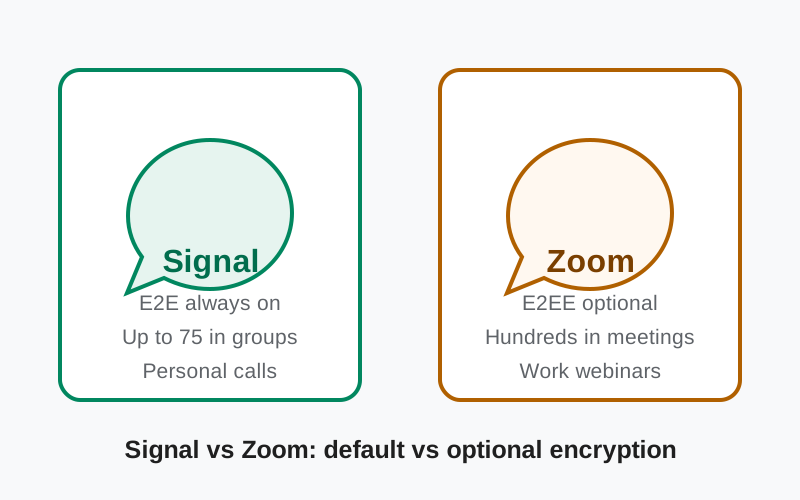
Short answer: Both Signal and Zoom can carry your voice and video, and both offer end-to-end encryption. But they do it very differently. Signal encrypts every call by default, always: one-to-one calls and group calls up to 75 people are end-to-end encrypted with no setting to enable. Zoom offers end-to-end encryption as an option you must turn on, it does not cover every meeting type, and enabling it switches off some features.
They are also built for different jobs: Signal for personal, private calls; Zoom for work meetings, classes, and webinars. This comparison explains the encryption gap honestly, then helps you pick by use case.
from Signal's official site — file hosted by Signal, not by us
The short answer
If the call is personal (family, friends, anything sensitive), Signal is the safer and simpler choice: encryption is on by default and there is nothing to configure. If the call is a work meeting, a class, or a webinar with dozens of participants, Zoom is the practical choice, but go in knowing its end-to-end encryption is optional, not default, and comes with limitations. For truly sensitive work calls, enable Zoom's E2EE and accept the trade-offs, or move the call to Signal.
Side-by-side comparison
| Feature | Signal calls | Zoom |
|---|---|---|
| End-to-end encryption | Always on, no setting | Optional mode; not default, not all meeting types |
| Group call size | Up to 75, all encrypted | Hundreds; large meetings typically not E2EE |
| Built for | Personal private calls | Work meetings, classes, webinars |
| Recording | No built-in recording | Yes (requires non-E2EE for cloud) |
| Transcription | No | Yes (requires non-E2EE) |
| Screen sharing | Yes | Yes |
| Meeting scheduling / invites | Call links | Full scheduling, calendar integration |
| Webinar mode | No | Yes |
| Business model | Nonprofit, donations | Commercial subscriptions |
| Open source | Yes (clients) | No |
What each app is for
Signal is a private messenger that happens to do calls very well. Its calling is built for personal conversations: you call a contact, or a small group, and talk. There are no meeting IDs, no waiting rooms, no webinar modes. It is the phone call, rebuilt with modern encryption.
Zoom is a meetings platform built for organizations. It handles scheduled meetings with calendar invites, large audiences, screen sharing for presentations, breakout rooms, recording, and webinars. Its design center is "the 10 a.m. team standup" and "the 500-person company all-hands," not "calling your mother."
Keeping this straight prevents the most common confusion in this comparison: people ask which has "better calls" as if they compete directly. They barely overlap. The overlap is exactly one scenario: a small private call where privacy matters. That is the scenario this article focuses on.
Encryption: default vs optional
Signal
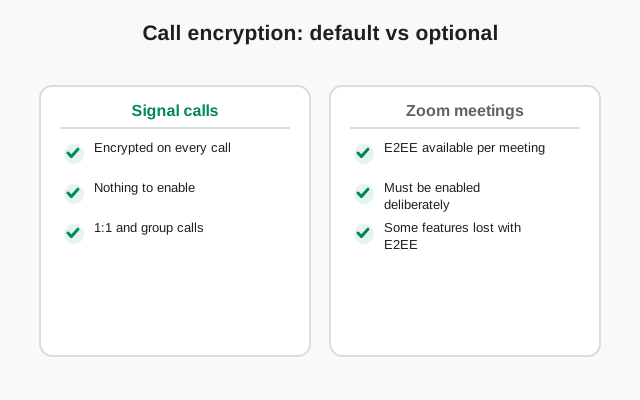
Every call is end-to-end encrypted, period. One-to-one calls, group calls, it does not matter. The encryption is always on and there is no way to turn it off. The call keys are negotiated between the participants' devices, and Signal's servers only relay encrypted data they cannot read. You do not need to trust a setting or remember a toggle.
Zoom
End-to-end encryption exists, but it is not the default and it is not universal. Standard Zoom meetings use transport encryption. Your audio and video are encrypted on the way to Zoom's servers, but Zoom's servers process them in readable form. That is how cloud recording, transcription, and some other features work: they require server-side access to the media.
Zoom's optional E2EE mode
Zoom's optional E2EE mode changes this: with it enabled, encryption keys stay on participants' devices and Zoom's servers cannot access meeting content. But, and this is the honest catch, enabling E2EE turns off a set of features that depend on server-side media access. Per Zoom's own documentation, things like cloud recording and live transcription are affected. It does not apply to every meeting type either. Some meeting formats and integrations simply do not support the E2EE mode. Check Zoom's current documentation for the exact list before relying on it, because the details change.
The practical difference
The practical difference: with Signal, privacy is the default you cannot break. With Zoom, privacy is a mode you must deliberately choose, with costs attached. Most Zoom users never enable it, which means most Zoom calls are not end-to-end encrypted.
A note on Zoom and trust
We will keep this factual and brief, because it matters to the trust question. A few years ago, Zoom marketed its meetings using "end-to-end encryption" language while its standard meetings were, technically, using transport encryption with server-side access. Not true end-to-end encryption. Security researchers and the press called out the gap, and regulators got involved. Zoom later introduced genuine optional E2EE and settled with regulators.
Why mention it: not to relitigate the past, but because it explains the design you see today. Zoom's E2EE is optional and limited precisely because the platform was architected around server-side features first, with true end-to-end encryption retrofitted as a mode. Signal was architected the other way round: end-to-end encryption first, with features built inside that constraint. Architecture is downstream of history.
None of this means Zoom is unusable. It means: understand what each mode actually protects, and do not assume "encrypted" means "end-to-end encrypted" on any platform.
Group calls and meetings
Signal supports group video calls with up to 75 participants, all end-to-end encrypted. For a family gathering, a friends' hangout, or a small team call, that is plenty. Every participant gets the same default encryption as a one-to-one call. Call links make joining easy without an account dance.
Zoom is built for scale far beyond that: meetings with hundreds of participants, webinar modes for audiences, and the organizational tooling (host controls, waiting rooms, breakout rooms) that large gatherings need. But scale and end-to-end encryption pull in opposite directions: the larger and more feature-rich the meeting, the less likely it is running in E2EE mode.
Rule of thumb: if everyone fits in a Signal group call, Signal gives you the call with the strongest privacy and zero configuration. If you need hundreds of people, recording, or webinar tooling, that is Zoom's territory. Just know which encryption mode you are in.
Features beyond the call
Zoom's feature list is long because it serves organizations: scheduling integrations, virtual backgrounds, meeting recording (local and cloud), transcription, polling, breakout rooms, and admin dashboards. If you run meetings for work, these are not luxuries. They are the job.
Signal's feature list is short on purpose: high-quality voice and video, screen sharing, group calls, call links. It does the personal call extremely well and does not try to be a meeting platform. There is no recording, no transcription, no webinar mode. For private calls, the absence of recording is arguably a feature.
Neither list is "better" in the abstract. A teacher running a class needs Zoom's tooling. Two friends catching up need none of it.
What data each company holds
Signal's nonprofit model means it holds almost nothing about your calls: no recordings, no transcripts, no call content, and minimal metadata. There is simply very little to request, leak, or misuse.
Zoom is a commercial company whose standard meetings pass through its servers in processable form, necessarily, for the features described above. Its privacy policy describes the categories of data it collects around meetings. If you use standard (non-E2EE) Zoom meetings, assume Zoom's systems can access the meeting content; that is the documented trade-off for cloud features. E2EE mode narrows this substantially for the meetings it covers.
A practical privacy checklist for calls
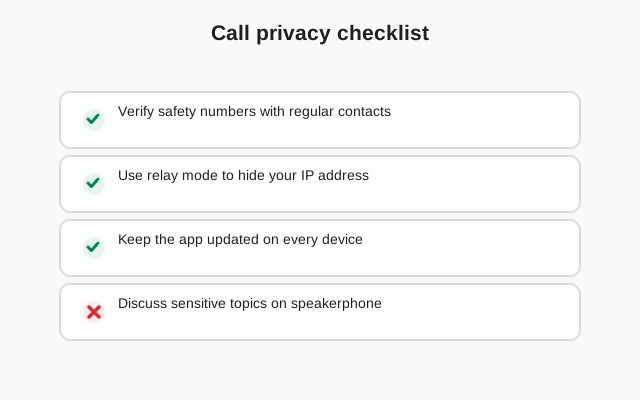
Whatever app you use, these habits cover most real-world call privacy:
- Know your mode. On Signal there is nothing to check. On Zoom, glance at the meeting info before sensitive calls and confirm whether E2EE is on.
- Assume standard meetings are observable. If a Zoom meeting is not in E2EE mode, behave as though the platform can access it. Because it can.
- Lock the room. Use waiting rooms and meeting passcodes on Zoom so strangers cannot wander in. Signal's invite-only groups need no equivalent.
- Watch for recording. On Zoom, check whether the meeting is being recorded and by whom before saying anything sensitive. On Signal there is no recording to watch for.
- Keep the app updated. Both apps ship security fixes regularly; an old version is the easiest way to lose the protections described in this article.
None of this is paranoia. It is the call equivalent of locking your front door. Two minutes of setup, then you forget about it.
Which one fits your calls: an honest verdict
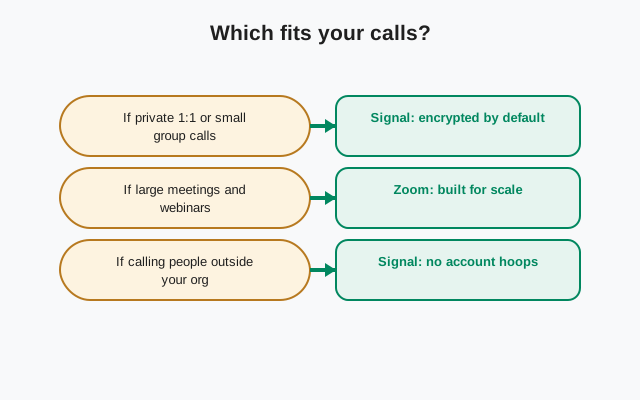
Use Signal for: personal calls where privacy matters (family video chats, calls with friends, anything sensitive). Encryption is default, the quality is excellent, and there is nothing to configure or get wrong.
Use Zoom for: work meetings, classes, webinars, and any gathering that needs scheduling, recording, or hundreds of participants. If the content is sensitive, enable E2EE mode deliberately and check that your meeting type supports it. Accept the features you lose.
The one rule to remember: on Signal, "encrypted" always means end-to-end encrypted. On Zoom, check which mode you are in before assuming it does. That single habit covers almost the entire privacy gap between the two.
The honest bottom line: these are different tools for different calls. Signal is the private phone call; Zoom is the meeting room. Use each where it belongs, and enable Zoom's E2EE whenever the conversation deserves it.
Frequently asked questions
Are Zoom calls end-to-end encrypted?
Only if you enable Zoom's optional E2EE mode - it is not the default. Standard Zoom meetings use transport encryption, meaning Zoom's servers process the media. E2EE mode also disables some features and does not cover every meeting type, so check Zoom's current documentation.
Are Signal calls always encrypted?
Yes. Every Signal call - one-to-one and group calls up to 75 participants - is end-to-end encrypted by default with no setting to change. Signal's servers only relay encrypted data they cannot read.
Can I use Signal for work meetings?
For small team calls it works well, especially when privacy matters. For large meetings with scheduling, recording, or hundreds of attendees, Zoom's organizational tooling is the practical choice.
Why did Zoom face criticism over encryption?
Zoom previously marketed meetings with end-to-end encryption language while standard meetings used transport encryption with server-side access. Researchers and regulators pushed back, and Zoom later added genuine optional E2EE.
Which is better for a private family video call?
Signal. The call is end-to-end encrypted by default, quality is strong, group calls cover up to 75 people, and there is nothing to configure. It is the simpler and safer choice for personal calls.
Related guides
- Signal video calls guide: how Signal's encrypted video calls work
- Signal group video calls: group calls up to 75, explained
- Signal call links: easy joining without the account dance
- Signal vs Discord: another calls-and-chat comparison
- download the official Signal APK: the verified build from Signal's own site