
Moving from WhatsApp to Signal: the Complete, Honest Guide
Published: October 7, 2026
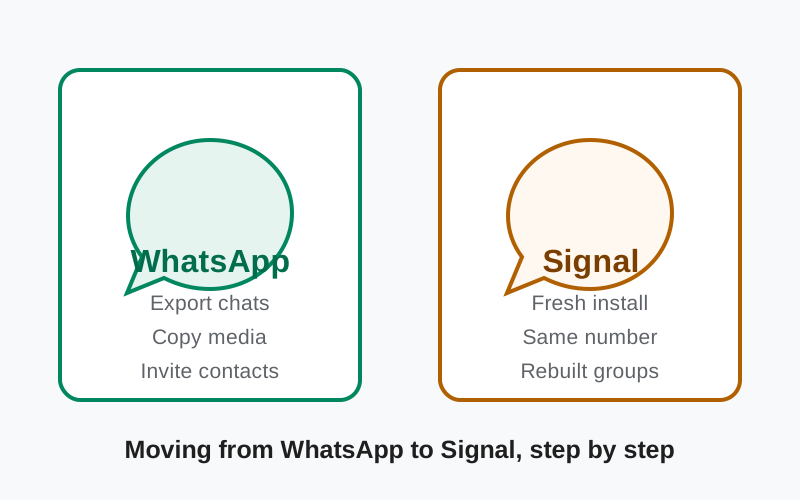
Thinking of moving from WhatsApp to Signal? Here is the honest truth up front: there is no button that moves your chats from WhatsApp to Signal. The two apps are built by different organizations with different encryption, and no direct chat transfer exists between them. But the move is still very doable. It just takes an afternoon of manual work: exporting the chats you care about, moving your photos, inviting your contacts, and rebuilding your groups.
This guide walks through every step in order, tells you exactly what transfers and what does not, and ends with an honest account of what you gain and what you give up. No sugar-coating.
from Signal's official site — file hosted by Signal, not by us
The honest truth first
WhatsApp and Signal are separate systems. Your WhatsApp account, chats, and media live in WhatsApp's world; Signal starts empty. There is no importer, no "transfer chats" button, and no third-party tool you should trust with this. Any app that claims to move chats between messengers automatically is either a scam or a privacy disaster. Plan for manual work, and you will not be disappointed.
The good news: the parts that matter most (your people, your groups, your important photos) all transfer fine with a little effort. The parts that do not transfer are mostly history and convenience. Most people who make the move say the one-time effort was worth it within a week.
Before you move: checklist
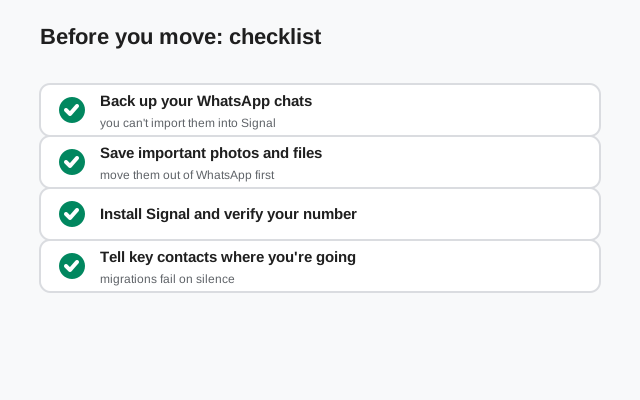
Do these in order, before touching anything:
- Update WhatsApp to the latest version so export features work properly.
- Free up storage. Chat exports with media can be large; make sure your phone has a few gigabytes free.
- Decide what matters. You probably do not need seven years of group memes. Pick the conversations whose history you actually want to keep. Usually that is a handful of chats with family and close friends.
- Charge your phone and connect to Wi-Fi. Exports and reinstalls are the wrong time for a dying battery.
- Do not delete WhatsApp yet. Keep it installed until Signal is fully set up and your contacts have moved. You will need it for the export steps.
Step 1: install and set up Signal
Get Signal on your Android phone from a source you trust. The verified route without Google Play is the official APK from Signal's own download page (current website build 8.29.3, package org.thoughtcrime.securesms). That is the same file this site documents. Install it, open it, and register with your phone number. Yes, Signal needs a number, just like WhatsApp did.
During setup, Signal will ask for profile details. Set a display name and, if you like, a username. Usernames let new contacts reach you without seeing your phone number, which is one of the privacy upgrades you are moving for. Turn on a Signal PIN when prompted; it protects your account if you ever reinstall.
Grant the permissions Signal asks for: contacts access (so it can find which of your contacts are on Signal), and notification permission. You can tighten everything later; for the move itself, the defaults are fine.
Step 2: export your WhatsApp chats
WhatsApp lets you export one chat at a time. Open the chat, tap the contact or group name, and choose the export option. You will be asked whether to include media. Say yes for the chats that matter, no for the ones where you only want the text history. WhatsApp packages the chat into a file (a zip with media, or a plain text file without) that you can save to your phone, email to yourself, or store in cloud storage.
Be realistic about this step: it is one chat at a time, and it is tedious for more than a dozen chats. That is why the checklist asked you to pick the chats that matter. For most people, that is under ten conversations.
Important honesty note: exported chats do not import into Signal. The export is a readable archive: a text file and a folder of photos. Not a transfer. You keep it for reference. Your Signal chats start fresh from the day you move. Nobody likes hearing this, but it is better to know now than to discover it mid-move.
Step 3: move photos and files
Your photos and videos matter more than chat text, and they move easily because they are just files. WhatsApp stores received media in your phone's storage (in the WhatsApp media folders). You can copy the folders you care about (WhatsApp Images, WhatsApp Video, WhatsApp Documents) to a safe place: your computer or a cloud drive. Or just leave them where they are. They stay on your phone even after you stop using WhatsApp.
For the truly important items (family photos, documents, anything irreplaceable), resend the best ones to yourself in Signal using its "Note to Self" chat. That gives you an encrypted, searchable copy inside your new home. It takes a few minutes and it is worth it.
Voice notes deserve a mention: they export as audio files inside the chat export zip. Save the ones that matter (kids' first words, a late parent's voice) to your own storage. Those are the files people regret losing.
Step 4: bring your people over
This is the step that actually determines whether the move sticks. Signal can show you which of your phone contacts already use it. Check that list first, because the answer is often "more than you expected."
For everyone else, invite them to Signal personally. Our invite guide covers every method that works. A mass broadcast ("everyone move to Signal!") gets ignored. A personal message works: "Hey, I'm moving my messaging to Signal. It's the same idea as WhatsApp but private. Mind installing it so we can keep chatting there?" Send the official download link, not a random APK from a file-sharing site. Most people say yes when asked directly by someone they actually talk to.
Prioritize ruthlessly. You do not need all 200 WhatsApp contacts on day one. You need your partner, your family, your five closest friends, and your two most active groups. The long tail of acquaintances can follow over weeks, or stay on WhatsApp. Keeping WhatsApp installed for stragglers is completely normal and nothing to feel guilty about.
Step 5: rebuild your groups
Groups do not transfer, so you recreate them. This is actually an opportunity: most people's WhatsApp group lists are full of dead groups from 2019. Recreate only the live ones.
Make the new Signal group, add the members who have moved, and pin a message explaining the switch. For groups where half the members have not moved yet, run both in parallel for a few weeks: post in both, or post in Signal and drop a pointer in WhatsApp. Groups migrate slower than individuals; that is normal.
Signal groups support the essentials: admin controls, invite links, disappearing messages, and group calls. If your WhatsApp group used features like polls or communities, check whether Signal's current feature set covers your needs before promising a full replacement. Honesty with your group now saves complaints later.
Step 6: tell people you moved
Two announcements cover everyone. First, update your WhatsApp profile. Change your "about" line to something like "Moved to Signal, message me there" and consider setting a profile photo that says the same. Second, post a status update announcing the move with the download link. WhatsApp Status reaches exactly the audience you need: your existing contacts.
Then mute WhatsApp notifications (or all but a few chats) so the old app stops pulling you back. Do not delete your WhatsApp account immediately. Give it a month or two. Some contacts take weeks to move, and a deleted account just confuses them. When the stragglers are down to people you never talk to, then you can delete.
What you gain and what you lose: both sides honestly
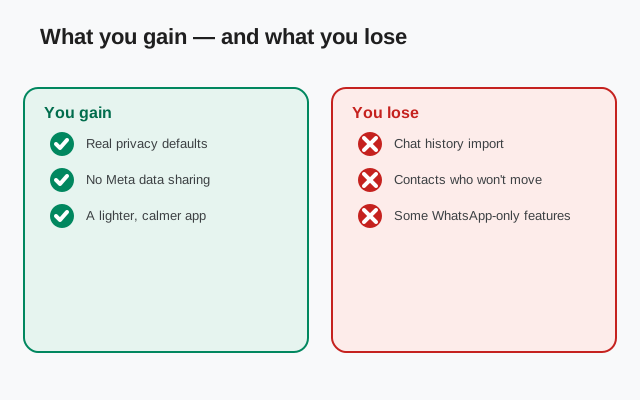
What you gain: meaningfully stronger privacy. Signal is run by a nonprofit with no advertising business; it stores no message content and minimizes metadata far beyond WhatsApp. The code is open source and independently audited. Usernames let you chat without sharing your phone number. Disappearing messages and sealed sender are genuine upgrades. And you stop feeding the world's largest advertising machine with your messaging metadata.
What you lose: network and convenience, at least at first. Not everyone will follow you. Accept that now. You lose WhatsApp-specific features your groups may rely on (large communities, channels, some business integrations). Multi-device support exists in Signal but works differently from WhatsApp's linked devices. And chat history starts from zero; nostalgia has a real cost.
Neither list is the whole story for any individual. But most people who complete the move report the same thing: the first week is annoying, and by week three they cannot imagine going back.
What transfers and what does not
| Item | Transfers? | How |
|---|---|---|
| Your contacts (people) | Yes | Invite them; Signal finds existing users automatically |
| Chat history text | Archive only | Per-chat export from WhatsApp; readable, not importable |
| Photos and videos | Yes | Copy media folders; resend important ones to yourself in Signal |
| Voice notes | Archive only | Saved as audio files inside chat exports |
| Documents | Yes | Copy from WhatsApp media folders |
| Groups | Recreate manually | New Signal groups; run both apps in parallel during transition |
| Stickers | No | Signal has its own sticker packs to install |
| WhatsApp calls history | No | Starts fresh in Signal |
| Your phone number identity | Yes | Register Signal with the same number |
A final word of encouragement: the move feels bigger than it is. One focused afternoon covers the export, the install, the invites, and the group rebuilds. The people who matter will follow, especially when you ask them personally instead of broadcasting. And every conversation you move is one fewer conversation sitting on an advertising company's servers.
Frequently asked questions
Can I transfer WhatsApp chats directly to Signal?
No. There is no direct chat transfer between WhatsApp and Signal - they are separate systems with different encryption. You can export WhatsApp chats as readable archives (text plus media files) for reference, but they cannot be imported into Signal. Avoid any third-party tool that claims to do this automatically.
Will I lose my photos when leaving WhatsApp?
No. Photos and videos WhatsApp saved to your phone stay on your phone. Copy the WhatsApp media folders to safe storage, and resend the most important items to yourself in Signal's Note to Self chat for an encrypted copy.
Do my contacts need to install Signal too?
Yes - Signal only talks to Signal. Check which contacts are already on it first (often more than expected), then invite the rest personally. Keep WhatsApp installed during the transition for anyone who has not moved yet.
Is Signal really more private than WhatsApp?
WhatsApp encrypts message content well, but as a Meta product it collects far more metadata, and its code is closed. Signal is nonprofit, open source, stores no message content, and minimizes metadata. For privacy, the difference is real.
Should I delete my WhatsApp account right away?
No. Keep it for a month or two while contacts migrate - some people take weeks. Update your profile to point people to Signal, mute notifications, and delete the account only when the remaining stragglers are people you never talk to.
Related guides
- Signal vs WhatsApp compared: the full feature and privacy head-to-head
- download the official Signal APK: start the move with the verified build
- Signal phone-number privacy: hide your number with usernames after moving
- exporting Signal chats: how Signal's own export works once you are there
- best private messenger 2026: where Signal and WhatsApp sit in our ranking