
Install Signal on Android 9 the right way
Published: October 7, 2026
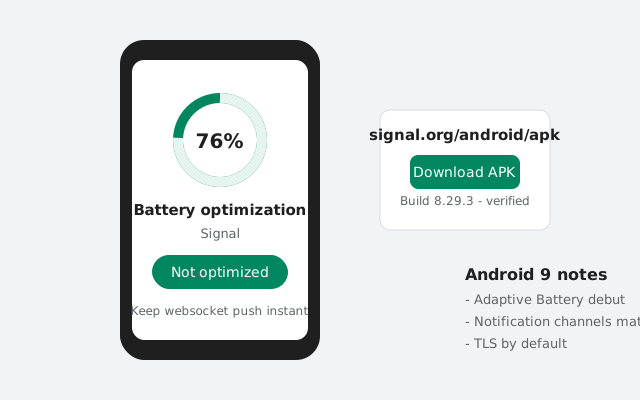
Android 9 (Pie) is where modern Android behavior really starts: Adaptive Battery manages background apps automatically, notification channels are mature, and the per-app install permission model is settled. Installing Signal's APK on Pie is straightforward, but Adaptive Battery is the one setting that silently breaks message delivery if left unmanaged. This guide covers the install and the Pie-specific settings that matter.
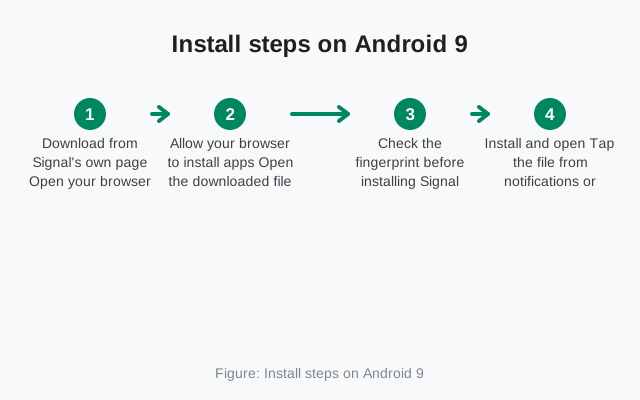
Install steps on Android 9
Download the APK
On the phone's browser, open signal.org/android/apk and download the current website build.
Open the file and allow the install
Tap the completed download. When Android asks, allow "Install unknown apps" for your browser (exact paths per brand).
Install and open
Confirm the installer screen says Signal, tap Install, then Open.
Register, then handle Adaptive Battery
Register your number, then immediately do the Adaptive Battery step below. Don't skip it "for later"; later is when you notice messages arriving late.
Pie's installer confirmation screen is worth reading properly: it lists the app's requested permissions under "It will have access to...": camera, microphone, contacts, and so on. This is your last look before committing. Confirm the name says Signal Private Messenger and the list looks like a messenger's (camera, mic, contacts, storage), then tap Install. If the permission list ever looks wrong for the app named: a "flashlight" asking for SMS access is the classic example. That's your cue to stop, whatever the app claims to be.
Downloading on mobile data? The APK is about 109 MB, fine on most plans, but Pie's Data Saver (if enabled) can pause background downloads when the browser isn't in the foreground. Keep the browser open during the download, or allow unrestricted data for the browser in Settings → Network → Data Saver.
Adaptive Battery: the setting that matters most
Android 9's Adaptive Battery uses usage patterns to restrict apps you don't open often, limiting their background activity to save power. For a messenger, that's dangerous: if the system decides Signal is "rarely used" (a second phone, a backup device, a quiet week), it throttles Signal's background connection and messages arrive late or not at all until you open the app.
The fix, in order of strength:
- Exempt Signal from battery optimization: Settings → Battery → ⋮ → Battery optimization → All apps → Signal → Don't optimize. This is the big one: do this on every Android 9 phone running Signal.
- Check Adaptive Battery's own list: Settings → Battery → Adaptive Battery shows restricted apps. If Signal appears there, remove it.
- Maker overlays still apply: Samsung's Sleeping apps, Xiaomi's Autostart, Huawei's Protected apps. Pie-era skins kept their own killers alongside Google's. Whitelist Signal in those too.
There's a second, manual restriction worth checking: Settings → Apps → Signal → Battery → Background restriction. If this is set to "Restricted," Android 9 aggressively stops Signal's background activity regardless of Adaptive Battery's opinion. Set it to unrestricted (wording varies by skin). Between this toggle and the optimization exemption, you've covered both of Pie's throttling mechanisms.
Notification channels, matured
Pie refined Oreo's notification channels. In Settings → Apps → Signal → Notifications you'll find per-category controls: messages, calls, and system alerts each get their own sound, vibration, and behavior.
- Per-conversation customization still lives inside Signal itself (chat settings), while the system channels set the defaults.
- "Gentle" vs "Interruptive": Pie's notification ranking can quietly demote channels you swipe away often. If Signal alerts feel muted, check whether the channel got demoted and set it back to interruptive.
- Notification dots and lock-screen visibility are per-channel too. Worth a glance if message previews vanished from your lock screen.
TLS-by-default and what it changes (nothing for you)
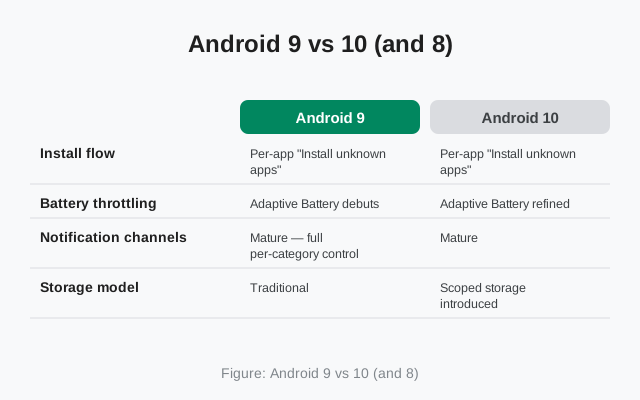
Android 9 blocked cleartext (non-HTTPS) network traffic by default for apps. Headline version: this changes nothing about installing or using Signal. Signal has always used encrypted connections, and signal.org/android/apk is HTTPS. You might see this mentioned in developer changelogs for Pie. It's an app-developer concern, not something you need to configure.
One related user-facing note: our HTTPS download guide explains why the encrypted connection matters when you grab the APK: Pie's TLS-by-default is the OS enforcing the same principle system-wide.
Private DNS and connection notes
Android 9 added system-wide Private DNS (DNS-over-TLS): Settings → Network & internet → Advanced → Private DNS. In Automatic mode it uses your network's DNS; you can also set a hostname for an encrypted DNS provider.
For Signal, Private DNS doesn't block or break Signal: the app connects to its servers by IP/hostname over TLS regardless. If you're in a region where Signal's domains face interference, Private DNS in Automatic mode changes nothing (your ISP's DNS still answers); a manually configured encrypted DNS hostname can help name resolution, but connection-level blocking needs more than DNS. See our blocked-regions guide.
Troubleshooting note: if you suspect Private DNS is involved in a connection problem (rare, but possible with misconfigured hostnames), set it to Off temporarily and retest. If the problem vanishes, your DNS hostname was the issue, not Signal, not your network.
Notification behavior on Android 9
- Bundled notifications group per conversation: expand the bundle to see individual messages.
- Smart replies in notifications work with Signal; they're generated on-device from message content.
- Do Not Disturb honors notification channels: you can let Signal's call channel bypass DND while messages stay silent, configured per channel.
- If notifications stop entirely after working fine, the cause is almost always battery restriction (see Adaptive Battery above), not notification settings.
Updates and the signing-key warning
Same story as newer versions: the website build prompts for its own updates inside the app and installs over itself with no conflict. Keep Signal allowed in the Install unknown apps list so update installs proceed, and never accept a Signal "update" from anywhere except inside the app. The signature rules mean a genuine update always matches the installed build's key.
Is Android 9 still supported?
Pie is aging but not yet at the cliff edge. It stopped receiving security patches years ago, which is the real concern: the OS underneath Signal is unpatched, so keep security-sensitive activity (banking, 2FA apps) to a newer device if you have one.
For Signal itself: the current website build installs and runs on Android 9, and Pie is comfortably above Signal's minimum version floor for now. That floor rises over time, so Pie's days are numbered in the long run, but today, a properly configured Android 9 phone (battery exemption done, notifications tuned) runs Signal perfectly well.
When the floor does eventually rise past Pie, the symptom will be unmistakable: the new APK will refuse to install, or the app will tell you on launch that your Android version is no longer supported. Your installed version keeps working after that point. It just stops getting updates, which for a messenger is a slow-burning security problem. That's the moment to move to a newer phone, not to hunt for old APKs: running an outdated Signal to dodge a version floor trades real security for convenience.
Until then, Pie remains a perfectly good Signal phone with one maintenance habit: revisit the battery exemption after every major settings reset or factory reset. Exemptions don't survive wipes, and "it worked for a year and then messages got slow" is almost always an exemption lost to a reset nobody connected to the symptom.
One diagnostic that saves time: if messages are instant on Wi-Fi but slow on mobile data (or the reverse), that's a network-level issue (Data Saver, carrier throttling, or an interfering VPN), not Adaptive Battery. Test both networks before changing any settings, so you fix the right layer.
from Signal's official site. The file is hosted by Signal, not by us.