
Installing and Using Signal in China
Published: October 7, 2026 · Updated: October 8, 2026
Signal is blocked in mainland China. The app is not in Chinese app stores (Apple removed Signal from its China App Store in 2021 at the government's request), and Signal's service does not connect over a normal mainland internet connection. But Signal publishes its Android APK directly on its own website, and the app has a built-in censorship-circumvention setting made for exactly this situation. The honest path: download and set up Signal before you travel to China, not after you arrive. This guide walks through the preparation step by step, explains what the circumvention toggle actually does, covers the SMS registration trap most travelers fall into, and ends with the rules you should know.
What exactly is blocked in China
“Blocked” covers three different things, and it helps to keep them separate:
- The app is not in Chinese app stores. Apple removed Signal from its China App Store in 2021 at the request of the Chinese government. On Android, the Google Play Store is not available in mainland China at all, so there is no store route on either platform. The direct APK from Signal's own site is the only install route on Android.
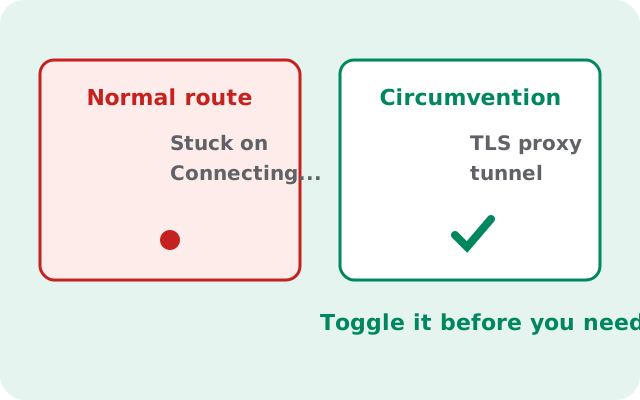
- Signal's servers are unreachable from a normal mainland connection. Open Signal on hotel Wi-Fi in Beijing without any circumvention and it will sit on “Connecting” forever. Messages do not send, calls do not connect, and nothing syncs.
- Signal's own website may not load either. That means downloading the APK after you arrive is unreliable. The download page you need can be the very page you cannot reach.
Put together, the picture is clear: a fresh install plus a fresh registration done inside China is the hard path. An account that is already installed, registered, and set up before you travel is the workable path. Everything in this guide flows from that one fact.
The golden rule: prepare before you travel
Do every step below while you still have a normal internet connection: at home, at the airport before departure, anywhere outside the firewall. Each task gets dramatically harder after you land:
| Task | Before you leave | After you arrive |
|---|---|---|
| Download the APK | One tap from signal.org | Unreliable. The download page itself may not load |
| Verify the SHA-256 fingerprint | Takes a minute, page is right there | Cannot compare against a page you cannot open |
| Register your number (SMS code) | Codes arrive normally | Codes often never arrive on mainland networks |
| Turn on censorship circumvention | 30 seconds in Settings | Still 30 seconds. But you cannot test if it works until you try |
| Test that messages send | Easy, on your home connection | You are debugging blind on hotel Wi-Fi |
The single most common failure we see: travelers who install Signal for the first time at their hotel in Shanghai, then discover the SMS verification code never arrives and the download page will not load. Do not be that traveler. An hour of preparation at home saves a trip's worth of frustration.
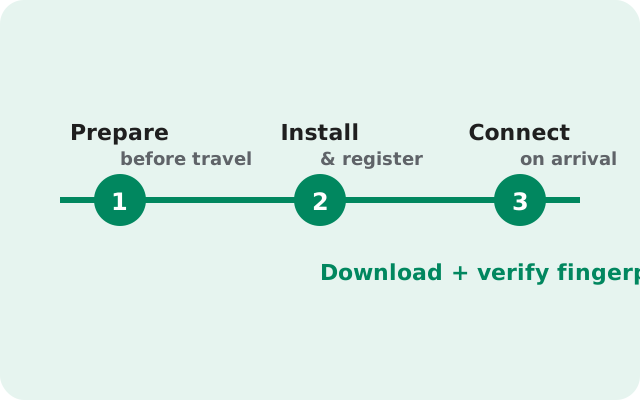
Step by step: get Signal ready for China
- Download the APK at home. Go to signal.org/android/apk/ on a normal connection and download the file (currently version 8.29.3, about 109 MB). Do not use a mirror or a third-party APK site. The whole point is knowing exactly what you installed.
- Check the SHA-256 fingerprint. Signal publishes its signing-certificate fingerprint on that same download page. Compare it with the file you downloaded. One minute of checking buys real certainty.
- Install the APK. Allow “install unknown apps” for your browser, tap the file, then turn the permission back off. Our sideload walkthrough covers this screen by screen.
- Register with your phone number now. This is the critical one. Signal texts you a verification code during setup, and those codes often do not arrive on Chinese mobile networks. Register while your home SIM still receives SMS normally. If you use a Chinese SIM later, your Signal account keeps working. The number is just an identifier.
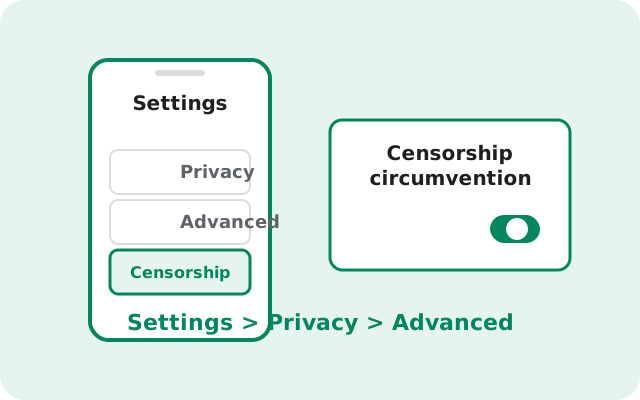
- Turn on censorship circumvention. In Signal, go to Settings > Privacy > Advanced and switch on Censorship circumvention. This is Signal's built-in answer to blocked connections. More on what it does in the next section.
- Test it before you fly. With the toggle on, send a message to a friend and confirm it delivers. If it works at home, the app side is ready; the only remaining variable is the network in China.
- Learn the proxy setting as a backup. In that same Advanced screen there is a Use proxy option. You do not need it now, but know where it is. It is your plan B if the built-in circumvention struggles.
That is the complete preparation. If you did all seven steps, you land in China with a working, registered Signal that already knows how to route around the block.
What the censorship-circumvention toggle actually does
When this setting is off, Signal connects to its servers directly. In China, that direct connection is blocked, so the app never gets through. When you switch Censorship circumvention on, Signal instead routes its traffic through Signal's own proxy infrastructure: relay servers designed to look like ordinary encrypted web traffic, which is much harder to block selectively.
A few honest notes about what it is and is not:
- It is built for exactly this. Signal added this setting for users in censored regions. It is not a hack or a workaround you found on a forum. It is a first-class feature, in the app, maintained by Signal.
- It is not a guarantee. Blocking is a cat-and-mouse game, and methods that work today can be countered tomorrow. Most travelers find it works; nobody can promise it always will. That is why the proxy setting exists as plan B.
- Expect it to be slower. Your traffic takes a longer path through relay servers. Messages still arrive in seconds, but voice and video calls may feel laggier than at home.
- Leave it on for the whole trip. There is no downside to keeping it enabled outside China either, but inside China, turning it off means going back to the blocked direct connection.
- It helps you connect; it is not invisibility. The setting is about reachability, not about hiding the fact that you use Signal from a determined network observer. Keep your expectations honest.
If Signal still will not connect with the toggle on, our China connection troubleshooting guide walks through the fixes in order.
If you are already in China
Reading this from a hotel in China with no working Signal? Here is the honest situation and what you can still try.
First, do not reinstall or factory-reset anything. If you have Signal installed and were logged in before the trip, your session is valuable. Reinstalling would force a fresh SMS verification, and those codes frequently do not arrive on mainland networks. Protect the logged-in state you have.
If you are starting from zero inside China, the obstacles are real:
- The APK download page (signal.org) may not load. Ask someone outside China to send you the file directly. A friend can download it from signal.org/android/apk/ and transfer it to you. Check the SHA-256 fingerprint against the value on Signal's page (via whatever connection you can get) before installing.
- The SMS verification code may never arrive. Try requesting it at different times of day, and try the voice-call option. Sometimes calls get through when texts do not. There is no reliable trick here, and anyone selling you one is selling you something.
- Keep the censorship-circumvention toggle on from the start: Settings > Privacy > Advanced > Censorship circumvention.
One thing that does work well: an account registered before the trip, on a phone that stays logged in, generally keeps working in China with the toggle on. The registration, not the daily messaging, is the fragile part. If a colleague traveling later asks you for advice, tell them to register at home.
Using a custom proxy (without getting scammed)
Signal also lets you route through a proxy of your choice: Settings > Privacy > Advanced > Use proxy. Signal supports TLS proxies here. This is genuinely useful if the built-in circumvention is struggling. But the proxy you pick matters enormously, so read this before typing anything in.
- Only use a proxy you operate or deeply trust. A proxy operator cannot read your messages (they stay end-to-end encrypted), but they can see metadata: that you use Signal, when you connect, and roughly how much you send. That is a meaningful amount of information to hand a stranger.
- Never buy a “Signal proxy” from a random seller. Paid proxy lists advertised in chat groups and on social media are a classic scam vector, and sometimes a surveillance vector. There is no official marketplace for these.
- We will not give you proxy addresses here. Any site that publishes “free working Signal proxies for China” is publishing either dead entries, honeypots, or both. If you run your own server outside China, you can point the setting at it; otherwise, stick with Signal's built-in circumvention.
- A VPN you already trust is a separate option. We do not endorse VPN brands (that is not our job), but if you already use one you trust for other reasons, Signal works fine over it. Do not install a random free VPN just for this trip; free VPNs monetize you somehow, usually with your data.
For most travelers, the built-in toggle plus a registered-before-you-left account is the whole solution. The custom proxy field is there for edge cases, not as step one.
A short, honest note on the rules
We will keep this brief and non-preachy, because it matters and lectures do not help.
China regulates messaging apps: services are expected to follow local rules, and unapproved foreign messaging apps are restricted. That is why Signal is blocked there rather than merely unpopular. We are an independent guide, not lawyers, and this page is not legal advice. Rules also change, and what was tolerated last year may not be this year.
Before you travel, take five minutes to check the current situation from a source you trust: your company's travel policy, your government's travel advisory, or recent reporting. Then make your own informed decision. Our job on this page is to make sure the technical side is handled correctly; the judgment call about the rules is yours.
from Signal's official site — file hosted by Signal, not by us
Frequently asked questions
Is Signal illegal in China?
Signal is blocked and restricted rather than available. The app was removed from Apple's China App Store in 2021 and its service does not connect over mainland networks. Whether using it violates local rules is a legal question we cannot answer; check current regulations or a trusted travel advisory before you go.
Will the censorship-circumvention toggle definitely work?
No honest guide can promise that. It works for most travelers most of the time, because it routes through Signal's own proxy infrastructure. But blocking methods evolve. Prepare the custom-proxy option as a backup and have a second way to reach people who matter.
Can I just download the APK after I arrive in China?
Unreliable. Signal's own download page may not load from inside China. Download and verify the APK before you travel, or have someone outside China send you the file.
Do I need a VPN to use Signal in China?
Not for the method in this guide. The built-in censorship-circumvention toggle is Signal's own answer and needs no VPN. If you already trust a VPN for other reasons, Signal works over it, but we do not endorse VPN brands.
Will my existing chats and contacts work in China?
Yes. Once you are logged in and connected, everything behaves normally: chats, groups, calls, and contact discovery all work. Registration is the fragile part, not daily use.
Does the circumvention toggle slow Signal down?
Somewhat, yes. Traffic takes a longer path through relay servers, so expect slightly slower message delivery and laggier calls than at home. For texting it is barely noticeable.
Keep reading
- the install guides index: every Signal install guide in one place
- the sideload walkthrough: installing the APK screen by screen
- Signal not connecting in China: fixes when the toggle alone is not enough
- allowing installs from your browser: where the unknown-sources toggle lives
- the Signal APK download page: version, size, and fingerprint details