
Molly's database encryption: what your passphrase really protects
Published: October 7, 2026 · Updated: October 8, 2026
Molly lets you lock its message database with a passphrase, so your chat history at rest is encrypted with something only you know. Signal's own app doesn't offer this. It relies on your phone's lock screen and the operating system's disk encryption to protect data at rest. Molly's extra lock covers a specific gap: a phone that is on or recently unlocked, or a database file copied off the device. It does not protect messages in transit (the Signal protocol already does that), and it cannot help if you forget the passphrase. This guide explains what the feature is, what it genuinely protects against, how encrypted backups and restores work, and how it compares to Signal's approach.
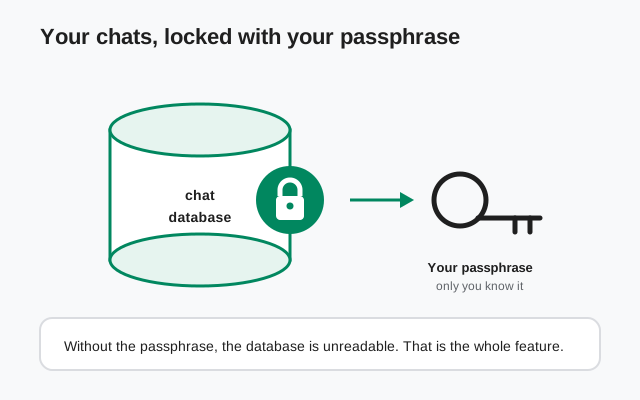
What "encrypted database" actually means
Your chats live in a database file inside the app's private storage on your phone. Every message, every attachment reference, every conversation thread: it all sits in that one file. Normally, the only things standing between that file and anyone who gets hold of your device are your lock screen and the operating system's disk encryption. If those are bypassed, say on a phone that's powered on and seized or through forensic tools that can read app data from a running device, the database is just sitting there, readable.
Molly's database encryption adds a lock of your own choosing. When you set a database passphrase in Molly, the database is encrypted with a key derived from that passphrase. From that point on, the file on disk is unreadable gibberish to anything that doesn't have the passphrase: forensic tools, someone who copies the file off the phone, anyone poking through app storage. Open Molly and you enter the passphrase to unlock the database; without it, there is nothing to read. That's the entire feature, and it's a meaningful one: it's the difference between "whoever holds the phone holds the chats" and "whoever holds the phone and the passphrase holds the chats."
A few things this is not. It's not end-to-end encryption. That's the Signal protocol, which protects messages traveling between you and your contacts, and it works the same in Molly and Signal. It's not a second Signal PIN or a screen lock on the app, though Molly has its own lock options too. And it's not magic: a weak passphrase like a pet's name is barely a lock at all. The strength of the whole feature is the strength of the passphrase you choose, which is why the setup section below spends time on that.
What it protects against and what it doesn't
Honest security features need honest boundaries. Here's exactly where the passphrase helps and where it doesn't:
| Situation | Does the passphrase help? | Why |
|---|---|---|
| Phone powered off, disk encryption on | No extra help | The OS already protects everything at rest when the phone is off. The passphrase adds nothing here. |
| Phone on and locked, then seized or examined | Yes: this is the point | The database stays locked even if app storage is read from a running device |
| Database file copied to another device | Yes | Without the passphrase it's unreadable, wherever it goes |
| Messages traveling to your contact | No | That's the Signal protocol's job. Same protection in Molly and Signal. |
| Someone who knows or guesses your passphrase | No | Use a long, unique passphrase. The lock is only as strong as the key. |
| You forget the passphrase | No recovery | The database stays locked, including for you. |
The key insight: your phone's own disk encryption plus a strong lock screen already covers the powered-off case well. Molly's passphrase covers the gap: the phone that's on, recently unlocked, or examined while running, where disk encryption has already done its unlock and stepped aside. If your threat model includes "someone gets my phone while it's on," the passphrase is doing real work. If your phone is always either in your hand or powered off with a strong lock, the feature is mostly redundant, which is fine. Not every security feature has to be for everybody.
And the row people skip: forgetting the passphrase. There is no "forgot passphrase" flow, no recovery email, no support desk that can unlock it. That's by design, because any recovery mechanism would be a backdoor. Treat the passphrase like a safe combination: store it in a password manager before you need it, not after.
Setting your passphrase
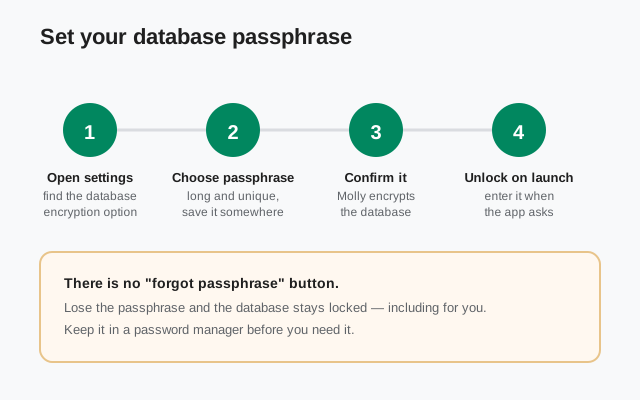
Setting it up takes a couple of minutes. Look for the database encryption or passphrase option in Molly's settings. It's part of the fork's security options, not something official Signal has, so don't go looking for it in the Signal app. The flow:
Step 1: open Molly's settings and find the database option. It's grouped with the security settings. If you're setting up Molly fresh, you can enable it during or right after setup. Either way works.
Step 2: choose a strong passphrase. This is the step that determines whether the feature means anything. "Strong" here means long and unique: a full sentence you can remember, or better, a random passphrase generated by a password manager. Do not reuse a password you use elsewhere. The passphrase is the key to years of chat history; give it the respect you'd give a safe combination.
Step 3: confirm it and let Molly encrypt. Molly encrypts the database with a key derived from your passphrase. On a large chat history this can take a little while. Let it finish, and don't force-close the app mid-encryption.
Step 4: unlock on launch. From now on, when Molly needs the database, typically after the app restarts, it asks for the passphrase. Enter it once and you're in.
One practical note: store the passphrase in your password manager now, while you're setting it up. The people who lose passphrases are always the ones who meant to write it down later. And if you're migrating from official Signal or between Molly builds, sort out your Molly backup first. Encrypting the database is not a substitute for a backup, and you want a known-good backup before changing anything about how your data is stored. The backup-before-switching guide walks through that order of operations.
Backups and restores with the passphrase
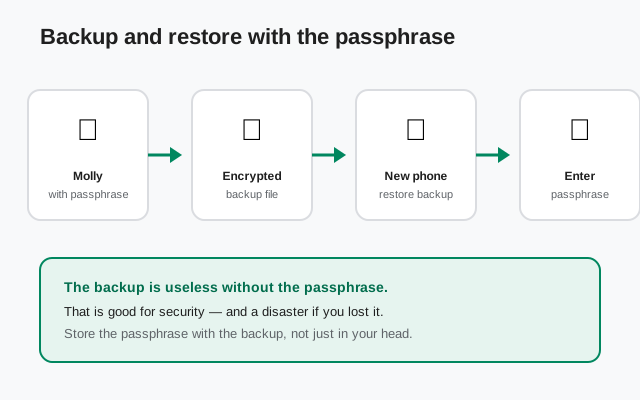
Molly's backups are encrypted too, and the passphrase is part of that story. When you create a backup in Molly, the backup file is encrypted, so a backup sitting in your files or on a computer isn't a plaintext copy of your chats waiting to be read. When you restore that backup, on a new phone or after reinstalling, you'll need the passphrase to unlock the restored database. No passphrase, no restore. That's good security and, if you lost the passphrase, a complete disaster: the backup and the passphrase are a pair, and neither works without the other.
So treat them as a pair in how you store them. Keep the backup file somewhere safe and keep the passphrase somewhere separate but findable. A password manager is the obvious answer for the passphrase, and the backup file can live on an external drive or wherever you keep important files. What you must not do is keep the passphrase only in your head. Heads forget; password managers don't.
If you're moving between phones, the safe order is: back up on the old phone, confirm the backup file exists and you know the passphrase, then set up the new phone and restore. The Molly backup guide covers the mechanics. And if you're coming from official Signal rather than Molly, remember the two apps store data differently. Migrate through a proper backup, and don't try to copy database files between apps by hand.
How Signal handles the same problem
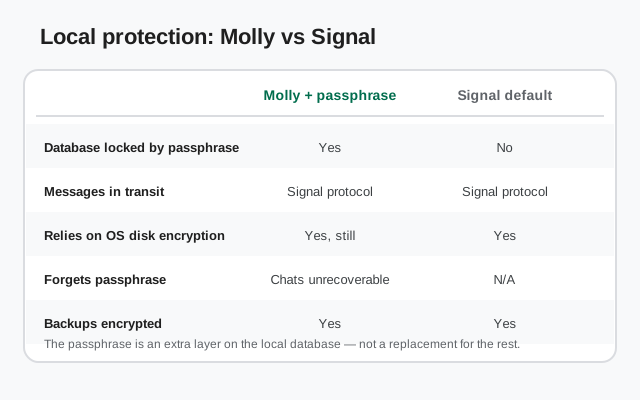
Official Signal has no database passphrase. Its protection for data at rest is your phone itself: the lock screen keeping people out, and the operating system's full-disk encryption scrambling everything when the phone is off. Signal also offers an in-app screen lock and a registration lock PIN, which protect against different things (someone picking up your unlocked phone, and someone hijacking your number), but neither encrypts the message database with a key only you know.
So the comparison is straightforward. Messages in transit: identical. Both use the Signal protocol, and Molly talks to the same Signal servers. Powered-off phone: identical. Both rely on the OS. The difference is exactly one layer: Molly lets you add a passphrase lock on the local database, covering the "device is on" gap that Signal leaves to the operating system.
Is that layer worth it? For most people, a strong device lock plus full-disk encryption is genuinely enough, and I'll say that plainly. The passphrase earns its keep for people with a sharper threat model: journalists, activists, anyone whose phone might be examined while powered on, or anyone who simply sleeps better knowing their chat history has a lock whose key exists only in their head (and their password manager). It's an option, not an obligation, which is exactly how a fork should treat it. If you're still deciding between the fork and the official app overall, the Molly vs Signal comparison lays out the full picture.
from Signal's official site — file hosted by Signal, not by us
Bottom line: Molly's database encryption is a passphrase lock on your chat history at rest: real protection for the "phone is on" gap, no help for messages in transit (already covered) or a forgotten passphrase (unrecoverable by design). Use a long, unique passphrase, store it in a password manager, and keep your encrypted backups paired with it. It's the kind of feature you set once and hope never to think about again.
Frequently asked questions
Does the passphrase encrypt my messages?
No. Messages traveling between you and your contacts are protected by the Signal protocol, the same in Molly and Signal. The passphrase locks the database file on your phone: your chat history at rest. Two different layers, two different jobs.
What happens if I forget my database passphrase?
You lose access to the database, permanently. There is no recovery flow, no reset link, no support desk that can unlock it; any recovery mechanism would be a backdoor. This is why the setup guide insists on storing the passphrase in a password manager before you need it.
Is Molly's database encryption better than Signal's protection?
It's an extra layer, not a replacement. Signal relies on your lock screen and the OS's disk encryption for data at rest. Molly adds an optional passphrase lock on top of that, covering the gap when the device is on. For most people the defaults are enough; the passphrase is for sharper threat models.
Do I need the passphrase to restore a backup?
Yes. Molly's backups are encrypted, and restoring one requires the passphrase to unlock the restored database. Keep the passphrase stored with, but separately findable from, your backup files.
Does database encryption slow the app down?
You'll notice it once: the initial encryption of a large chat history takes a little while. After that, unlocking on launch is quick and day-to-day use feels the same. The cost is one passphrase prompt after restarts, not ongoing sluggishness.
Keep reading
- Molly hub: the full map of fork guides
- Molly backups: encrypted backups and restores
- Molly vs Signal: fork versus official, honestly
- Safe Molly install walkthrough: install the fork safely
- Keeping Molly updated: don't miss security fixes
- Backup before switching builds: the safe order of operations