
The Molly release cycle: how the fork follows Signal's updates
Published: October 7, 2026 · Updated: October 8, 2026
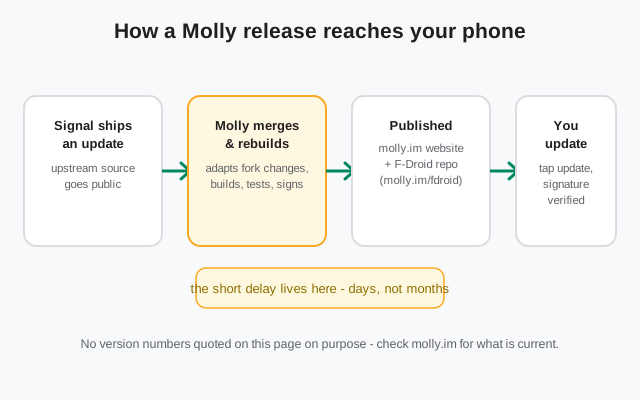
Molly follows Signal's releases with a short delay. It has to. Molly is an independent FOSS fork of Signal from molly.im. It is not official and not affiliated with Signal Foundation. When Signal ships an update, Molly's developers merge the upstream changes, adapt the fork's own code, build, test, and publish. That rebuild takes days, sometimes a little longer. You update through Molly's own F-Droid repository (molly.im/fdroid) or an APK from molly.im. Never through Google Play. This page explains the cycle, why the delay is normal, how to update cleanly, and where to check what's current. One deliberate choice: we don't quote version numbers here. They change constantly, and molly.im is the source of truth.
Why the delay is normal (not a bug)
Every fork pays a tax, and Molly's is the rebuild. When Signal publishes a new Android release, the sequence on Molly's side looks like this: merge the upstream changes into the fork, adapt Molly's own modifications (the FOSS de-Googling patches, the database encryption, the notification rework) so they still apply cleanly, build reproducibly, run tests, sign with Molly's own keys, and publish to the website and the F-Droid repository. Each step is real work done by a small team, and together they take days, sometimes a bit more when the upstream release is large or touches the same code Molly modifies.
This is not a sign of a dying project; it's the structural cost of forking. The delay is short and the project is maintained. But be honest with yourself about what it means: security fixes reach you a few days later than they reach official Signal users. For most threat models those days change nothing. If your personal policy is "install security patches the hour they land," a fork structurally can't match the upstream app. That's a legitimate reason to stay on official Signal, and our official APK guide has you covered. No one should talk you out of whichever choice fits your priorities.
One more thing the delay is not: it is not a reason to go hunting for "faster" Molly downloads on mirror sites. A random APK that claims to be a newer Molly is either fake or tampered with. The real builds come from molly.im and the official F-Droid repo, signed by Molly's keys, on the project's schedule. Patience is part of the security model.
Where Molly updates actually come from
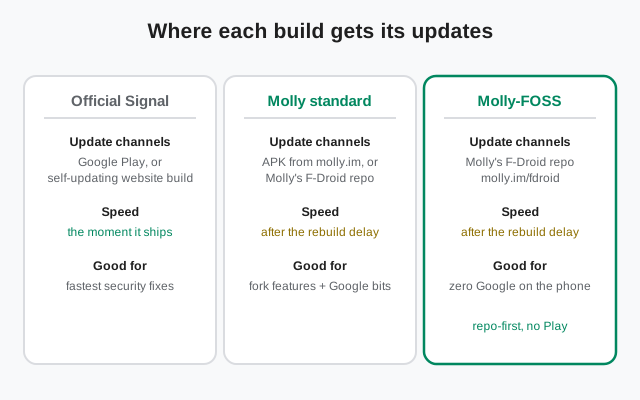
Molly has no presence on Google Play, so updates arrive through the project's own channels. The table below maps every legitimate path. If your update method isn't on it, stop and reconsider where that file came from.
| App | Update channels | Speed | Best for |
|---|---|---|---|
| Official Signal | Google Play, or the self-updating website build from signal.org | The moment it ships | Fastest security fixes, official support |
| Molly standard | APK from molly.im, or Molly's F-Droid repo | After the rebuild delay | Fork features while keeping Google bits |
| Molly-FOSS | Molly's F-Droid repo (molly.im/fdroid) | After the rebuild delay | Zero Google on the phone, repo-first updates |
The key detail in the table is whose keys sign the build. Official Signal is signed by Signal Foundation; both Molly builds are signed by Molly's own keys. Android enforces this: an update must carry the same signature as the installed app, or it won't install. That's why a "Molly" APK from a mirror site can never silently replace your real Molly: the signature won't match. It's also why you can't install Molly over official Signal (or vice versa) as an "update"; they're separate apps, and switching means backup, uninstall, reinstall, restore.
Updating through the F-Droid repo, step by step
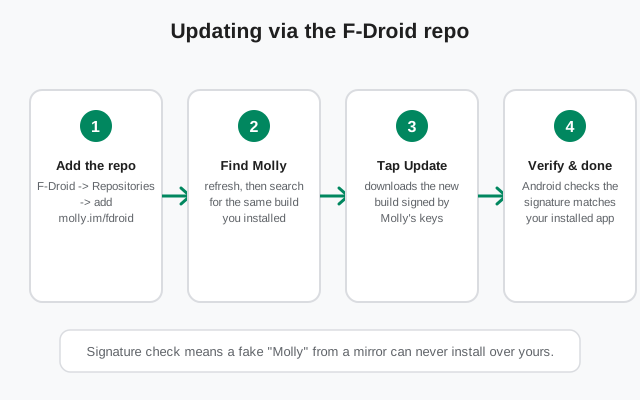
The F-Droid repository is the smoothest way to run Molly-FOSS (and it works for the standard build too). Set it up once and updates arrive like any other F-Droid app.
Step one: in F-Droid, open Settings, then Repositories, and add molly.im/fdroid. F-Droid will show the repository's fingerprint. Compare it against the fingerprint published on molly.im before confirming. This one check is what makes the whole chain trustworthy: it proves you're talking to Molly's real repo and not an impostor. Step two: refresh the repository list, then search for Molly. Pick the same build you already have installed, standard or FOSS, because the two builds carry different signatures and Android treats them as different apps. Step three: when an update is available, tap Update. F-Droid downloads the build and hands it to Android's installer. Step four: done. Android verifies the signature matches your installed copy; if it didn't match, the install would refuse. That's the safety net working.
Prefer the website route instead? Download the APK from molly.im and install it over your existing copy. Same signature, so Android treats it as an update and your chats stay put. What you must not do is mix channels carelessly: installing the FOSS build over the standard build (or the reverse) will fail or demand a reinstall, because the signatures differ. Same build, any legitimate channel: that's the rule.
Standard vs FOSS builds: any update difference?
Short answer: no meaningful one. Both builds track the same upstream Signal releases, both go through the same merge-and-rebuild cycle, and both carry the same short delay. The builds differ in contents (the FOSS build strips proprietary Google bits; the standard build keeps them), not in how fast they ship.
The practical difference is channel habit, not speed. FOSS users almost always update through the F-Droid repo, since that's the build's natural home. Standard-build users split between the website APK from molly.im and the repo. Either channel serves either build; the repo just happens to be where FOSS users already live. Our standard vs FOSS comparison covers the contents side in detail if you're still choosing.
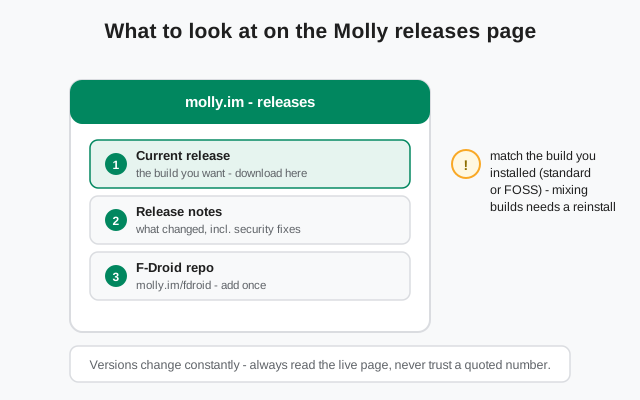
The one rule that matters: pick a build and stay on it. Hopping between standard and FOSS means a full backup, uninstall, reinstall, and restore every time, because Android won't let different signatures update each other. The builds update on the same schedule, so there's no "faster" build to chase. Choose by features and Google-freeness, then let the repo handle the rest.
Update-day checklist
Updates are routine, but five minutes of care beats an hour of recovery. Run through this before you tap Update:
- Read the release notes on molly.im first. They tell you what's new and whether the release includes security fixes worth installing promptly.
- Back up your chats. Updates preserve data, but a backup before any app update is cheap insurance. Our Molly backup guide walks through it.
- Update from the same channel you installed from. Same build, same source: no signature surprises.
- Install only from molly.im or the official F-Droid repo. No mirrors, no Telegram channels, no "Molly Pro": that edition doesn't exist, and anything claiming the name is a trap.
- If F-Droid shows no update yet, wait. The rebuild delay is normal; hammering refresh won't make the fork build faster.
- Confirm after installing. Open the app, check it launches and your chats are intact, and glance at the version in Settings so you know the update actually applied.
What if you fall behind by several versions?
It happens: you ignore updates for two months, then notice. The fix is boring and safe: just update straight to the latest release. You don't need to install the intermediate versions one by one; Android applies the newest build directly over your old one as long as the build (standard or FOSS) and signature match.
Two cautions for big jumps. First, back up before you update. The longer the gap, the more the app has changed internally, and a backup is your undo button. Second, skim the release notes for the versions you skipped; occasionally a release changes a setting's behavior or requires a one-time migration step, and the notes will say so. If something does go wrong, the Molly install guide covers clean reinstalls, and the troubleshooting guide handles the common post-update hiccups.
And the standing rule for every wave of this site: when in doubt about what's current, molly.im is the source of truth. This page deliberately quotes no version numbers because any number we printed would be stale within weeks.
from Signal's official site — file hosted by Signal, not by us
Frequently asked questions
How long does Molly usually lag behind Signal releases?
Days, sometimes a bit more for large upstream releases. There is no fixed schedule. The fork's developers merge, adapt, build, test, and publish each release by hand. Check molly.im for the current state rather than expecting a calendar.
Can Molly update itself automatically?
Not through Google Play. Molly isn't on Play. The F-Droid repo path updates like any F-Droid app once you've added molly.im/fdroid, and the website build notifies you of new releases from molly.im. Either way, you stay in control of when it installs.
Do I need to reinstall Molly to update it?
No. Updating the same build installs in place and keeps your chats. A reinstall is only needed when switching between builds (standard to FOSS or the reverse), because the two builds carry different signing keys.
Where do I see the current Molly version?
On molly.im, the project's own site. That's the source of truth. We deliberately don't quote version numbers in this guide because they go stale fast; always read the live releases page.
Is it safe to skip Molly updates for a while?
Skipping feature updates is harmless, but don't linger months behind: releases include security fixes, and the fork already trails upstream by a few days. When you do update after a gap, back up first and jump straight to the latest release.
Keep reading
- Molly hub: the full map of fork guides
- Molly vs Signal: where they differ and where they don't
- Molly or Molly-FOSS: which build to pick
- Safe Molly install walkthrough: the install path from molly.im
- Molly backup guide: protect your chats before updates
- Molly troubleshooting: post-update hiccups, fixed