
Notifications on Molly without Google: how UnifiedPush does it
Published: October 7, 2026 · Updated: October 8, 2026
UnifiedPush is an open standard for push notifications that doesn't depend on Google's servers. Molly's FOSS build uses it to deliver message notifications on phones without Google services: instead of Firebase Cloud Messaging (FCM), your phone runs a small distributor app that holds a direct connection and wakes Molly when a message arrives. No Google account, no Google servers, no proprietary push library in the app. It works. But it's a tradeoff: you gain independence from Google and give up some of FCM's battery efficiency and battle-tested reliability. This guide explains what UnifiedPush is, how Molly uses it, what setup looks like, and when it's the right call versus just using FCM.
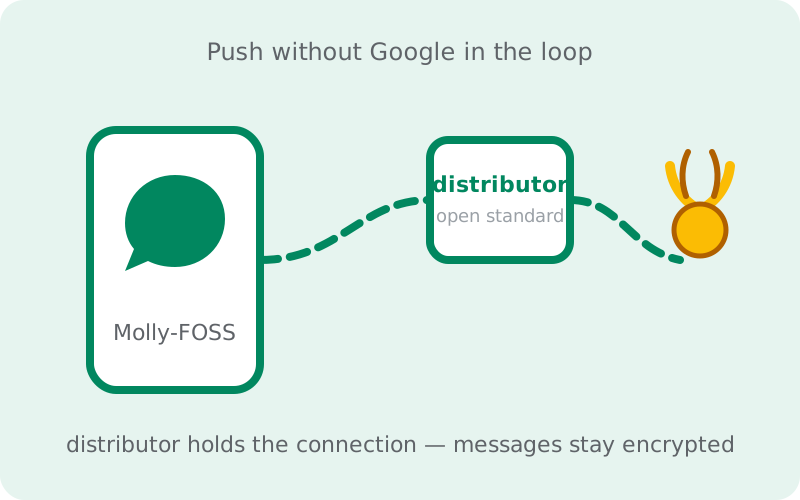
What UnifiedPush actually is
Push notifications have a bootstrapping problem: your phone can't receive a message while it's asleep unless something stays awake listening for it. On most Android phones, that something is Google's Firebase Cloud Messaging: one shared, system-level connection that every app uses. UnifiedPush is an open standard that solves the same problem without Google: instead of one company's servers, any app can act as a distributor that holds the connection, and any other app can register with it to receive wake-ups.
The key word is standard, not service. There's no "UnifiedPush company" and no single server everyone depends on. The protocol is public, distributors are interchangeable, and the whole thing is designed so no single party, Google included, sits in the middle of everyone's notifications. Think of it like email protocols versus one email provider: the standard lets independent pieces interoperate instead of everyone renting the same middleman.
It's worth being clear about what UnifiedPush does not do: it doesn't read your messages, route your messages, or replace your messenger's servers. It's just the wake-up call: "hey, something arrived, come fetch it." The message itself still travels through Signal's servers, still encrypted with the Signal protocol, exactly as before. The push layer never sees content.
How it differs from FCM
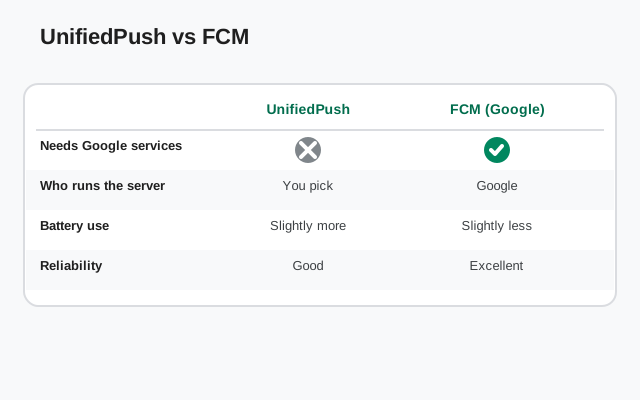
FCM's advantage is centralization done well. One connection, maintained by the OS itself, shared by every app on the phone. Google has spent over a decade tuning it: it's gentle on battery, it survives aggressive power management because the system protects it, and app developers get reliability for free. The cost is structural: every notification on a normal Android phone passes through Google's servers, which learn the timing and frequency of your app activity (not message content, but metadata about when you're being contacted).
UnifiedPush inverts the tradeoff. Advantage: no Google in the loop at all: no account, no servers, no proprietary library. Your notification metadata stays between you, the distributor, and the messenger's servers. Cost: the distributor is just an app, not a protected system service. It holds its own persistent network connection (more battery than sharing FCM's), and the OS is allowed to kill it, which is exactly what aggressive battery savers on some phones love to do. When the distributor dies, notifications stall until it restarts and reconnects.
Neither is "better" in the abstract. FCM is the better engineering solution on phones that have Google services; UnifiedPush is the only solution on phones that don't, and the principled one for people who've chosen to keep Google out. Judge by your phone, not by ideology.
How Molly uses it
UnifiedPush is specifically a Molly-FOSS feature. The FOSS build strips out the proprietary FCM library, so it needs another way to wake up. That's UnifiedPush. Standard Molly keeps FCM and doesn't need any of this. (If you're unsure which build you have or want, the Molly vs Molly-FOSS guide settles it.)
In Molly-FOSS, push works like this: you install a distributor app, you tell Molly to use UnifiedPush, and Molly registers with the distributor. From then on, when a message arrives at Signal's servers, the wake-up flows through your distributor instead of Google's push service. Molly wakes, fetches the message over its own encrypted connection, and shows you the notification. The distributor itself never sees message content: it only passes along the "something arrived" signal.
Molly's developers document which distributors are compatible on molly.im. We won't endorse specific ones here, because the compatible list changes and recommending software we haven't verified would be dishonest. Any distributor that implements the UnifiedPush standard works; pick one that's actively maintained and suits your setup.
What you need
The shopping list is short:
- Molly-FOSS installed from molly.im or the official F-Droid repo: the standard build doesn't use UnifiedPush.
- A UnifiedPush distributor app installed on the same phone. This is the piece that holds the persistent connection. Check molly.im's documentation for currently compatible options.
- A few minutes and one test message. Setup is quick, but you should verify notifications actually arrive before relying on them. Send yourself a message from another device and watch.
Some distributors need an account or a server address to connect through; others work peer-to-peer. That's a property of the distributor you choose, not of Molly. Read the distributor's own setup notes. And keep the distributor updated like any other app: it's now part of your notification chain, so a stale distributor is a stale wake-up path.
Setup overview
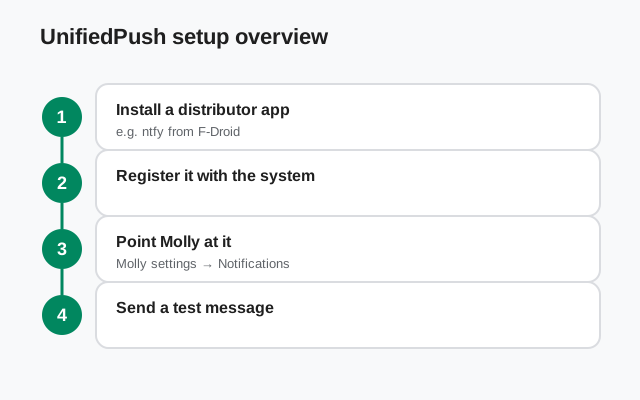
The exact screens vary by distributor, but the shape of the setup is always the same:
Step 1: install and configure the distributor first. Get it running and connected before you touch Molly's settings. Molly can only register with a distributor that's already working. If the distributor needs an account or server, finish that setup now.
Step 2: open Molly-FOSS and find the notification settings. Look for the push/notification options in Molly's settings. Choose UnifiedPush (rather than any built-in fallback) as the push method.
Step 3: register with the distributor. Molly will show the available distributors on your phone; pick yours and confirm the registration. You should see a confirmation that push is registered.
Step 4: exempt the distributor from battery optimization. This is the step people skip and then regret. Open Android's battery settings, find the distributor app, and set it to unrestricted / not optimized (wording varies by phone). A distributor that the OS kills in the background is a distributor that can't wake Molly.
Step 5: test with a real message. From another device or a friend's phone, send yourself a message while your phone's screen is off. The notification should arrive within seconds. If it doesn't, the Molly hub's troubleshooting pointers apply. But in practice, nine times out of ten the fix is step 4.
We keep this deliberately high-level because distributor apps and Molly's settings screens change between releases; screenshots would rot. The flow above is stable even when the buttons move.
Battery and reliability tradeoffs
Let's be blunt about what UnifiedPush costs, because the advocacy around it tends to skip this part. Battery: a persistent connection that your phone maintains itself uses more power than sharing FCM's single system-level connection. On modern phones the difference is modest. You won't halve your battery life, but it's real and measurable, especially on phones where the radio has to work hard to hold the connection (weak signal areas).
Reliability: FCM is protected by the OS; a distributor is not. On GrapheneOS and other systems that respect your battery-exemption choices, a properly exempted distributor is solid: notifications arrive promptly and consistently. On stock phones from manufacturers with aggressive background killers, the distributor can be killed despite your settings, and some of those systems re-kill it after updates or reboots. The symptom is always the same: messages arrive fine when you open the app, but notifications are late or missing while the phone sleeps.
Mitigations that actually work: exempt the distributor from battery optimization (step 4 above); on problematic phones, also exempt Molly itself; keep both apps updated; and if your phone has a "background data" or "auto-start" permission, grant it to the distributor. These aren't hacks. They're the documented cost of running your own push infrastructure instead of renting Google's.
When it works well, and when it doesn't
| Situation | UnifiedPush experience | Why |
|---|---|---|
| GrapheneOS / de-Googled ROM, distributor exempted | Works well: prompt, consistent | OS respects your exemption; no competing task killer |
| Huawei without GMS, distributor exempted | Works well for most users | This is the setup Molly-FOSS was built for |
| Stock phone, distributor exempted, mild battery saver | Usually fine | Exemption holds on most mainstream skins |
| Stock phone with aggressive task killer, exemption ignored | Unreliable: delayed or missing notifications | OS kills the distributor regardless of settings |
| Weak-signal areas, phone on mobile data all day | Works, costs more battery | Radio works harder to hold the persistent connection |
| Phone with Google services, FCM available | Works, but pointless | FCM is more efficient here; UnifiedPush buys nothing |
The pattern: UnifiedPush shines exactly where FCM is absent, and struggles exactly where the OS fights background apps. If your situation is in the bottom three rows, reconsider whether the FOSS build is serving you. Standard Molly with FCM exists for a reason.
The honest alternative: FCM
Here's the sentence UnifiedPush advocates won't write: if your phone has Google services, use FCM. Standard Molly keeps Google's push, and it's better at the job: more reliable, gentler on battery, zero setup, zero distributor to babysit. Choosing UnifiedPush on a Google phone is ideology over engineering, and your notifications will be worse for it.
UnifiedPush earns its place in exactly two situations: your phone has no Google services (so FCM isn't an option), or you've decided as a matter of principle that Google doesn't belong in your notification path. Both are legitimate. Everything else is standard-Molly territory. If you don't need the fork's extras at all, official Signal is simpler than either build. The Molly vs Signal comparison lays out that broader choice if you're still deciding.
from Signal's official site (file hosted by Signal, not by us)
Bottom line: UnifiedPush is a real, working, open answer to "how do I get notifications without Google." It is not a hack, and not a compromise you should feel bad about. Set it up carefully (especially the battery exemption), test it with a real message, and it will serve a Google-free phone well. Just don't deploy it where FCM already does the job better.
Frequently asked questions
Do I need a Google account for UnifiedPush?
No. That's the entire point. UnifiedPush involves no Google account, no Google servers, and no proprietary Google code. It's an open standard, and the distributor you choose is independent of Google.
Will my notifications arrive instantly?
Usually within seconds, when the distributor is running and exempted from battery optimization. Delays happen when the OS kills the distributor in the background. That's a battery-saver problem, not a Molly problem, and the exemption setting is the fix.
Can the distributor app read my messages?
No. The distributor only passes along the wake-up signal ('something arrived'). The message itself travels through Signal's servers encrypted with the Signal protocol, which the distributor never sees.
Can I use UnifiedPush with official Signal?
No. Official Signal uses Google's FCM for push notifications and doesn't support UnifiedPush. UnifiedPush on the Signal network is a Molly-FOSS feature. It is one of the reasons the fork exists.
What happens if my distributor app stops working?
Molly can't be woken for new messages, so notifications stall until the distributor reconnects. Messages themselves are safe on Signal's servers and arrive when you open the app. Keep the distributor updated and exempted from battery optimization to prevent this.
Keep reading
- Molly hub: the full map of fork guides
- Molly or Molly-FOSS: which build to pick
- Safe Molly install walkthrough: the safe install path
- What is Molly: the fork explained from scratch
- Molly vs Signal: fork vs official, honestly
- Signal on Huawei: the Google-free phone case