
Is updates.signal.org safe? A supply-chain check
Published: October 7, 2026 · Updated: October 8, 2026
Yes. updates.signal.org is Signal's own update server, and it is exactly where the official Signal APK and its updates come from. When you tap the download button on signal.org/android/apk, the file itself is served from updates.signal.org; the website build's self-updater also pulls new releases from there. Seeing that domain in your download manager or browser address bar is normal and expected, not a sign of a redirect attack. This page walks the full supply chain, from the landing page you trust to the file server you may not recognize. It shows you how to verify each link in it, and catalogues the lookalike-domain patterns scammers use to exploit the confusion.
The short answer
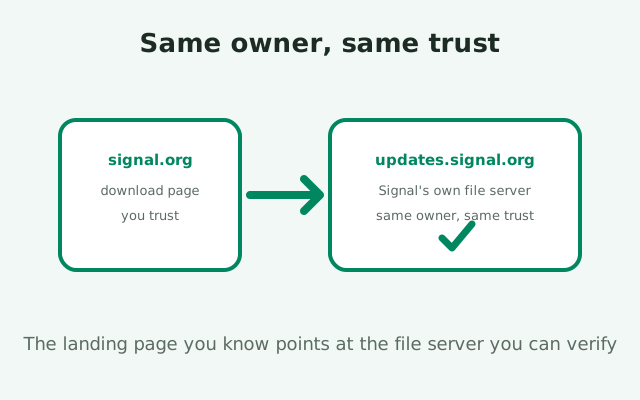
updates.signal.org belongs to Signal. It is the content-delivery host Signal uses for Android APK downloads and updates: the "direct file" behind the download button on Signal's APK page lives there, and the website build checks there for new versions. If you watch a download closely and see the URL resolve to updates.signal.org, everything is working as designed. The domain is as much Signal's as signal.org itself: same organization, same trust.
The confusion is understandable. People memorize one trusted address, signal.org, and anything else looks like a redirect to somewhere shady. Attackers exploit exactly that instinct in reverse: they register lookalike domains hoping you will not notice the difference. So the useful skill is not "trust only one domain" but "know which domains are Signal's and verify the rest." After this page, updates.signal.org joins your trusted list, and every similar-but-different domain stays off it.
One boundary for this whole page: we link only to Signal's landing page, never directly to the file on updates.signal.org. The file URLs there can rotate between releases, and a direct file link teaches the bad habit of trusting bare file URLs. The landing page is the stable trust anchor; the file server is where it points. Bookmark the page, verify the file.
What updates.signal.org actually is
Every software company needs somewhere to put the actual files. The website (signal.org) is the storefront: pages, text, the download button. The files themselves (large binaries downloaded millions of times) live on infrastructure built for serving files fast and reliably. updates.signal.org is Signal's file-serving host for Android updates. The name is literal: it serves updates.
Standard practice, not a Signal invention
This split is standard practice, not something Signal invented. Companies keep their main site and their download infrastructure on different hosts so that a traffic spike on downloads cannot take down the website, and so the file servers can be tuned purely for throughput. When the arrangement is legitimate, both hosts belong to the same organization, which is verifiable: the domain is a subdomain of signal.org, registered to the same owner, serving over HTTPS with a valid certificate.
What flows through it
What flows through it: the website-build APK files for Android, and the update metadata the website build's self-updater checks. When your installed website build notifies you of a new version and downloads it in the background, that download comes from updates.signal.org. When you tap the download button on the APK page, the file your browser saves comes from updates.signal.org. Same host, same owner, both directions.
What does not flow through it
What does not flow through it: anything requiring your trust beyond the file itself. The server does not ask for your phone number, your credentials, or payment; it serves files. Any page on a similar-looking domain that asks for credentials "to complete the download" is not this server and not Signal. It is phishing wearing a familiar-looking address.
How the download supply chain works
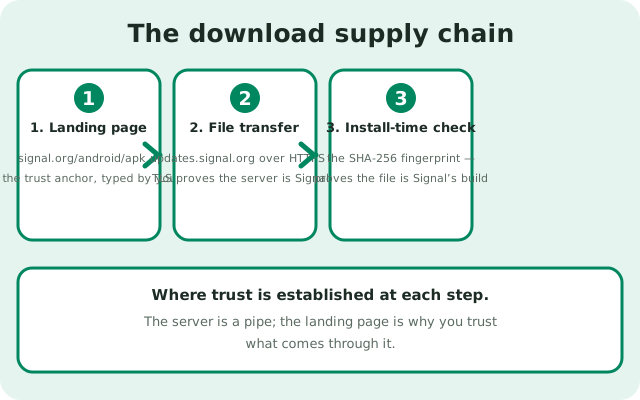
Follow a download from tap to install, and watch where trust is actually established at each step.
- The landing page. You open signal.org/android/apk, typed or bookmarked by you. Trust here comes from the domain, which you verified. The page shows the current version (8.29.3 at the time of writing) and the SHA-256 fingerprint of Signal's signing certificate. This page is the trust anchor for everything downstream.
- The file transfer. You tap download; the file arrives from updates.signal.org over HTTPS. Trust here comes from two things: the TLS certificate (proving you are really talking to Signal's server, not an impostor in the middle) and the fact that you arrived via the trusted landing page rather than a random link. The server is a pipe; the landing page is the reason you trust what comes through it.
- The install-time check. When you install the APK, Android itself verifies the file's signature against the signing key. If you then compare the signing certificate's fingerprint against the value published on Signal's page (which we re-verified live while writing this guide), you close the loop: the file you hold was signed by the key Signal publishes. Our fingerprint verification guide walks through the comparison.
The key insight: the signature is the real trust anchor, not any domain. Domains can be spoofed, pages can be cloned, but the signing key cannot be forged. updates.signal.org is trustworthy because it is Signal's, and you can confirm that, but even if a download somehow came from elsewhere, a matching fingerprint would still prove the file genuine, and a mismatching fingerprint would still prove it fake. The chain has redundancy by design. Verify the fingerprint and the domain question becomes secondary.
How to verify it yourself
The information-gain element for this page: the verification checklist. Run it any time a download touches a domain you do not recognize.
| Check | How | What "pass" looks like |
|---|---|---|
| Subdomain of signal.org | Read the domain right to left: updates.signal.org | The last two labels are exactly signal.org: nothing added, nothing changed |
| Valid HTTPS certificate | Tap the padlock in your browser's address bar | Certificate issued for the domain you are on, current and valid |
| Arrived via the landing page | Check your path: did you start at signal.org/android/apk? | You navigated there yourself (typed or bookmarked), not via a forwarded link |
| File fingerprint matches | Compare the APK's signing fingerprint to the published value | Character-for-character match with the fingerprint on Signal's page |
| No credential requests | Note whether the server asked for anything | A file server serves files; it never asks for phone numbers, codes, or PINs |
| Version consistency | Compare the downloaded version with the page's stated version | The file matches the version Signal's page currently lists (8.29.3 at writing) |
Six passes and the chain is verified end to end. Note the order of strength:
- The fingerprint check is the strongest (cryptographic proof).
- The domain checks are the practical ones you run every time.
- The credential check is the tripwire: a file server asking for your PIN fails instantly no matter what else passes.
Make this checklist a habit for the first download on each new device, not for every update. The website build's self-updater handles updates from the same host automatically; re-verifying the infrastructure monthly is paranoia, not prudence. Verify once per device, then let the updater work.
The lookalike-domain patterns
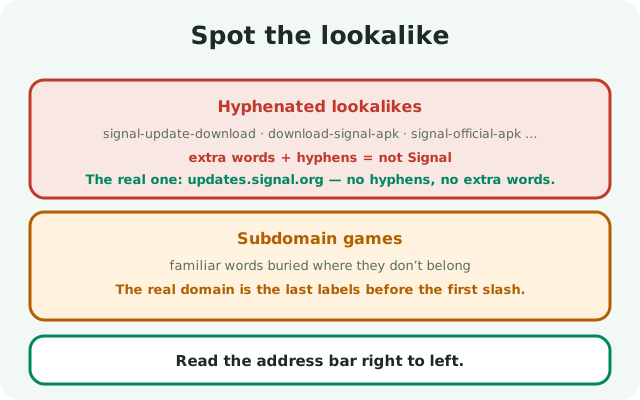
Now the other side: the domains that want you to confuse them with Signal's. We do not name specific malicious domains (they rotate constantly, and listing them advertises them), but the construction patterns are stable, and every one is visible in the address bar if you read it right to left.
Hyphenated lookalikes
Hyphenated lookalikes splice familiar words together: the real name plus "update," "download," "apk," or "official," joined with hyphens, under various endings. They read convincingly at a glance because every word in them is a word you expect. The defense is reading the full domain, not the familiar words: updates.signal.org has no hyphens and no extra words.
Subdomain games
Subdomain games bury the real name where it does not belong: the familiar words appear, but the actual registered domain (the last two labels before the first slash) is something else entirely. Readers stop at the first familiar word and never reach the part that matters. Always read to the end of the domain.
Wrong endings
Wrong endings reuse the familiar name under a different top-level domain. Most users do not register which ending is correct, and attackers count on it. Signal's infrastructure lives under signal.org; anything else is something else.
Unicode lookalikes
Unicode lookalikes swap in characters from other alphabets that render identically to Latin letters. These are visually undetectable, which is why the defense is behavioral rather than visual: never reach a download server through a link someone sent you. Type it, bookmark it, or arrive via the landing page. Then the characters render however they render, because you chose the destination.
The unifying defense
The unifying defense is the same one this site repeats everywhere: the landing page is the trust anchor. If you start at signal.org/android/apk (typed by you), then wherever the download technically resolves is fine, because you can verify the fingerprint at the end. Lookalike domains only work on people who arrive through the lookalike's own links. Do not be that arrival.
Why we link the landing page, not the file
A reasonable question: if updates.signal.org is legitimate, why does this guide never link directly to the file there? Three reasons, all about your habits rather than our convenience.
File URLs rotate
First, file URLs rotate. Each release gets its own file path, and old paths go stale. A bookmarked or shared direct-file link quietly rots: one day it 404s, the next someone registers a lookalike to catch the traffic. The landing page is the stable address; it always points at the current file. Linking the stable thing teaches you to trust the stable thing.
Bare file URLs skip the verification context
Second, bare file URLs skip the verification context. The landing page shows you the version number and the signing fingerprint alongside the download button: the exact values you need to verify what you downloaded. A direct file link downloads without showing you any of that, which trains the habit of downloading first and verifying never. We want the opposite habit.
One place for the trust decision
Third, it keeps the trust decision in one place. "Is this signal.org/android/apk, the page I trust?" is a single, learnable check. "Is this 200-character file URL on updates.signal.org legitimate?" is not learnable. Nobody memorizes file paths, so nobody can evaluate them, so everyone just clicks. Centralizing trust on the human-readable page is a design choice in your favor.
This is also why you should be wary of anyone who sends you a direct file link "to save time", even if the domain in it is genuinely updates.signal.org. The time saved is seconds; the verification context skipped is the whole safety model. Take the thirty seconds, open the landing page, and download from there like everyone else.
When to be suspicious
Legitimate infrastructure has a boring profile: it serves files, asks for nothing, and is reached through the landing page. Suspicion is warranted whenever the profile gets interesting.
- Be suspicious if a download link arrives unsolicited (in a message, an email, a comment), even when the domain looks right. Attackers cannot fake Signal's servers, but they can fake the link text that claims to point there. Hover or long-press to see the real destination before tapping.
- Be suspicious if any page in the download flow asks for your phone number, a verification code, your Signal PIN, or payment. File servers do not need credentials. This is phishing regardless of how convincing the domain looks, and it is the single most reliable tripwire in this entire guide.
- Be suspicious if the version offered does not match the version on Signal's page. A "newer" build than the official page lists, a "pro" or "premium" edition, a special regional variant. Signal ships one Android build at a time, and anything else is fiction. Our fake-APK guide covers the full catalog of these lures.
- Be suspicious if the fingerprint does not match. This overrides everything else: a mismatching fingerprint means the file is not Signal's, full stop, no matter how legitimate the domain looked or how official the page felt. Delete it, and re-download from the landing page.
And when none of these fire (landing page typed by you, file from updates.signal.org, fingerprint matching, no credential requests), you are done. That is what a clean supply chain looks like: boring at every step. Boring is the goal.
from Signal's official site — file hosted by Signal, not by us
Frequently asked questions
Is updates.signal.org safe?
Yes. It's Signal's own update CDN: the official APK download and the website build's self-updater both pull files from there. Seeing that domain during a download is normal and expected.
Why does my download come from updates.signal.org instead of signal.org?
Standard practice: the website (signal.org) is the storefront and updates.signal.org is the file-serving infrastructure. Both belong to Signal. The file URLs there can rotate, which is why you should always start from the landing page.
How do I know updates.signal.org really belongs to Signal?
It's a subdomain of signal.org, serves over HTTPS with a valid certificate, and is the host Signal's own download page points to. The decisive check remains the APK's signing fingerprint against the value published on Signal's page.
Someone sent me a direct updates.signal.org file link. Should I use it?
No. Always open signal.org/android/apk yourself and download from there. A forwarded file link skips the version and fingerprint context the landing page shows you, and link text is easy to fake.
What does a fake Signal update domain look like?
Hyphenated names with words like 'update' or 'download', the brand buried in a subdomain of an unrelated domain, wrong top-level domains, and Unicode lookalike characters. Read every domain right to left and start downloads from the landing page you typed yourself.
Keep reading
- verifying the APK's SHA-256 fingerprint: the check that closes the trust loop
- spotting fake Signal download sites: the typosquat pattern catalog
- APK hash vs app signature: two different checks, both explained