
Fake Signal websites: how to spot them before they hurt you
Published: October 7, 2026 · Updated: October 8, 2026
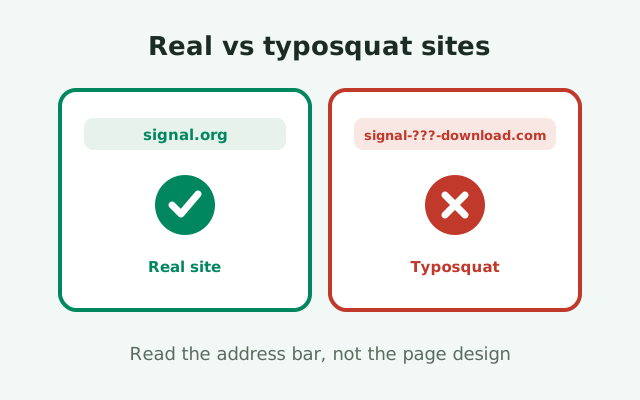
Fake Signal websites copy the look of Signal's real download page, rank in search results, and hand you an APK that is not Signal's. They are one of the most common ways people end up with a tampered app: the page looks right, the green button says "Download," and the file that arrives is something else entirely. The good news is that these sites are easy to spot once you know the patterns scammers reuse, and a single habit (bookmarking the real site) makes you nearly immune. This page covers the typosquat pattern catalog, what the fake sites actually do to you, and the 10-second check you should run on any download page.
Why fake Signal download sites exist
A fake Signal download site is a webpage that pretends to be the official place to get the Signal app, but is run by someone else. Most exist for one of three reasons. The first is malware distribution: the download button serves a modified APK with spyware or fraud code, and the page is just the storefront. The second is ad and affiliate fraud: the site surrounds the real file (or a fake one) with aggressive ads, popups, and redirect chains that make the operator money per visit. The third is phishing: the page asks you to enter your phone number, a verification code, or your Signal PIN to "complete the download," which hands the attacker your account.
Why Signal gets targeted
Why does Signal get targeted more than most apps? Because demand for its APK is high and legitimate supply is narrow. Millions of people need the APK outside the Play Store: Huawei phones without Google services, phones in regions where app stores are blocked, people reinstalling an old device. All of them search the web for a download, and search is exactly where the fake sites wait. One real page, signal.org/android/apk, serves everyone. The fakes try to intercept the journey there.
Cheap to build, profitable to run
The sites are cheap to build and profitable to run. A scammer registers a lookalike domain for a few dollars, clones the visual style of the real page, and starts collecting victims from search results and social media links. When one domain gets reported and taken down, three more appear. This is not a fight anyone wins by reporting alone, which is why this page teaches pattern recognition instead of listing today's bad domains. Domains die; patterns survive.
Why they persist
Understanding the economics also explains the persistence. Even a fake site that converts one in a thousand visitors can pay for itself if it serves enough malware installs or ad impressions. Reporting matters (we cover it in our fake-APK reporting guide), but the protection that scales is user behavior: knowing what the patterns look like and never trusting a download page you arrived at through a random link.
The typosquat pattern catalog
This is the information-gain core of the page: the complete pattern catalog. We deliberately do not name specific fake domains here, because listing them advertises them and they change weekly anyway. What does not change is the grammar of deception. Scammers recombine the same handful of tricks, and every one of them is visible in the address bar.
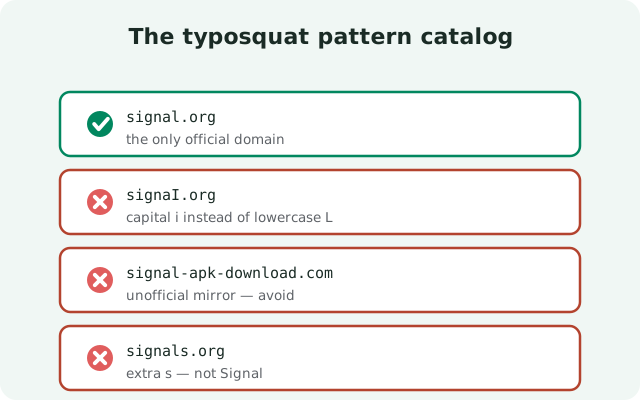
| Pattern | What it looks like | Why it works |
|---|---|---|
| Extra words added | The real name plus words like "pro," "download," "free," "app," "official," or a year | Your brain reads "signal" and fills in trust; the extra words are camouflage |
| Misspellings | Swapped letters, doubled letters, dropped vowels, a letter that looks like another | Fast readers do not notice one wrong letter, especially on a phone screen |
| Wrong TLD | The same name under .net, .org, .app, .apk, .io, or a country TLD instead of the real one | Most people do not register which ending is correct |
| Hyphen tricks | Hyphens inserted to splice the brand name onto other words, or to break it apart | Hyphens make long lookalike names readable, which makes them look legit |
| Subdomain games | The brand name buried in the middle: something like signal.something-else.com | Readers stop at the first familiar word and skip the actual domain at the end |
| Unicode lookalikes | Letters from other alphabets that look identical to Latin letters | Visually indistinguishable; the giveaway is copying the URL into a text editor |
| Extra depth | A convincing-looking domain with a long path: realname.com/signal/apk/download | The familiar word appears on screen, but the domain itself is unrelated |
Three habits defeat the whole catalog. First, read the domain from right to left: the part that matters is the last two labels before the first slash (in signal.org, that is signal plus .org). Everything before it is decoration. Second, slow down on small screens, where address bars truncate long names and show you exactly the familiar part the scammer wants you to see. Third, compare against the one address you have memorized: signal.org. If the site you are on is not signal.org, it is not Signal's site, and its download button deserves suspicion, not trust.
One more honest note: search results are not a trust signal. Fake sites buy ads and optimize pages to rank for download queries, and a result that says "Signal APK download" in the title can point anywhere. The ranking proves the scammer understands SEO, nothing more. Always verify the domain yourself before the download button.
What fake sites actually do to you
Outcome one: a modified APK
The download button on a fake site leads somewhere the real page never would. The most common outcome is a modified APK: a file built from Signal's open-source code with extra code added by a stranger, signed with a key Signal does not own. It installs, it looks like Signal, and in the background it can read your messages, contacts, and media, or run premium-SMS and overlay fraud. Because the site looked right, you install it with confidence, which is exactly the attacker's plan. Our guide to telling real and fake Signal APKs apart covers how to check any file you already have.
Outcome two: the redirect maze
The second outcome is a redirect maze. Some fake sites do not even host a file; they exist to bounce you through layers of popups, fake "continue" buttons, and ad-heavy pages that earn the operator money per click while you chase a download that never arrives cleanly. You may eventually get a file, but only after handing the site several rounds of ad impressions and possibly installing "downloader" apps or browser extensions that are themselves unwanted software.
Outcome three: phishing
The third outcome is phishing. These pages ask for your phone number to "send the download link," then ask for the verification code that arrives. Or they present a form asking for your Signal PIN "to verify your identity." Real downloads never ask for any of this. A download is a file; it needs no account, no code, no PIN. Any page that makes the download conditional on handing over credentials is harvesting them, full stop.
Notice the common thread: every variant asks you to trust the page's appearance. The defense is never about appearance. It is about the address bar and the habit of starting from the bookmark, which is the next section. Design can be cloned in an afternoon; a bookmark to the real site cannot be faked by anyone but you.
The 10-second website check
Run this checklist on any page offering you a Signal download. It takes ten seconds and catches nearly every fake.
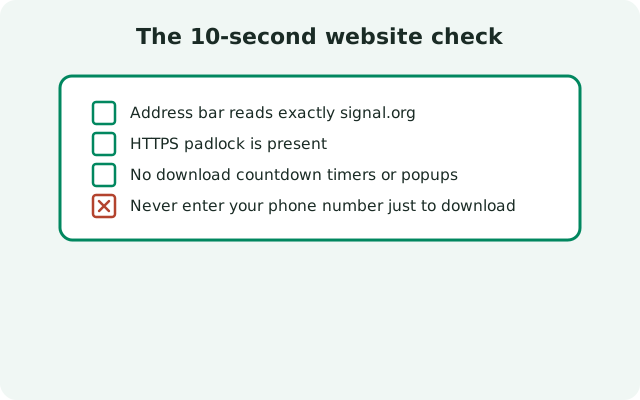
- Read the domain right to left. Is it signal.org, nothing added, nothing changed, correct ending? If yes, you are safe. If anything else, stop. This one check resolves most cases by itself.
- Look for the padlock and tap it. A real HTTPS certificate is table stakes, but also check who it was issued to. Fake sites often have valid certificates for their fake domains; the padlock proves encryption, not identity.
- Compare the claimed version. Signal's real page currently lists version 8.29.3. If the page you are on advertises a newer version, a "pro" edition, or "premium" features, it is fabricating. Signal ships one app, one version at a time.
- Watch for credential requests. If the page asks for your phone number, verification code, or PIN before downloading, leave. Downloads do not need credentials.
- Check the link target. On desktop, hover over the download button and read the status bar. The real file comes from Signal's servers. If the link points to a file host, a shortener, or another domain, close the tab.
Two failures out of five is enough to walk away; you do not need all five to confirm a fake. And remember the asymmetry: a real site passes all five instantly, because it has nothing to hide. Only fakes need you to stop checking.
For downloads on phones where the address bar is truncated, the check is even simpler: do not download from the page at all. Open your bookmark to signal.org/android/apk directly, or type it. The ten seconds you spend typing the address is the cheapest security upgrade in this whole guide.
The bookmark habit
Pattern recognition is good. Not needing it is better. Bookmark signal.org/android/apk in your browser right now, and make a rule: the only download page you ever use is that bookmark. Not the top search result. Not the link a friend forwarded. Not the page that looks identical to the real one. The bookmark.
This works because it moves the trust decision from "every single time" to "once, verified." You check the domain carefully a single time, save it, and from then on you never evaluate download pages again. Phishing sites cannot reach you through a bookmark; they rely on intercepting your journey, and a bookmark skips the journey entirely.
Extend the habit to the people you help. When family members ask where to get Signal, do not send them a link they have to evaluate. Walk them through bookmarking the real page. Or better, download the file for them from your own bookmark and transfer it over USB or Bluetooth. Then verify the file after the transfer so the copy is as trustworthy as the original. Most people's security does not fail on knowledge; it fails on habits. Give them the habit.
The same principle covers the other official sources. The Play Store listing (published by Signal Foundation) is reachable through your bookmark or the Play app itself, never through a web link. Desktop builds come from signal.org/download, which you can also bookmark. Three bookmarks, and the entire category of fake-download-site scams loses its grip on you permanently.
If you already downloaded from a fake site
If you downloaded but did not install
If you landed on a fake site and downloaded its file, do not install it. Delete the file. A download sitting in your storage cannot hurt you; an installed app with your permissions can. Then go to your bookmark, get the real file from Signal's page, and verify its signature with our SHA-256 verification guide before installing.
If you installed it
If you installed it, treat the situation seriously but calmly. Uninstall the app completely, do not try to update over it. Assume it saw everything while installed: change important passwords from a different device, check your carrier bill for unexpected charges, and re-secure any accounts whose verification codes you entered while the app was on the phone. Then install the genuine app and re-register. Our APK malware guide walks through the full cleanup.
If you entered credentials on the site
If you entered your phone number, a verification code, or your Signal PIN on the fake site, re-register Signal yourself immediately so any session the attacker started gets replaced, and change your Signal PIN to something they cannot guess. If you entered payment details anywhere on the site, contact your bank about replacing the card.
Report the site
Finally, report the site. Your report is what gets the domain flagged in browsers and search results, which protects the next person who searches. Our reporting guide shows exactly where to file and what evidence to attach. A fake site you report is a fake site fewer people will ever see.
from Signal's official site — file hosted by Signal, not by us
Frequently asked questions
How can I tell if a Signal download website is fake?
Read the domain in the address bar from right to left. The only real site is signal.org. Extra words, misspellings, wrong endings like .net, hyphens, and lookalike Unicode letters are the classic typosquat patterns.
Is signal.org the only real Signal download site?
For the Android APK, yes: signal.org/android/apk. The Play Store listing published by Signal Foundation is the other legitimate source. Anything else claiming to offer the Signal APK deserves suspicion.
Why do fake Signal websites rank in Google?
Because the scammers understand SEO and sometimes buy ads. Ranking proves marketing skill, not legitimacy. Always check the domain yourself instead of trusting the search result.
Can a fake website give me the real Signal APK?
Sometimes, but mixed with ad fraud or redirect mazes. More often the file is modified. The only files worth trusting come from Signal's own page, where you can also verify the signature.
What should I do if I downloaded from a fake site?
Don't install the file, delete it, and get the real one from your bookmarked signal.org page. If you already installed it, uninstall it, change important passwords, and report the site.
Keep reading
- telling real and fake Signal APKs apart: file-level checks for anything already downloaded
- reporting fake Signal APKs and sites: where to file a report that actually lands
- verifying the APK's SHA-256 signature: the one check that settles authenticity
- fake “Signal APK” Telegram channels: what to watch for