
Can the Official Signal APK Contain Malware?
Published: October 7, 2026 · Updated: October 8, 2026
"Can the official APK contain malware?" is a fair question, and it deserves a real answer rather than a dismissive "of course not." Software supply chains get attacked. It has happened to major companies. So let us take the question seriously: trace the path from Signal's developers to your phone, examine each link in the chain, and see where malware could theoretically enter and what stops it.
The honest conclusion up front: for a file downloaded from Signal's own page and verified against Signal's published fingerprint, the practical risk is as close to zero as software gets. The sections below explain why, without asking you to take it on faith.
from Signal's official site — file hosted by Signal, not by us
The supply chain, link by link
Every APK you install travels a chain. For the official Signal website build, the chain is short:
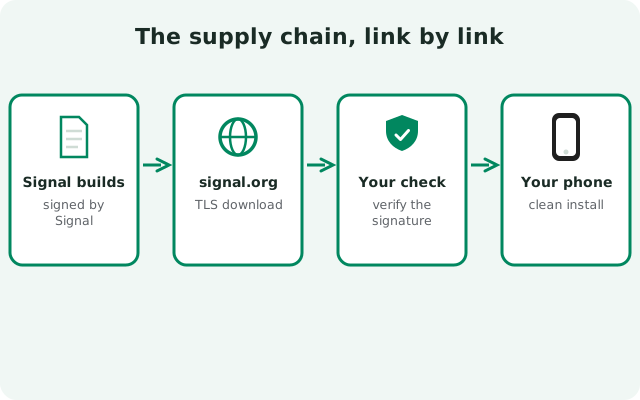
Source code
Signal's Android client is open source under the AGPLv3 license. The code is public, which means independent researchers can read it. And have, repeatedly.
Build
Signal's team compiles the source into the APK on their own build infrastructure. The current website build is version 8.29.3.
Signing
The built APK is signed with Signal's private signing key. This is the step that makes everything downstream verifiable: only this key produces the fingerprint Signal publishes.
Hosting
The signed file is served from Signal's infrastructure: the download page at signal.org/android/apk, with the file itself delivered from updates.signal.org.
Your download
Your browser fetches the file over HTTPS, which protects it from modification in transit between Signal's servers and your phone.
Installation
Android verifies the APK's signature during installation and refuses to install a file whose signature does not verify.
Short chains are safer chains. Compare this with a mirror-site download, which inserts unknown middlemen between steps 4 and 5: people you did not choose and cannot audit.
Why the official download is trustworthy
The full trust case is walked through on our Signal APK safety verdict page: the publisher is Signal Foundation itself, the code is open source, the signature is published and checkable, and the build updates itself. This page takes those four facts as its starting point and asks the harder question: what could still go wrong?
One point belongs to the threat model rather than the verdict: motive. Signal Foundation is a nonprofit funded by donations. It has no advertising business and no data-brokerage revenue, so it has no motive to ship spyware in its own product. Doing so would destroy the one thing it runs on: trust.
What could go wrong in theory
Intellectual honesty requires naming the scenarios, even the unlikely ones. Here is what a supply-chain attack on the official download would have to look like:
| Attack scenario | What the attacker would need |
|---|---|
| Malicious code slipped into the source | To get a backdoor merged into Signal's public repository, one of the most scrutinized codebases in messaging, without any reviewer, auditor, or outside researcher noticing. |
| Build machine compromised | To infect Signal's build infrastructure so the compiled APK differs from the public source, and to do it without triggering any of the integrity checks around the build. |
| Signing key stolen | To exfiltrate Signal's private signing key, the crown jewels, and then distribute a malicious APK that still matches the published fingerprint. |
| Download page or CDN compromised | To modify the file served from signal.org or updates.signal.org (or the fingerprint shown on the page) without Signal noticing and reverting it within hours. |
| Network interception of your download | To defeat HTTPS, which would require a compromised certificate authority or malware already on your device or network. |
Note what these scenarios have in common: every one of them is a sophisticated operation against Signal the organization, not against you personally. Supply-chain attacks happen, but they target the vendor's infrastructure and they make headlines. They are not something a random download site can pull off.
Why each scenario is unlikely in practice
Unlikely is not impossible, so here is the reasoning for each:
- Source tampering vs. public code. The client is open source and heavily watched. A backdoor commit would be visible forever in the public history, attributable, and career-ending for whoever merged it. Attackers prefer softer targets.
- Build compromise vs. signature transparency. Even if a build machine were compromised, the output is still signed with the real key and the source remains public. Researchers comparing builds to source would eventually notice discrepancies.
- Key theft vs. key handling. Signing keys for an app like Signal are among the most carefully guarded secrets in the organization, typically held offline or in hardware security modules. Stealing one is a nation-state-grade operation, not a smash-and-grab.
- CDN/page compromise vs. visibility. signal.org is one of the most monitored domains in privacy tech. A defaced download page or swapped binary would be noticed and reported within hours by researchers and users worldwide.
- Network interception vs. HTTPS. HTTPS with a valid certificate means the bytes you received are the bytes Signal sent, unless your device or network is already compromised, in which case you have bigger problems than this download.
The through-line: attacking Signal's supply chain is high-effort, high-risk, and high-visibility. Attackers with that level of capability have easier targets. The people actually getting malware "from Signal" got it from fakes, which is a much cheaper attack and the reason our fake APK guide exists.
Verification steps that close the remaining gap
You do not need to trust the reasoning above blindly. These checks let you confirm the file yourself:
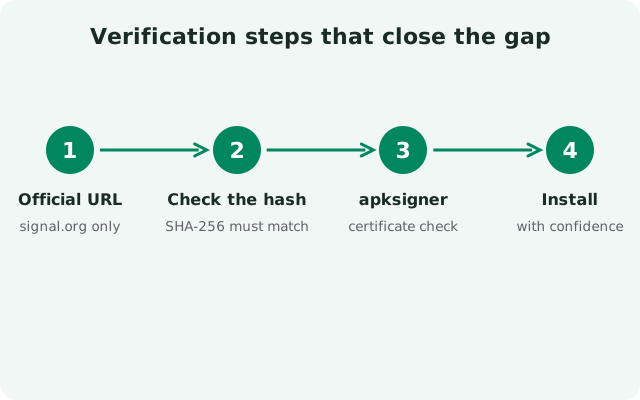
Download only from signal.org/android/apk
Type the address yourself or use a bookmark. This single habit eliminates the fake-copy problem, which is where virtually all real-world "Signal malware" comes from.
Verify the SHA-256 fingerprint
Use
apksigner(or an on-device signature viewer) to check the file's signing certificate against the fingerprint published on Signal's download page. A match proves the file was signed by Signal's key and unmodified since. Full steps: verify the Signal APK fingerprint.Confirm the package name after install
Settings → Apps → Signal should show
org.thoughtcrime.securesms. This catches the case where a fake replaced or sat alongside the real app.Keep the app updated
The website build updates itself through Signal's signed updater. Known vulnerabilities get fixed in updates. Running an old build is a bigger real-world risk than a supply-chain attack.
Review permissions once
After installing, glance at Settings → Apps → Signal → Permissions. Contacts, microphone, camera, notifications, media: expected. Accessibility services or device admin: not expected, investigate immediately.
What Play Protect and antivirus add (and do not)
Google Play Protect scans sideloaded apps too, and it will scan the Signal APK when you install it. A clean result is reassuring: it means the file matches nothing in Google's malware database. But understand its limits:
- Scans detect known malware. A brand-new malicious variant will not be in any database yet. Scans are a backstop, not a verdict.
- Scans cannot prove genuineness. Only the signature check proves the file came from Signal. A scan says "no known bad patterns found"; the fingerprint says "Signal signed this."
- Occasional false flags happen. Security tools sometimes flag legitimate sideloaded apps heuristically. If Play Protect warns about a file you downloaded from signal.org and verified by fingerprint, the warning is about the sideloading, not about Signal. Our Play Protect guide explains how to handle it.
Use scans as a supplement to verification, never as a replacement for it. The order of strength is: signature check first, source second, scans third.
Frequently asked questions
Has Signal's official APK ever contained malware?
There is no documented case of the official Signal APK, downloaded from signal.org and signature-verified, containing malware. Real-world "Signal malware" incidents trace back to fake copies from third-party sources.
Could a government force Signal to add a backdoor?
Signal's code is open source and independently audited, so a backdoor would be visible in the public source. The transparency is the protection.
Is updates.signal.org safe to download from?
Yes. It is Signal's official update domain, serving the same signed files as the download page. Our supply-chain check of updates.signal.org covers it in detail.
Does verifying the fingerprint protect against all supply-chain attacks?
It protects against everything except a compromise of Signal's own signing key or build process: scenarios where the malicious file would carry a valid signature. Those are the nation-state-grade cases discussed above, and no user-side check can detect them. The fingerprint check defeats every realistic threat.
My antivirus flagged the Signal APK. Is it infected?
Probably not. False positives on sideloaded apps are common. Verify the file's signature against Signal's published fingerprint; if it matches, the file is genuine and the flag is a false positive.
Is the Play Store build safer than the APK?
Both are genuine Signal builds from the same source code. The Play build gets Google's additional review layer; the website build gives you direct-from-Signal distribution with self-updates. Neither has a malware problem. Pick based on your situation, compared in our build comparison.
Related guides
- Signal APK safety hub: all verification and scam guides in one place
- Verify the SHA-256 fingerprint: the check that proves your file is genuine
- Real vs fake Signal APK: where the actual malware risk lives
- Is the Signal APK safe?: the honest full safety assessment
- Is updates.signal.org safe?: trusting Signal's official update domain