
Signal notifications broken on Oppo, Vivo, Realme or OnePlus? Tame the background killer
Published: October 7, 2026
Oppo, Vivo, Realme and OnePlus phones kill background apps more aggressively than almost any other Android brand, and that kills Signal notifications. All four brands come from the same manufacturer family (BBK), so they share the same habit: freezing or force-stopping apps the moment the screen turns off. Signal then can't maintain its background connection, and messages only arrive when you open the app. The fix is a set of four exemptions, autostart, battery management, recents lock, and background data, detailed below for each brand's skin (ColorOS, FuntouchOS, Realme UI, OxygenOS).
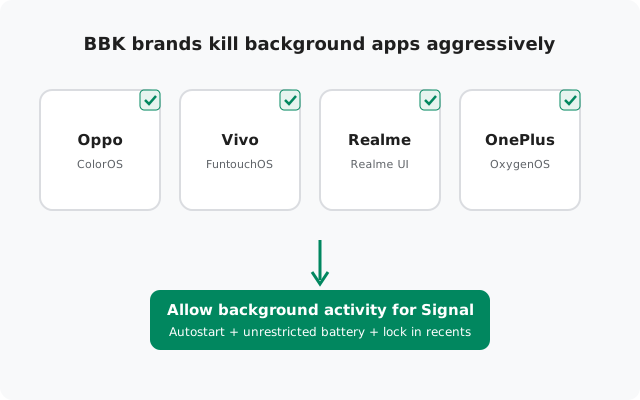
Why BBK phones are the hardest on notifications
Every Android phone manages battery, but BBK skins (ColorOS on Oppo, FuntouchOS on Vivo, Realme UI on Realme, OxygenOS on OnePlus) take it further than most. Independent testing projects that track this behavior consistently rank these brands among the most aggressive at killing background apps. The typical pattern: you install Signal, everything works for a day or two, then notifications silently stop, while the app looks perfectly fine when open.
Three separate systems do the killing, and each needs its own exemption:
- Autostart manager, decides which apps may start themselves after a reboot or in the background. Signal is denied by default.
- Battery / power consumption rules, freeze apps running in the background after the screen turns off, or restrict their background activity entirely.
- Recents clearing, swiping Signal away from the recent-apps screen force-stops it, cutting the connection instantly.
Fixing only one of the three leaves the other two free to keep killing Signal. Do all four exemptions below.
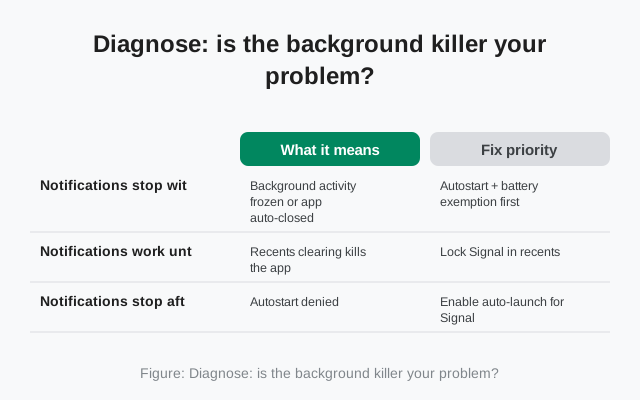
Diagnose: is the background killer your problem?
| Symptom | What it means | Fix priority |
|---|---|---|
| Notifications stop within minutes of locking the phone | Background activity frozen or app auto-closed | Autostart + battery exemption first |
| Notifications work until you swipe Signal away, then stop | Recents clearing kills the app | Lock Signal in recents |
| Notifications stop after every reboot | Autostart denied | Enable auto-launch for Signal |
| Messages arrive on Wi-Fi but not on mobile data (or vice versa) | Background data restricted on one network | Allow background data; check data saver |
| Everything works for days, then silently breaks | System "optimization" re-applied the restrictions | Re-check exemptions after OS updates; disable auto-optimization for Signal |
The signature symptom across all four brands is the same: messages flood in the moment you open Signal, proving the app works fine when running and only dies in the background.
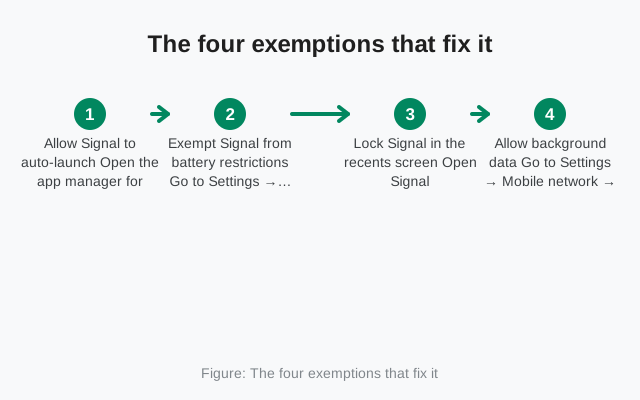
The four exemptions that fix it
-
Allow Signal to auto-launch
Open the app manager for startup apps, usually Settings → Apps → App management → Auto-launch (Oppo/Realme) or the Startup manager (Vivo/OnePlus). Find Signal and enable auto-launch / allow self-starting. Without this, Signal can't restart its background connection after a reboot.
-
Exempt Signal from battery restrictions
Go to Settings → Battery → App battery management (names vary), find Signal, and set it to Allow background activity or Don't optimize. This is the single most important exemption, it stops the system from freezing Signal's connection when the screen is off.
-
Lock Signal in the recents screen
Open Signal, then open recents and lock the Signal card (tap the card's menu or the lock icon, depending on the skin). Locked apps survive "clear all". Also avoid swiping Signal away manually, on these skins that force-stops the app.
-
Allow background data
Go to Settings → Mobile network → Data usage (or Settings → SIM & network) and make sure Signal is allowed background data on both mobile data and Wi-Fi. If Data saver is on, either turn it off or add Signal to its unrestricted list.
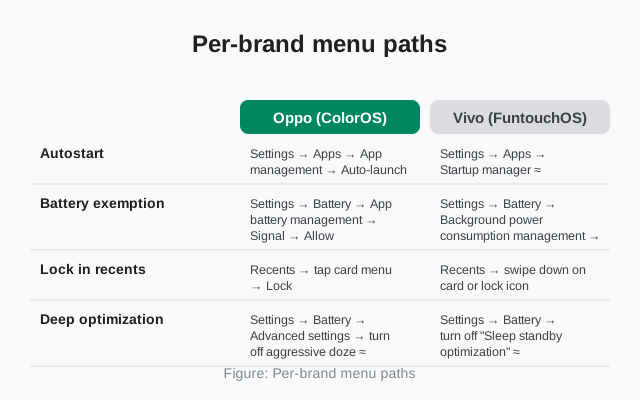
Per-brand menu paths
Use this table to find the exact screens on your phone. "≈" means the name varies by version, use Settings search if the label differs:
| Oppo (ColorOS) | Vivo (FuntouchOS) | Realme (Realme UI) | OnePlus (OxygenOS) | |
|---|---|---|---|---|
| Autostart | Settings → Apps → App management → Auto-launch | Settings → Apps → Startup manager ≈ | Settings → Apps → App management → Auto-launch | Settings → Apps → Startup manager ≈ |
| Battery exemption | Settings → Battery → App battery management → Signal → Allow background activity | Settings → Battery → Background power consumption management → Signal → Don't restrict ≈ | Settings → Battery → App battery management → Signal → Allow background activity | Settings → Battery → Battery optimization → Signal → Don't optimize |
| Lock in recents | Recents → tap card menu → Lock | Recents → swipe down on card or lock icon | Recents → tap card menu → Lock | Recents → tap ⋮ on card → Lock |
| Deep optimization | Settings → Battery → Advanced settings → turn off aggressive doze ≈ | Settings → Battery → turn off "Sleep standby optimization" ≈ | Settings → Battery → Advanced settings ≈ | Settings → Battery → Advanced optimization → disable Deep optimization / Sleep standby optimization |
On OnePlus, Advanced optimization deserves special attention: its "Deep optimization" and "Sleep standby optimization" features are designed to kill exactly the kind of persistent connection Signal uses. If notifications fail on a OnePlus phone after the standard exemptions, disabling these advanced features is usually what finally fixes it.
The screen-off test
BBK killers are sneaky, a fix that works at noon can fail at midnight. Test properly:
-
Reboot, then open Signal once
This confirms the auto-launch exemption works. If Signal doesn't start its connection after a reboot, revisit exemption #1.
-
Lock the phone unplugged for 15 minutes
Screen off, not charging. Send a test message from another device, it should arrive within seconds.
-
Test overnight
BBK phones apply their deepest restrictions after hours of inactivity. An overnight test catches what a short test misses.
-
Re-check after every OS update
ColorOS, FuntouchOS, Realme UI and OxygenOS updates routinely reset these exemptions. Make the four checks part of your post-update routine.
Extra killers to check
- Phone Manager / Security Center "cleanup": the built-in cleaner apps on Oppo, Vivo and Realme aggressively close background apps during "optimization" runs. Either disable automatic optimization or add Signal to its whitelist/protected list.
- Game Space / Game mode: if Signal notifications fail while gaming, check the game mode settings, some modes block all background activity and notifications while active.
- Dual apps / app cloner: cloned copies of Signal can split notifications between the original and the clone. Use one copy only.
- VPN and private DNS: an always-on VPN or strict private DNS can break Signal's background connection. Test with both temporarily disabled.
- Ultra power saving: disables background data for everything by design. Notifications stop while it's on, expected, not a bug.
One thing that does not fix this: reinstalling Signal. A fresh install lands in the exact same restriction lists, so you get the same broken behavior with the added pain of re-registering and re-downloading your data. Fix the settings, not the app.
from Signal's official site, file hosted by Signal, not by us
Frequently asked questions
Why does Signal work on my friend's Samsung but not my Oppo?
Different manufacturers apply different levels of background restriction. Samsung restricts too, but BBK skins (ColorOS, FuntouchOS, Realme UI, OxygenOS) are the most aggressive in the industry at killing background apps. The same Signal app needs stronger exemptions on these phones, the four above.
Will exempting Signal drain my battery?
Very little. Signal's background connection uses occasional tiny keep-alive packets. On BBK phones the battery savings from killing it are negligible, you gain minutes of standby at most, and lose all your notifications.
Do these steps work for Realme and OnePlus too?
Yes. Realme UI is built on ColorOS and OxygenOS shares the same BBK power-management DNA, so the four exemptions apply to all four brands. The menu paths differ slightly, use the per-brand table above.
Notifications worked yesterday and stopped today. What happened?
Most likely an automatic "optimization" run by Phone Manager / Security Center, or an overnight OS update reset your exemptions. Re-check all four exemptions, on these brands they can silently revert.
Should I use a third-party app to keep Signal alive?
No. "Keep alive" and notification-fixer apps from the Play Store can't override the manufacturer's power manager, they just add another app for the system to kill, and some are adware. The built-in exemptions above are the only reliable fix.
Does the official website APK behave differently here?
No, the background-connection model is the same whether you install from the Play Store or from signal.org/android/apk (current website build 8.29.3). The killers target the running app, not the install source.
Related: master notification diagnosis, battery-related delays on any phone, lock-screen notification visibility, installing Signal on Oppo, and the troubleshooting hub.