
Signal Android Version History: What Each Major Release Changed
Published: October 7, 2026 · Updated: October 8, 2026
How to read this timeline
Signal does not publish one long official history page. Release notes live in two places: the release notes on the official GitHub repository (signalapp/Signal-Android) for each Android build, and feature announcements on the official blog at signal.org/blog. This timeline uses only those two sources. If a change is not documented in either place, it is not listed here. That keeps this page honest, but it also means small bug-fix builds with no published notes get one line instead of a paragraph.
Reading a version number
Android version numbers look like 8.29.3. The first number is the major release, the second is the minor release, and the third is a patch. A jump from 8.28 to 8.29 usually means new features arrived. A jump from 8.29.0 to 8.29.3 usually means bugs got fixed. When only the patch number moves, nothing big changed on the surface, and Signal normally publishes no notes for those builds.
What "website build" and "Play build" mean below
One more note before the timeline. "Website build" below means the APK from Signal's own download page. "Play build" means the app from the Google Play Store. The two channels sometimes carry slightly different version numbers for the same features. That is normal. There is a full explanation in the guide on why the APK and Play versions differ.
Releases reach people in stages
Finally, releases reach people in stages. A version can exist on GitHub or the official download page days before it reaches your phone. If a friend has a newer build than you, that usually means their turn in the rollout came first, not that anything is wrong with your phone.
2026: 8.29 and the Signal Login beta
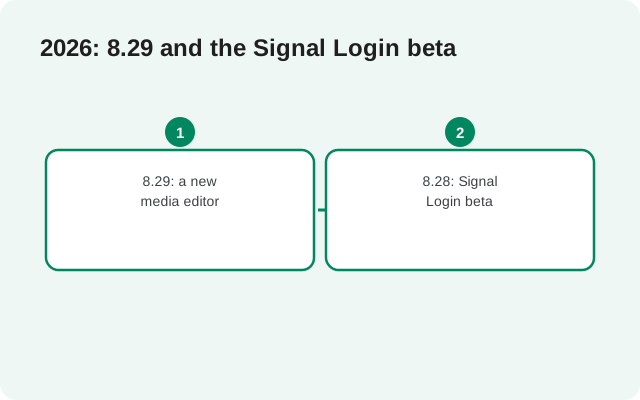
8.29: a new media editor
Version 8.29's headline change is the media editor. Signal rebuilt it from the ground up so it works well on tablets and foldable phones, and the official release notes say it now looks good on screens of all sizes. This matters because more people read and edit media on large screens than ever before, and the old editor was built for phones.
The same release added a small but genuinely useful option: you can strip the audio track out of a video before you send it. If a clip has background noise you would rather not share, one tap removes the sound and sends the video silent. It is the kind of quiet improvement you notice only when you need it.
The 8.29 line now stands at 8.29.3, which is the current website build. The patch builds between 8.29.0 and 8.29.3 were tagged on GitHub without published notes. That is standard practice across the industry: small fixes ship quietly, and the feature release carries the announcement. If you want to watch the 8.29 line yourself, the official GitHub releases page lists every tag as it ships.
For the full breakdown of this release, see what's new in Signal 8.29.
8.28: Signal Login beta
Version 8.28 introduced the beta of Signal Login: the option to register for Signal without a phone number. This is one of the biggest registration changes in the app's history, because a phone number has always been the price of a Signal account.
Phone-numberless registration asks for a small one-time fee. The fee exists for one reason: to stop spammers from creating huge numbers of free accounts and flooding the network. The official release notes stress that the in-app purchase is never directly linked to the new Signal account, so the payment does not become a new way to identify you. The notes also thank users for helping beta test the feature, which tells you its status: this is a beta, and it will keep changing before it reaches everyone.
After the payment, you receive an Account ID and a recovery key. Signal tells testers to store both in a password manager, because losing them means losing the account. There is no support desk that can recover it and no back door. That is not a bug; it is the design. The full story is in the guide to Signal Login without a phone number.
8.20: link another Android phone or tablet
One of the most requested features in Signal's history was proper support for a second device. The official blog announced it with Android version 8.20 (rolling out alongside iOS 8.22): you can now link another Android phone or Android tablet to your Signal account, next to the existing support for desktop and iPad.
The same update brought interface improvements so chats look right on large screens. Messages stay in sync across every linked device, so a conversation you start on your phone continues on your tablet without missing pieces. If you ever wanted Signal on both your phone and your tablet without workarounds, 8.20 is the release that made it official.
The details of how linking works, what transfers, and what stays on the primary phone are in the guide to linked phones and tablets.
The big platform moments
Some changes are bigger than one version number. These are the officially announced milestones that shaped the app, each with a link to Signal's own announcement.
Secure Backups
For years, the most common feature request was backups: a way to get your messages back if your phone was lost or broken. Signal answered with Secure Backups, an opt-in service that keeps an encrypted copy of your messages and media so they can be recovered on a new device. It started as a beta feature on Android, then rolled out to iOS and desktop. A 2026 blog post describes a full year of improvements, now available on all platforms, covering how media is handled, how restores work, and what the service costs to run. The practical guide is Signal Secure Backups explained.
Usernames
Usernames changed the privacy equation. Instead of sharing your phone number to connect, you pick a username and share that. Your number stays private, and you control who can find you by it. The official blog announced the launch with the full details of the number-privacy settings that came with it.
Call links
Call links let you start a voice or video call with anyone on Signal through a shareable link. No group chat required. The blog announced them for people who love group calls but do not want a group chat for every combination of friends.
Stories
Twenty-four-hour stories arrived on Android and iOS, announced on the blog with the audience controls that decide who sees them.
Pinned messages, polls, and member labels
Group chats kept gaining tools: pinned messages at the top of one-to-one and group chats, polls to settle group decisions, and member labels so you can see who is who across your many groups. Each was announced on the blog as it rolled out.
Key verification and quantum resistance
On the security side, the safety-number system gained a companion: automatic key verification, announced on the blog in 2026 as a streamlined way to confirm there is no unexpected party in the middle of your encrypted session. Deeper in the protocol, Signal added PQXDH and later the Sparse Post Quantum Ratchet, hardening the encryption against future quantum computers. The blog carries the full technical story for readers who want it.
SMS support removed
Signal's Android app began life as TextSecure, and for years it handled plain SMS and MMS alongside encrypted messages. The blog explains why that support was dropped after almost a decade: SMS cannot be secured, and keeping it blurred what Signal is for. The history and the reasoning are in the guide on why Signal dropped SMS support.
Release timeline
This table is the information-dense version of the page: one row per release or era, one officially documented highlight, one official source.
| Release | Officially documented highlight |
|---|---|
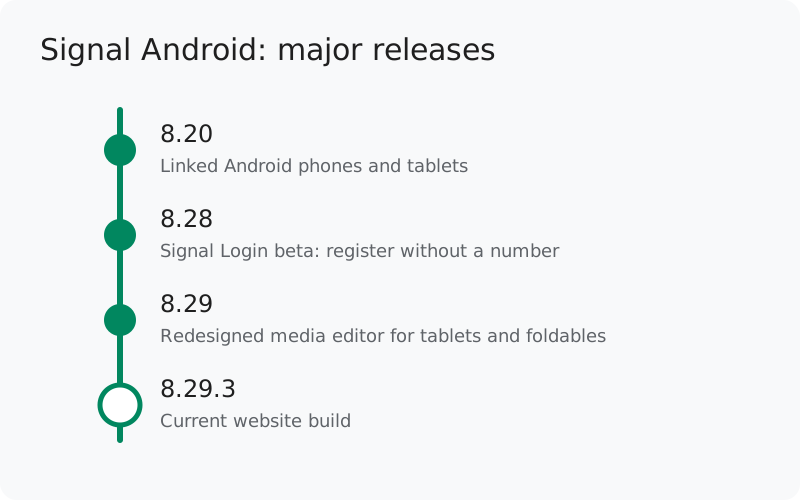
| 8.29.x (2026), current: 8.29.3 | Redesigned media editor for tablets and foldables; remove the audio track from a video before sending. Source: official GitHub release notes for v8.29.0. |
| 8.28 (2026) | Signal Login beta: register without a phone number; small one-time fee to prevent spam; purchase never linked to the account. Source: official GitHub release notes for v8.28.0. |
| 2026, all platforms | Secure Backups improvements after a year of feedback. Source: official blog. |
| 8.20 (Android) | Link another Android phone or tablet; large-screen interface improvements. Source: official blog. |
| Platform milestones | Usernames, call links, stories, pinned messages, group polls, member labels, automatic key verification, post-quantum ratchet. Source: official blog posts. |
| Earlier | SMS and MMS support removed after almost a decade. Source: official blog. |
How to use this history
If you are running an old build, the history tells you what you are missing. The fix is simple: update. The website build offers its own updates, and the Play build updates through the Play Store. Do not go hunting for old APK files on random sites to try a past version. Old builds carry known bugs, and random sites carry malware. The honest rundown of the risks is in the guide to old Signal APK versions, and if your update is stuck, the stuck-on-an-old-version fix walks through it.
Remember the golden rule of this whole section: version numbers move. This page is a snapshot. The version shown on Signal's own download page is always the truth, not any guide. And any site offering a version far ahead of the official page is offering fiction.
from Signal's official site, file hosted by Signal, not by us
Frequently asked questions
What is the newest Signal Android version?
8.29.3 is the current website build. Always confirm on Signal's own download page, because version numbers move. The latest Signal version guide tracks the current build.
Where are the official release notes?
Per-build notes live on the official GitHub releases page. Feature announcements live on the official blog. The release notes guide lists every official channel.
Why do some versions have no changelog?
Patch builds (for example 8.29.1 to 8.29.3) fix bugs without new features, and Signal tags them without published notes. That is normal.
Has Signal ever removed a feature?
Yes. SMS and MMS support was removed from the Android app after almost a decade, because those protocols cannot be secured. See why Signal dropped SMS support.
Is the version history the same on iPhone?
No. iOS has its own version numbering and its own release rhythm. See the Signal iOS version history for the Apple side.
Related guides: all version guides · the current build in detail · what's new in 8.29 · the beta program · where release notes live