
Using Signal to Talk to Your Customers
Published: October 7, 2026 Updated: October 8, 2026
Yes. A small business can take customer messages on Signal, and customers never need to see your personal phone number. Set a public username like @yourshop, tighten your number-privacy settings, and print the username on your business card and shop sign. Customers message the username; they only ever see the username. That said, Signal has no business accounts, no CRM connections, and no shared inbox. One account lives on one phone. It suits a one-person shop or a tiny team with a manageable stream of messages, not a call center. This guide covers the setup, the reply-time habits that keep customers happy, and the honest limits you should know before you start.
from Signal's official site file hosted by Signal, not by us
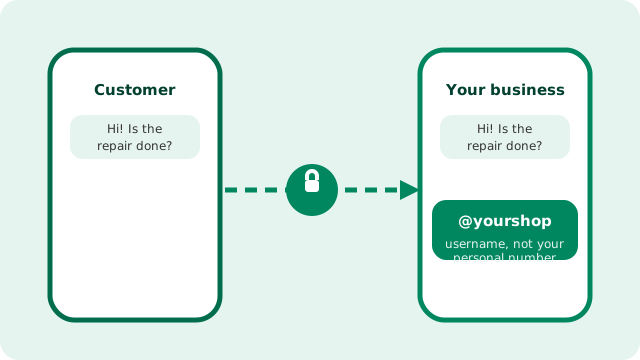
Can customers message you without seeing your personal number?
Yes. Signal's usernames solve the biggest worry small owners have: handing out a personal number to every customer. You still register Signal with a phone number. That part is required, but customers never have to see it.
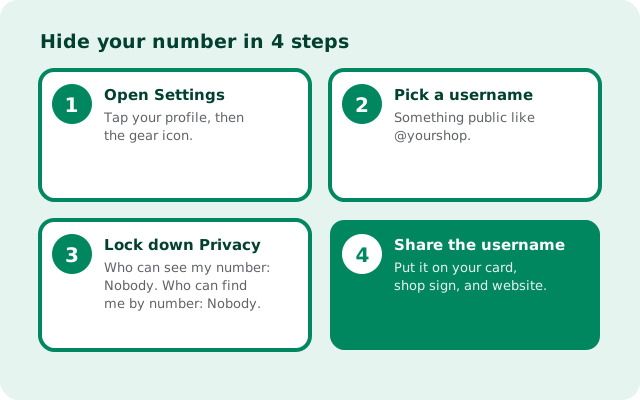
The setup takes about five minutes:
- Pick a username in Settings, something public and easy to spell, like @yourshop. This is what customers will search for and message.
- Lock down number privacy. In Settings Privacy, set "Who can see my number" to Nobody and "Who can find me by number" to Nobody. Now even people you chat with only see the username.
- Share the username everywhere: business card, shop sign, website, receipts, and your social media bios. A username is easier to print and remember than a phone number anyway.
- Test it from a friend's phone: have them start a chat with your username and confirm they cannot see your number anywhere.
Customers can also reach you through a Signal QR code for your profile, which works well on a counter card or a shop window: they scan, a chat opens, done. Read our number-privacy settings walkthrough for the full details.
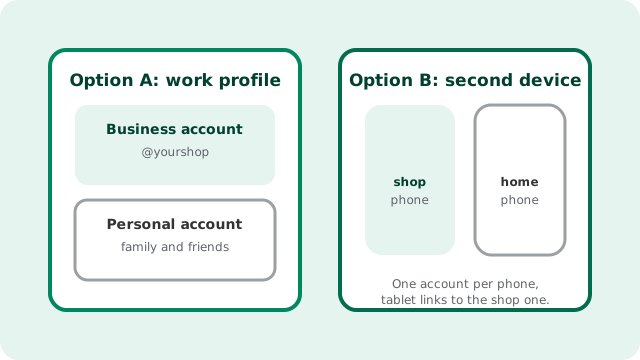
How do you keep business chat off your personal phone?
The mixing of late-night customer messages with family chat is the fastest way to burn out. You have two honest options for separation:
Option A: an Android work profile. A work profile gives you a separate, sandboxed space on the same phone with its own apps. Install Signal in the work profile with a second number (a cheap second SIM or eSIM), and you get a clean split: business Signal in the work profile, personal Signal in the personal one. When work ends, you can pause the work profile and the customer chats go silent until morning.
Option B: a second device. A dedicated shop phone is the simplest mental model. It stays at the shop or gets switched off at night. One honest limitation to know: a Signal account can only be active on one phone at a time. You cannot clone the same account onto two phones. What you can do is link a tablet or a desktop app to the shop account, so whoever is at the counter can answer from a bigger screen while the phone stays in your pocket.
Either way, keep the rule simple: business conversations live in the business account, and the business account gets quiet hours. Your customers will respect boundaries you actually enforce.
How fast do customers expect a reply?
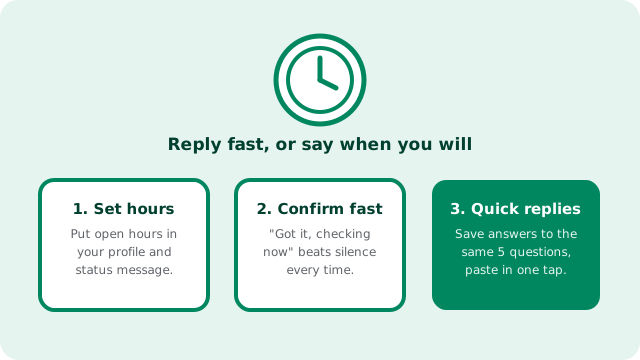
Messaging apps train people to expect fast answers. You do not need to reply instantly, but you do need to set the expectation. Three habits cover it:
1. Publish your hours. Put your open hours in your Signal profile and your status message, and repeat them wherever you printed your username. "Replies 9am6pm, MonSat" removes most of the pressure, because the customer was told.
2. Confirm receipt fast, answer fully later. A thirty-second "Got it, checking with the supplier, back to you by 3pm" beats three hours of silence followed by a perfect answer. Customers mostly want to know they were heard. Keep read receipts on for the business account so people can see their message landed.
3. Save quick replies. Every small business answers the same five questions over and over: hours, prices, delivery time, location, warranty. Write the answers once, keep them in your notes app, and paste them in one tap. It looks personal because it is your answer. You just stopped retyping it.
If a conversation goes quiet for a day, one polite follow-up is fine. Two is pushy. Let the customer come back on their own terms.
Can Signal connect to a CRM or other business tools?
Honestly: no. Signal has no official business API, no CRM integrations, no shared team inbox, and no bot platform for automated replies. There is no supported way to pipe Signal conversations into your sales software, your helpdesk, or your spreadsheet.
This is a deliberate design choice, not a missing feature they forgot. Integrations that read your messages would break the end-to-end encryption promise, so Signal does not build them. Any third-party tool that claims to "connect your CRM to Signal" is unofficial, unsupported, and a privacy risk. Steer clear.
The practical workaround is manual and old-fashioned: when a chat turns into an order, a booking, or a support ticket, copy the details into your business system yourself. For a shop handling dozens of messages a day, that takes minutes. For a business handling hundreds, Signal is simply the wrong tool. That volume needs a real helpdesk with a shared inbox, which is what Slack-style tools and dedicated support software are for.
Your week-one setup playbook
Do these in order and you will be taking customer messages professionally by the weekend.
| Day | Task | Why it matters |
|---|---|---|
| 1 | Install the verified Signal APK (v8.29.3) and register with your business number | You need a number to register; customers will never see it after step 2 |
| 1 | Create your username and lock number-privacy settings to Nobody/Nobody | Customers reach @yourshop; your personal number stays private |
| 2 | Set up separation: work profile or second device; link a tablet or desktop if useful | Business chat stays in business hours and out of your personal life |
| 3 | Write your profile: business name, open hours, what to message about | Sets reply expectations before the first message arrives |
| 4 | Draft your five quick replies: hours, prices, delivery, location, warranty | Consistent, fast answers without retyping |
| 5 | Print the username and QR code: cards, counter sign, receipts, website | Customers cannot message you if they cannot find you |
| 6 | Decide your records rule: what gets copied into your books, and when | Chat is for talking; orders and money live in your business system |
What are the honest limits of customer chat on Signal?
One account, one phone. Staff cannot share a single Signal account across two phones. If two people need to answer customers, they need two accounts (two usernames) or a linked desktop/tablet at a shared counter.
No automation. No auto-replies, no chatbots, no "we are closed" responder. Everything is typed by a human, which is charming at small scale and exhausting at large scale.
No message history for the business. Chats live on devices, not in a company archive. If a phone is lost or an employee leaves, that history goes with it. Copy anything that matters into your real records the same day: orders, agreements, payment confirmations.
Disappearing messages cut both ways. A one-week timer keeps customer chats tidy and private, but it can also delete the proof of what was promised. Use timers for casual chat; keep order confirmations and quotes in messages that do not disappear, or save them elsewhere.
Customers must have Signal. Unlike SMS or a phone call, the customer needs the app installed. Most will already have it or will install it in a minute, but keep your phone number or another channel available for the holdouts.
No support contract. If something breaks, there is no business support line, just the public help pages. For a shop this is fine; for anything mission-critical, have a backup channel ready.
Frequently asked questions
Can customers message my business without seeing my phone number?
Yes. Create a Signal username and set your number-privacy settings so nobody can see or find you by number. Customers message the username and never see the number.
Does Signal have business accounts?
No. There is no business edition, no admin console, and no verified business profiles. You use the same consumer app as everyone else, with a username and profile name that represent your shop.
Can two staff members share one Signal account?
Not on two phones: one Signal account works on one phone at a time. Use a second account for the second person, or link a shared tablet or desktop to the shop account.
Does Signal work with my CRM?
No. Signal has no official API and no CRM or helpdesk integrations, by design, to protect end-to-end encryption. Copy order details into your business system manually.
Is using Signal for business free?
Yes, completely free with no paid tier. The trade-offs are no shared inbox, no automation, and no support contract.
Keep reading
- our guide to running a small team on Signal
- how Signal compares with Slack and Teams
- number-privacy settings explained step by step
- when auto-deleting messages helps a business
- download the verified Signal APK