
Signal vs Slack for Small Teams: An Honest Comparison
Published: October 7, 2026 · Updated: October 8, 2026
Signal and Slack are both chat apps, but they were built for different jobs. Signal is a private messenger with end-to-end encryption on everything. It is free, it has no admin console, and it gives nobody control over anyone else's account. Slack and Microsoft Teams are company tools: they come with admin consoles, channels, threads, app integrations, and compliance features. They charge per user. For a small team, the honest rule is simple. Pick Signal if privacy matters most and nobody needs to manage anyone else's account. Pick Slack or Teams if someone needs admin controls, message archives, or connections to business software. Plenty of small businesses end up with both: Slack for the office, Signal for clients and sensitive talk.
from Signal's official site — file hosted by Signal, not by us
What is the real difference between Signal and Slack?
The difference is who the customer is. With Signal, you are the user: a person who wants private messages and calls. With Slack or Teams, your company is the customer: an organization that wants to run, monitor, and control how its people communicate.
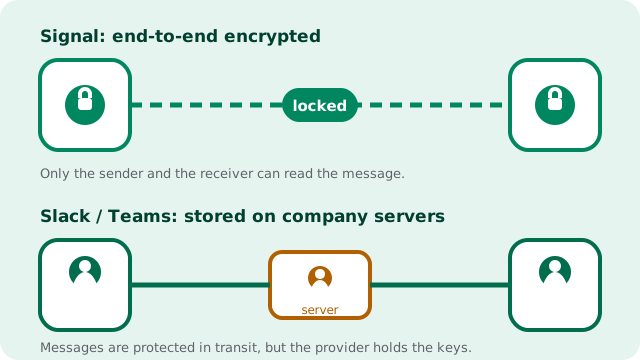
That split explains almost every feature difference. Signal encrypts every message and call end-to-end by default, because its job is keeping conversations private from everyone except the people talking. Slack and Teams encrypt messages in transit and on their own servers, but the company running the service holds the keys and can read what is stored: its job is giving the employer visibility and control.
Signal is run by a nonprofit and has no paid tier, no admin seat, and no business edition. Slack and Teams are commercial products whose main selling points are exactly the things Signal refuses to build: admin dashboards, user provisioning, compliance archives, and integrations with the rest of your business software.
Neither is "better" in the abstract. They are different tools for different jobs, and the rest of this guide compares them on the dimensions that actually matter to a small team.
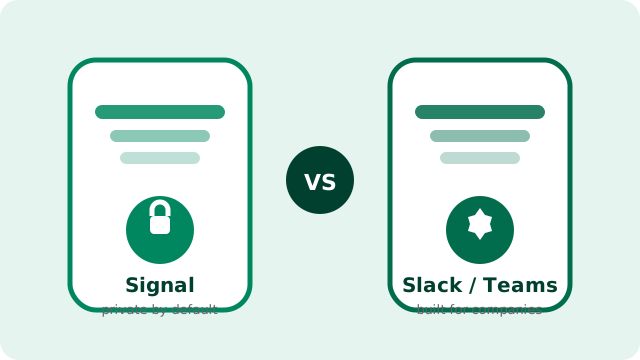
How do Signal and Slack/Teams compare, side by side?
Here is the honest comparison table. Everything below describes the general, well-known shape of these products. Not marketing claims, and not a feature checklist from a sales page.
| Dimension | Signal | Slack / Microsoft Teams |
|---|---|---|
| Encryption model | End-to-end encrypted by default on all chats, group chats, and calls | Encrypted in transit and at rest on the provider's servers; the provider holds the keys |
| Who can read stored messages | Nobody except the participants, not even Signal | The service provider, and your employer's admins under the company's policy |
| Price | Free, no paid tier at all | Paid per-user plans for full features; limited free options |
| Admin controls | None: no admin console, no user provisioning, no SSO | Full admin consoles, user management, and IT controls |
| Channels | No: conversations are chats and groups only | Yes: topic-based channels are the core unit |
| Threads | No threaded replies | Yes: replies stay in context under each message |
| Group size | Up to 1,000 members per group | Built for whole companies; much larger workspaces |
| App integrations | None: no bot platform or app directory | Large app/integration ecosystems for business tools |
| Compliance archives | Impossible by design: there is nothing to export centrally | Available: retention policies, exports, and legal holds |
| Support contract | None: community and help pages only | Paid support tiers with the paid plans |
What does each one cost a small team?
Signal costs nothing and there is no upsell. The app is free, there is no premium tier, no per-seat license, and no "business plan" waiting behind a paywall. Signal Foundation is a nonprofit funded by donations, so the pricing page is, in effect, blank.
Slack and Teams are commercial products sold per user. For a team of five that is a modest bill; for a team of fifty it is a real line item in the budget every month. Slack does offer a free plan, but it limits how far back you can search history and locks away the admin and compliance features. Those are usually the reason a company considered Slack in the first place.
The honest way to think about it: with Signal you pay nothing and get zero management. With Slack or Teams you pay per person and get management, integrations, and someone to call when things break. If your team is three people in one shop, the paid seat is buying control you may never use. If you are hiring your twentieth employee, that control starts to look like the whole point.
What can Slack and Teams do that Signal cannot?
Channels. Slack organizes conversation by topic (#orders, #suppliers, #general). On Signal, everything is a chat or a group, so a busy team's conversations blur together with no structure.
Threads. Replies nest under the message they answer. In a Signal group, replies scroll past and context gets lost. Anyone who has watched a 40-person Signal group will recognize the chaos.
Integrations. Slack and Teams connect to the tools a business already runs: calendars, file storage, project trackers, CRM systems. Signal connects to nothing. There is no bot platform, no app directory, and no official API for business software.
Admin controls. On Slack or Teams, an owner can add and remove people, reset access, enforce policies, and set retention rules from one dashboard. On Signal there is no dashboard at all. If a staff member leaves, you remove them from groups manually and hope they do not still have the chat history on their phone. You cannot wipe it remotely.
Compliance archives. Regulated industries need message retention, exports, and legal holds. Slack and Teams are built for that world. Signal cannot do it by design: there is no central copy of anything to archive, which is exactly what makes it private and exactly what makes it unsuitable for regulated record-keeping.
What can Signal do that Slack and Teams cannot?
Real end-to-end encryption, on everything, by default. Every direct message, group chat, and call is end-to-end encrypted without toggling a setting or paying for a plan. Nobody at Signal, and nobody who compromises Signal's servers, can read your conversations, because the keys never leave the devices.
Truly free. No tiers, no seat licenses, no feature gates. A ten-person team and a thousand-person team pay the same: nothing.
No IT department required. There is nothing to administer, nothing to provision, and no console to learn. If your "IT department" is whoever is best with phones, that is a feature.
Clients need nothing except the free app. You do not need a company workspace, a paid seat, or an invitation from an admin to talk to someone. With usernames and number-privacy settings, a client can message your business without either side sharing a phone number.
No ad business behind it. Signal is run by a nonprofit; your conversations are not fuel for an advertising machine. For teams handling sensitive client information, lawyers, clinics, journalists, and consultants, that structural difference matters more than any single feature.
Who should pick which?
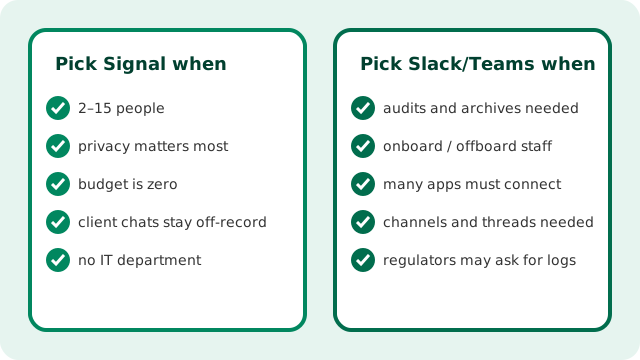
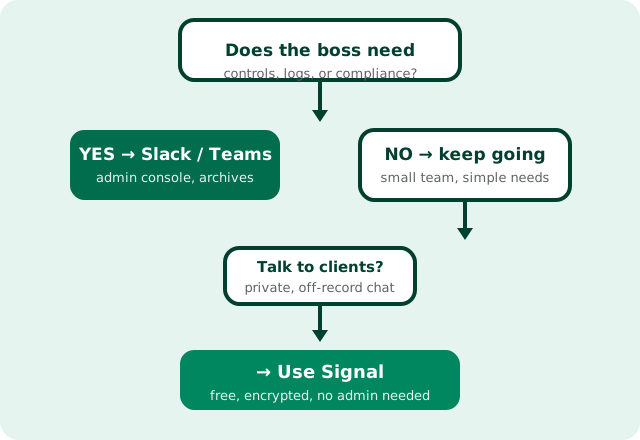
Most small teams can decide with one question: does anyone need to manage, monitor, or archive what other people say? If the answer is yes (onboarding and offboarding staff, keeping records for regulators, searching years of company history), you need Slack or Teams. Signal physically cannot do those jobs, and no settings screen will change that.
If the answer is no (a small trusted crew that just needs to talk privately, coordinate work, and message clients without surveillance), Signal is the simpler, cheaper, and more private choice. The diagram below summarizes the fit.
Can a small team use both? The hybrid setup that actually works
Yes. For many small businesses it is the best answer. Use Slack or Teams for internal operations (the stuff that benefits from channels, threads, and search), and use Signal for conversations that should stay private: client discussions, quotes and negotiations, anything with personal data.
A few rules make the hybrid setup work instead of becoming a mess:
- Decide what lives where, in writing. One sentence is enough: "Office coordination in Slack; client conversations in Signal." Ambiguity is how sensitive messages end up in the wrong app.
- Use disappearing messages for sensitive client threads. A one-week timer keeps old quotes and personal details from piling up on everyone's phones.
- Keep one source of truth. Chat is for talking, not for records. Orders, invoices, and decisions belong in your business system, whichever app the conversation happened in.
- Train once. Ten minutes showing the team which app is for what prevents a year of "wait, where did we discuss that?"
The hybrid approach gives you the privacy of Signal where it matters and the management of a workplace tool where that matters, without pretending one app can do both jobs.
What about Microsoft Teams?
The same comparison logic applies. Teams is a workplace platform sold to companies. It ships with Microsoft 365, comes with enterprise admin and IT controls, and is priced as a business product. If your company already pays for Microsoft 365, Teams is effectively already on the shelf, which makes it the path of least resistance for internal chat.
The privacy trade-off is the same as with Slack: messages are protected in transit and on Microsoft's servers, but they are not end-to-end encrypted by default and the provider holds the keys. So the decision rule does not change: Teams or Slack for managed company communication, Signal for conversations that should be private by default. Many small businesses that live in Microsoft 365 still keep Signal on their phones for the calls and client chats they want nobody else to see.
Frequently asked questions
Is Signal free for business use?
Yes. Signal is free with no paid tier and no business edition, so a team can use it without paying anything. The trade-off is that there is also no support contract and no admin tooling.
Is Signal more secure than Slack?
For message privacy, yes: Signal encrypts everything end-to-end by default, so nobody except the participants can read it. Slack and Teams encrypt in transit and on their servers, but the provider holds the keys. They are built for different jobs, though.
Can Signal replace Slack for my team?
Only if your team does not need channels, threads, integrations, admin controls, or message archives. If any of those are required, Signal is the wrong tool and you should keep Slack or Teams.
How many people can join a Signal group?
Signal groups support up to 1,000 members, which is plenty for a small team but has none of Slack's channel structure or threading.
Do Slack and Teams charge for every user?
Yes, both are commercial products with per-user pricing for their full feature sets. Slack has a limited free plan, but the admin and compliance features that companies usually want are paid.
Keep reading
- our honest guide to running a small team on Signal
- using Signal for customer communication
- how Signal usernames hide your phone number
- why Signal has no channels
- get the verified Signal APK, version 8.29.3