
Signal for business and organizations: the honest guide
Published: October 7, 2026 · Updated: October 8, 2026
Signal Foundationfrom Signal's official site — file hosted by Signal, not by us. signal.org/android/apk
Signal wasn't built as business software. There's no admin console, no enterprise tier, no sales team. And yet newsrooms, NGOs, clinics, law firms, and small businesses run on it every day, because it's free, encrypted by default, and works on the phones people already own. This hub collects our organization-focused guides in one place, with the honest framing each one needs: what Signal does well for teams, where it genuinely falls short, and when you should pick something else.
A note on independence before you browse: this is an independent guide, not affiliated with Signal. We don't host downloads. The official APK for organization phones is always at signal.org/android/apk (website build 8.29.3). Everything below links official sources and our own guides; nothing here is sponsored, and the compliance sections in particular tell you where Signal doesn't fit, not just where it does.
The starting point: who Signal fits, what works for teams, and what it can't do.
The rollout playbook: installs, verification, PINs, groups, house rules.
The platform decision, compared honestly side by side.
If you're evaluating Signal for your organization right now, read those three in order: the fit assessment, the rollout playbook, and the platform comparison. Together they answer "should we?", "how do we start?", and "what about the alternatives?" That is the entire evaluation in practice.
Getting started as an org
The technical core first
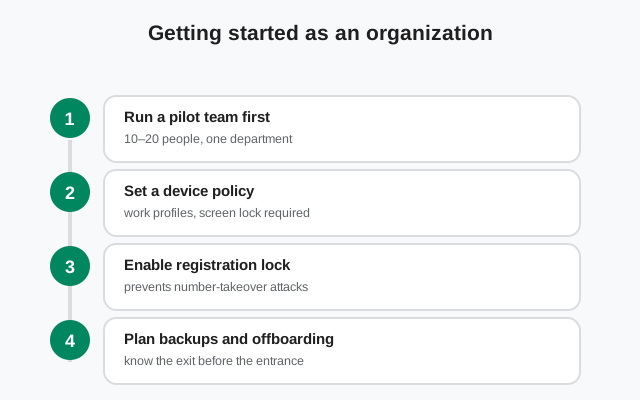
Rolling Signal out to a team is a people project with a small technical core. The technical core first: everyone installs from one official source: the Play Store where available, or the official APK at signal.org/android/apk for phones without Google services (common on field devices and Huawei phones). Each person registers their own number, sets a Signal PIN with registration lock, and joins the org's groups. That's the whole install story; our no-Play-Store install guide covers the APK path per brand.
Step 1–5 plus the one-week rollout plan and what you can/can't enforce.
Group structure that scales: roles, invite links, moderation realities.
Let staff keep personal numbers private with business usernames.
The people part: house rules and offboarding
The people part matters more than the technical part. Agree on house rules before day one: which groups are for what, whether disappearing messages are on or off (and why; see the compliance section), who administers groups, and what happens when someone leaves the team. Signal has no central admin console, so offboarding is a manual process: remove the person from groups, and rotate anything they had access to. Plan for that instead of discovering it during a departure.
Who pays for whose number
One decision deserves explicit discussion in every rollout: who pays for whose number. Signal identities are phone numbers, and staff using personal numbers for work chat is the norm. That is worth stating openly, especially where usernames now let people keep the number itself private. Some organizations issue work SIMs or stipends; others accept personal numbers with usernames as the privacy layer. There's no universally right answer, but "we never talked about it" is the wrong one. It surfaces later as resentment, or as someone's personal number living in client chat histories. Settle it in the rollout doc alongside the group rules.
Sectors
Different organizations use Signal for different reasons, and the guidance differs accordingly. A newsroom's threat model is not a dental clinic's. Pick your sector:
Source protection workflows, first contact, device-seizure reality.
Attorney-client communication and the retention problem.
Zero-budget team comms: volunteer onboarding, donor privacy.
Phones without Google, 1,000-member coordination, offline reality.
Why clinicians should read the caveats before using Signal for care.
Customer chat on Signal: setup playbook and honest limits.
Two patterns cut across all sectors. First, usernames changed the calculus: staff no longer have to expose personal numbers to be reachable, which removed the biggest objection organizations had to Signal. Second, the retention question is unavoidable: disappearing messages are a safety feature for journalists and a liability for regulated firms. Your sector guide covers your side of that line; the compliance section below covers the line itself.
Compliance & comparisons
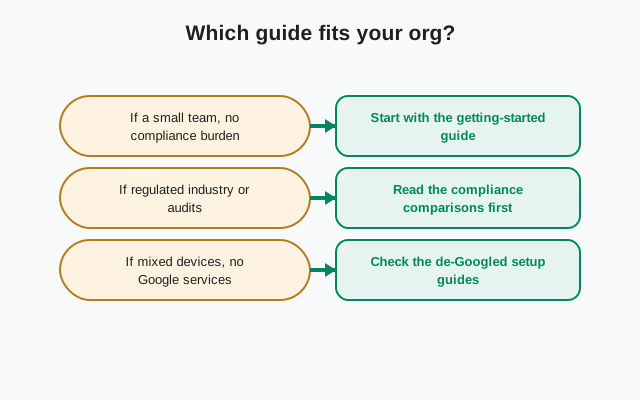
This is where honest guides earn their keep. Signal's design is excellent for privacy and complicated for record-keeping: minimal metadata, no server-side message store, optional disappearing messages. If your organization has retention duties, litigation-hold obligations, or sector regulation, read these before you commit:
The tension stated plainly, plus a practical policy for regulated teams.
Cost, admin controls, retention, and the hybrid setup that works.
The short version: Signal keeps almost nothing server-side: phone number, registration date, last connection. That is roughly the whole list, which is why it can't produce message histories for legal discovery and why it offers no admin export. For some organizations that's the point. For regulated ones it's disqualifying. Neither reaction is wrong; the mistake is not knowing which camp you're in until an auditor asks.
How to choose the right guide
| If you are… | Start here |
|---|---|
| Evaluating Signal for your team | Signal for Business: An Honest Team Guide |
| Rolling it out next week | Onboard a Team to Signal |
| Running groups at org scale | Managing Signal Groups for Your Organization |
| A newsroom or journalist | Signal for Journalists |
| A law firm | Signal for Legal Teams |
| A nonprofit or NGO | Signal for Nonprofits and Field Teams |
| In healthcare | Signal and HIPAA: the caveat: read before any patient use |
| Talking to customers | Customer Communication and Usernames for Business |
| Worried about records | Signal and Compliance |
| Choosing between platforms | Signal vs Slack |
Related hubs
Signal-for-organizations questions often lead into adjacent topics. These hubs cover them:
Every download guide: the official APK, versions, updates, mirrors.
The APK path for phones without Google services, common on field devices.
Signal vs WhatsApp, Telegram, Slack alternatives, and the two official builds.
Windows, Mac, and Linux setup for office machines.
Sources
Official references every organization guide on this site is checked against:
- Official APK download: signal.org/android/apk: the only official APK channel (website build 8.29.3).
- Support documentation: support.signal.org: Signal's official help center: requirements, features, troubleshooting.
- Signal blog: signal.org/blog: release notes, protocol updates, and transparency posts from the Signal Foundation.
- Android source code: github.com/signalapp/Signal-Android/releases: the open-source client releases (AGPLv3).
We re-check version numbers and feature claims against these sources; anything that can't be verified against them doesn't go on the site. If you spot something outdated, tell us: corrections are the fastest way this guide stays trustworthy.
Frequently asked questions
Can a business officially use Signal?
Yes. Signal is free for any use, including business, and it's funded by the nonprofit Signal Foundation rather than by ads or data. There is no business tier, no admin console, and no SLA; you use the same app as everyone else.
Is Signal HIPAA compliant?
Signal offers no BAA (Business Associate Agreement) and no admin controls, so it doesn't fit HIPAA-covered workflows that require them. Some clinicians use it informally, but that's not compliance. Read the HIPAA caveat guide before any patient-related use.
Can we keep records of Signal chats for compliance?
Signal has no server-side message archive and no admin export. If your organization has retention duties, you need a written policy covering disappearing messages and manual record-keeping. The compliance guide walks through it.
Does Signal give admins any controls over staff accounts?
No central admin console exists. Group admins control their groups (membership, links, disappearing-message timers), and that's the extent of it. Offboarding is manual: remove departures from groups.
Is Signal really free for organizations?
Yes. No per-seat pricing, no feature paywall. The trade-off for 'free' is the absence of enterprise features: support, admin tooling, and compliance exports that paid platforms bundle in.
from Signal's official site — file hosted by Signal, not by us. signal.org/android/apk