
Signal for field teams & NGOs: the honest playbook
Published: October 7, 2026 · Updated: October 8, 2026
If you run a field team or an NGO with staff scattered across locations, Signal can carry your whole coordination layer: free, private, and running on the cheapest Android phones. Groups hold up to 1,000 members, messages are end-to-end encrypted, and on phones without Google services you can install the official APK straight from Signal's own website. The honest part: Signal needs an internet connection to work at all, it is not an MDM tool with a central console, and onboarding and offboarding are manual. This guide is the playbook we would hand a field coordinator: setup, group discipline, disappearing messages, safety practices, and where the limits are.
from Signal's official site — file hosted by Signal, not by us
Why field teams pick Signal
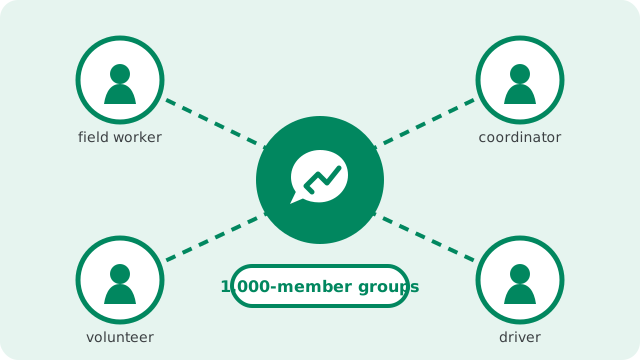
Field teams pick Signal for boring, practical reasons. It costs nothing, which matters when the budget goes to fuel and supplies instead of software licenses. It runs on the cheapest Android phones your staff already carry, so there is no hardware project before the first message. And it behaves the same on Android, iPhone, and desktop, so a mixed fleet of personal and donated devices just works.
The privacy side matters more in the field than in an office. Field staff share locations, schedules, beneficiary details, and photos of situations that should not leak. On an ad-funded messenger, that traffic trains someone's ad model. On Signal, message contents are end-to-end encrypted and the service is designed to store as little metadata as possible. For NGOs whose work depends on the trust of the communities they serve, the tool matches the mission.
There is one more reason teams stay: the learning curve is flat. Anyone who has used a chat app can use Signal, which matters when your team includes drivers, casual labor, and volunteers who will never attend a training session. The business teams guide covers general team setup; the nonprofits guide covers volunteer networks. This page is the field playbook: devices, groups, bandwidth, and the limits.
Phones without Google: the website APK path
Field deployments often include phones that have no Google Play at all: Huawei devices, de-Googled phones issued for security reasons, rugged handsets, or phones bought in regions where Play is unavailable. For these, Signal publishes an official APK on its own website. The current website build is version 8.29.3, package name org.thoughtcrime.securesms, and the download page is the only source you should ever use.
The website build updates itself, so field devices without Play still get security fixes without anyone sideloading updates by hand. One warning that matters for mixed fleets: the website build uses a different signing key than the Play Store build, so it cannot be installed over a Play-installed copy. If a phone already has Signal from Play, back up the chats first, then switch. Our no-Play install guide walks through the steps, and the download guide covers verifying you have the genuine file.
from Signal's official site — file hosted by Signal, not by us
Group coordination: 1,000 members, done right
Signal groups hold up to 1,000 members, which covers everything from a five-person survey crew to a district-wide volunteer network. The number is not the hard part; discipline is. Field teams that stay readable follow a few patterns.
One group per operation, not per topic
"Saturday relief distribution" beats separate groups for logistics, photos, and volunteer chat, because a coordinator in a moving vehicle checks one stream. When the operation ends, archive or disband the group instead of letting it become a dead channel people ignore.
Voice notes over typing
Hands are busy, literacy varies, and typing on a cracked screen in sunlight is miserable. Signal voice messages are encrypted like everything else and go through on weak connections better than live calls do. Make voice notes the default for field updates.
Two admins per group, one of them staff
Volunteers rotate; staff usually do not. If the only admin's phone dies, the group is orphaned. Keep a second admin on every operational group and review membership monthly, removing people whose assignment ended. A group full of former volunteers who can still read current plans is a security hole wearing a friendly face.
Location sharing stays opt-in
Signal can share a live or static location, which genuinely helps ("the supply van is here"). Make it situational and voluntary, never a standing requirement, and prefer a static pin over live tracking. A team member who feels surveilled will quietly stop using the app, and then you have lost the channel entirely.
Disappearing messages for sensitive field comms
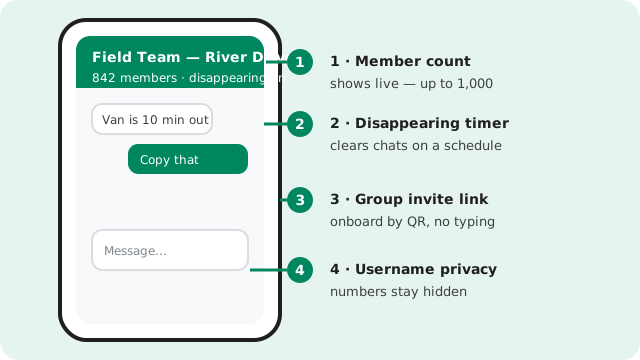
Field chats accumulate the most sensitive material an NGO handles: staff locations, movement schedules, beneficiary names, photos of vulnerable people. Disappearing messages put a clock on that. Set a timer of a day or a week on operational groups and the chat history clears itself from everyone's devices on schedule. It is the closest thing field teams get to a data-retention policy without an IT department.
Be honest with the team about what the timer does and does not do. It deletes messages from devices after the set time. It does not stop screenshots, it does not stop someone copying text elsewhere, and it does not erase anything already forwarded. Treat disappearing messages as exposure reduction, not as a guarantee. For anything that must be provable later, like incident reports, the record belongs in your case system, not in the chat.
Choose timers per group, not per person. A fast-moving distribution group can live on a 24-hour timer. A slower coordination group might use a week so people catching up on Monday can still read the weekend's plans. Our disappearing messages guide covers exactly how the timers behave, including what survives and what does not.
The offline reality: Signal needs a connection
Say this plainly, because field plans depend on it: Signal does not work without an internet connection. If the team is somewhere with zero signal, nothing sends, nothing receives, and no messages queue up for later on the other side. Anyone planning comms for a dead zone needs a different tool for that leg, whether that is SMS, radio, or a satellite messenger. Signal is excellent for low connectivity; it is useless for no connectivity.
The good news is the low-connectivity part. Qualitatively, Signal is kind to weak connections: text messages are tiny and routinely go through where image-heavy apps stall, and voice notes compress well enough to send on connections that cannot hold a call. Calls adapt their quality downward instead of dropping, though a truly bad link defeats any calling app. On old phones, the app runs on modest hardware, but check the minimum Android version before a big deployment and keep media-heavy groups tidy on small-storage devices.
Practical field habit: agree on message windows. When the team knows everyone checks in at the top of each hour, people stop re-sending and the group stays calm. And teach staff that a single check mark means the message reached Signal's servers but not the other person's phone yet, not that anyone ignored it. Most "Signal is broken" complaints in the field are just a dead zone.
Onboarding volunteers and staff fast
Field teams churn. Volunteers arrive the morning of the operation and leave the same week. The onboarding has to take five minutes and work without a technician. Print this as a one-page sheet and hand it to every intake group.
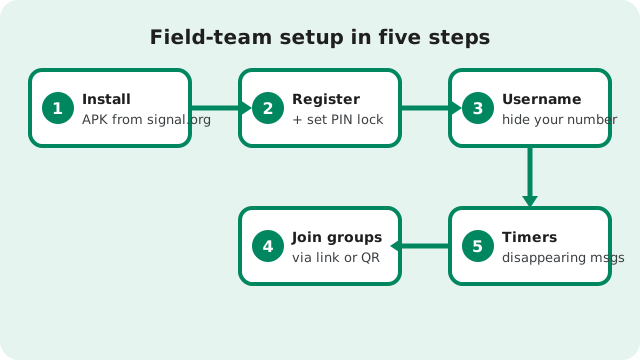
Install from the right source
Phones with Play get Signal from the Play Store. Phones without it get the APK from Signal's official APK page, never from a random download site. A tampered messenger on a field phone is worse than no messenger.
Register and set the PIN lock
Registration needs a phone number, and Signal asks for a PIN that acts as a registration lock. That PIN stops someone else re-registering the number and taking over the account. Write it down somewhere safe; losing it causes real pain at account recovery.
Set a username and hide the number
Have each person pick a username in your org's format, like firstname.lastname or firstname-team, then set phone-number visibility so personal numbers are not shown to everyone. In a network of hundreds, nobody's personal number should be public.
Join only the groups they need
Their team group, their shift group, the announcements channel. Nothing more. Group invite links with admin approval scale this: share the QR at intake, approve in batches, and nobody has to type usernames.
Turn on disappearing timers for field groups
Show them the timer and explain the screenshot caveat in one sentence. People accept the rule faster when they understand the reason: lost phones are common in field work, and a cleared chat is a smaller loss.
Verify the lock screen
Disappearing messages mean nothing on a phone with no lock screen. Check it during onboarding. It takes ten seconds and it is the cheapest security control in this whole guide.
Tell them the offboarding rule on day one
When the assignment ends, they leave the groups and delete the chats. Say it at onboarding so it is expected, not awkward. The journalists' field guide has more on source-protection habits that apply to sensitive fieldwork too.
Safety practices that actually matter
Field safety is about habits, not features. The features help, but only if the habits are trained.
Usernames hide numbers. This is the single most important setting for field teams. Staff and volunteers should never have to hand their personal number to dozens of near-strangers to do their job. Register, set the username, lock number visibility down, and verify it together at onboarding. Most people never open that settings screen on their own.
Registration lock stays on. The PIN set at registration prevents SIM-swap-style account takeover. For staff in areas where phone theft or number hijacking is a real risk, this is not optional. Treat the PIN like a password: stored safely, never shared in a group chat.
Verify safety numbers for sensitive contacts. For anyone coordinating sensitive movements, show them how to verify a contact's safety number once, in person or over a trusted channel. Thirty seconds, and it is the difference between probably talking to the coordinator and knowing.
Offboarding is manual, so make it a checklist. Signal has no central console, which means no remote wipe and no at-a-glance roster. When someone leaves: remove them from every group, ask them to delete work chats, and rotate any shared links or codes they had. Keep the checklist written down and assign it to a named person. The APK safety guide covers verifying the app itself is genuine before any of this matters.
What Signal is not: the MDM comparison
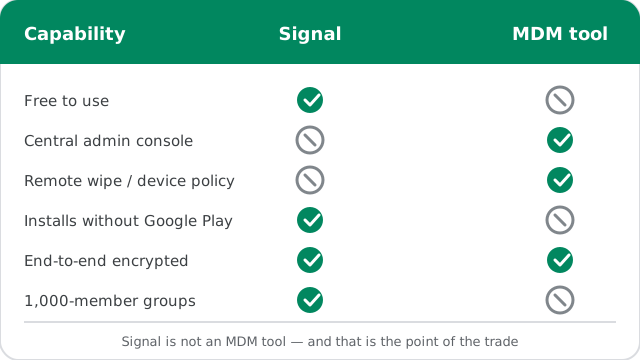
The honest framing, because someone will ask: Signal is not an MDM or enterprise messaging tool. There is no admin console, no device policies, no remote wipe, no forced settings, no usage dashboard. If your organization needs central control over devices, that is a different product category with a different price tag. Here is the trade, side by side.
| Capability | Signal | Enterprise MDM messaging |
|---|---|---|
| Cost | Free, no licenses | Per-user licenses |
| Central admin console | No | Yes |
| Remote wipe / device policy | No | Yes |
| Installs without Google Play | Yes, official website APK | Rarely |
| Runs on staff's own cheap phones | Yes | Often needs managed devices |
| End-to-end encrypted | Yes | Varies by vendor |
| Group size | Up to 1,000 members | Varies |
| Onboarding effort | Minutes, no training | IT project |
Read the table as a decision aid, not a verdict. If you have an IT department and managed devices, an MDM tool gives you control Signal never will. If you have volunteers, personal phones, zero budget, and a coordinator with a clipboard, Signal's missing console is not a bug you feel: there was nobody to sit at that console anyway. Pick the tool that matches the organization you actually have.
The cost story
Signal costs nothing in licenses, and for a field operation that is genuinely transformative: the comms budget can be zero while the fuel and supply budgets stay intact. But free software still has a price, paid in staff time. Someone writes the one-page policy. Someone runs the five-minute onboarding at each intake. Someone reviews group membership monthly and works the offboarding checklist. Someone answers the "I lost my phone" message at 9pm.
Budget that time honestly and Signal is still the cheapest option by far. Pretend the time does not exist and you get group sprawl, stale membership, and volunteers whose personal numbers are visible to the whole network. The teams that run Signal well treat it like any other field asset: small, but owned by someone named, usually the field coordinator.
One last note on sustainability: Signal is run by a nonprofit foundation funded by donations, not ads or data sales. If your organization depends on it for fieldwork, consider donating. It is enlightened self-interest: the tool your teams rely on stays independent because people like you keep it that way.
Frequently asked questions
Is Signal really free for NGOs and field teams?
Yes. There are no licenses, tiers, or application hoops. The real cost is staff time for onboarding, group management, and offboarding, which you should budget honestly.
Can field staff use Signal on phones without Google Play?
Yes. Signal publishes an official APK at signal.org/android/apk (currently version 8.29.3) that installs on de-Googled and Huawei phones and updates itself. Note it uses a different signing key than the Play build, so it cannot install over a Play copy; back up first.
How many people fit in a Signal group?
Up to 1,000 members per group, which covers most field operations and volunteer networks. Keep operational groups focused: one group per operation, archived when it ends.
Does Signal work without an internet connection?
No. Signal needs a connection to send or receive anything; in a true dead zone nothing moves. On weak connections it behaves well: texts and voice notes go through where heavier apps stall.
What happens when a team member leaves?
Remove them from every group, ask them to delete work chats, and rotate anything they could access. There is no central deprovisioning, so keep a written offboarding checklist owned by a named person.
Keep reading
- the nonprofits guide for volunteer-network specifics
- the general business teams guide
- the journalists' field guide for source-protection habits
- installing Signal without the Play Store
- how disappearing messages really behave