
The Signal APK "direct link", explained honestly
Published: October 7, 2026 · Updated: October 8, 2026
Signal FoundationThere is no permanent "direct link" for the Signal APK. That's by design. The actual file does live on Signal's update server at updates.signal.org, but its address includes the version number, so every new release moves it. Any direct file link you find in a blog post, forum, or video description will rot the moment Signal ships the next update. The only link that always works is the official download page: signal.org/android/apk. Open that page, tap its download button, and you get the current file. That page is the direct link, maintained by Signal itself.
This page explains the difference between the download page and the file it serves, why hotlinking the file is a bad idea for everyone involved, and how to share or bookmark the download correctly. We are an independent guide, not Signal, and we never host APK files. Our own buttons point to Signal's official page, never to the file itself.
from Signal's official site — file hosted by Signal, not by us
Why the direct link keeps "breaking"
If you've ever bookmarked a direct APK link and come back to a 404, nothing is wrong with your browser. The file genuinely moved. Signal names its website build with the version baked into the filename. Right now, that's Signal-Android-website-prod-universal-release-8.29.3.apk. The file is served from updates.signal.org under that exact name. When 8.29.4 or 8.30 ships, the old filename stops existing and a new one takes its place.
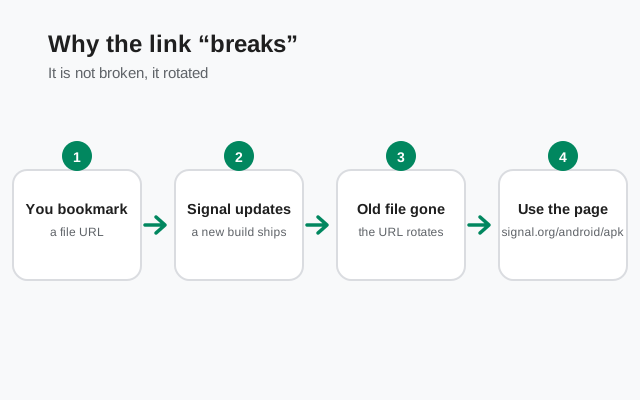
This is standard practice for software distribution, and it's actually a safety feature in disguise: a versioned filename means you can always tell exactly which build you're holding. But it kills permanence. A blogger who pastes the direct file URL into a tutorial in October is linking to a dead address by the time a few releases have passed. Worse, anyone who does reach an old cached copy may install an outdated build without realizing it. Our filename decoder breaks down what each part of that long name means.
The download page solves this by being the one address that never changes. signal.org/android/apk always points at the current file, whatever it's called this week. Signal updates the page the moment a release ships; no blogger, forum, or guide site can promise the same. That's the whole argument in one sentence: link to the page, not the file.
The download page vs the file: what's actually different
People treat "the page" and "the file" as the same thing, but they serve different jobs. This table makes the split concrete:
| The download page (signal.org/android/apk) | The direct file (updates.signal.org/...apk) | |
|---|---|---|
| Address stability | Permanent: same URL for years | Temporary: changes with every release |
| Always serves the latest build? | Yes. Signal updates it per release. | No. A saved file URL freezes at one version. |
| Shows the SHA-256 fingerprint? | Yes. The trust anchor for verification. | No. Just the bytes, no context. |
| Safe to bookmark? | Yes | No. It will rot. |
| Safe to share with a friend? | Yes. They always get the current, verifiable build. | Risky. They may get an outdated build with no fingerprint to check. |
| Works in scripts/automation? | Needs a small parsing step | Yes, until the next release breaks it |
Notice the pattern: the page is the trust layer, and the file is just bytes. The fingerprint printed on the page is what lets you verify the download with our SHA-256 guide. A bare file link gives you nothing to check against. Skipping the page means skipping the one piece of information that proves the file is genuine.
What "links rotate" means in plain English
You'll sometimes hear that Signal's download links "rotate." That phrasing confuses people, so let's demystify it. There are two things going on, and neither is mysterious.
First, the versioned filename described above: each release gets a new file address, so old addresses stop working. That's rotation in the simplest sense: the target moves on a schedule.
Second, large download servers often hand out time-limited or region-specific addresses behind the scenes. When you tap the download button, the page may resolve to a file URL that works for your session and your region, and that specific URL isn't meant to be passed around. It's like a coat-check ticket: valid for you, right now, useless to someone else tomorrow.
Both mechanisms point to the same conclusion. The page is the stable front door; everything behind it is allowed to move. Any workflow built on a copied file URL (a bookmark, a tutorial, an automation script, a "direct link" button on a third-party site) is building on moving ground. It will work today and embarrass you later.
Why nobody should hotlink the file
Hotlinking means pointing your own download button straight at someone else's file. In this case, that means the APK on updates.signal.org instead of linking Signal's page. It seems helpful ("one click, straight to the file!") but it's bad for everyone, including you. Here's why we don't do it on this site, and why you shouldn't either.
It breaks, and the breakage looks like your fault. The moment Signal ships a new version, your hotlinked button serves a 404 or, worse, a stale build. Your visitors blame you, not Signal. A link to the page never has this problem.
It strips the verification context. The fingerprint on Signal's download page is the whole basis for proving a file is genuine. A hotlink bypasses the page, so your visitors never see the fingerprint, and most will never think to check it. You've made their download less verifiable while trying to make it easier.
It borrows bandwidth you weren't offered. Signal pays to serve those files. Linking the page sends users through the front door Signal built for exactly this purpose; hotlinking treats their infrastructure as your CDN. It's not illegal, and it's not good citizenship either. For a nonprofit, bandwidth is real money.
It trains users to trust file links. Every hotlinked APK button teaches people that "click a file link, install whatever arrives" is normal. That is precisely the habit that fake-APK scammers exploit. Linking the official page instead teaches the safer habit: go to the publisher, then download. Our mirror warning guide covers the scam economy this feeds.
The correct way to share or bookmark the download
Sharing Signal's download correctly takes one line: send people to signal.org/android/apk. That's it. Whoever opens it gets the current build, the fingerprint, and the install instructions, in whatever language and region Signal serves them. It works in texts, emails, forum posts, video descriptions, and QR codes. A QR code pointing at the page is the best way to get a roomful of people onto the genuine file at once.
What about sending the APK file itself to a friend, say over Bluetooth or a messaging app? Technically the file installs fine if it's the genuine build. But your friend loses the ability to verify it, since the fingerprint lives on the page, not in the file. If you must transfer the file directly (no internet on their end, for example), send them the page link too and tell them to check the SHA-256 fingerprint from Signal's page before installing. Our post-transfer verification guide walks through exactly that check.
For the technically inclined: if you automate downloads, don't hardcode the file URL. Fetch the download page and extract the current file address programmatically, then verify the fingerprint after downloading. A script that assumes today's filename will silently break, or worse, silently download nothing and report success, at the next release. Pin your automation to the page, the way everything else should be.
Spotting fake "direct links"
Search results for "signal apk direct link" are a minefield. Scammers know exactly what you're looking for, and they build pages that look like the answer. Learn the tells:
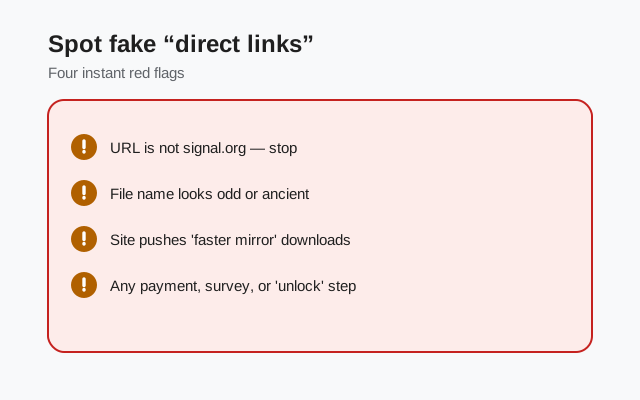
- The domain isn't signal.org. The only genuine page is signal.org/android/apk. Anything else offering a "direct link," like file hosts, URL shorteners, or blog download buttons, is a middleman you didn't ask for.
- The link is shortened or obscured. A genuine share never needs a URL shortener. Shortened links hide the destination, which is exactly what a distributor of fake APKs wants.
- It promises a specific old version as "stable." Old builds have unpatched security issues; anyone pushing them as preferable is either careless or malicious. See our old versions guide.
- The page shows no fingerprint, or a fingerprint with no way to verify it. A fingerprint means nothing unless you read it from signal.org and check it yourself.
- It asks you to install a "downloader" or disable security first. The real download is one file, no helpers, no settings gymnastics beyond Android's normal unknown-sources prompt.
When in doubt, close the tab and type signal.org/android/apk yourself. Thirty seconds of caution beats hours of cleaning up a compromised messenger.
Frequently asked questions
What is the current direct APK URL?
As of this writing it's the v8.29.3 file on updates.signal.org. Don't bookmark it. It changes with every release. Bookmark signal.org/android/apk instead; that page always serves the current file.
Can I download the APK with wget or curl?
You can fetch the file URL from the download page programmatically and then download it, but hardcoding the file address will break at the next release. Always resolve the current URL from the page first, and verify the SHA-256 fingerprint afterward.
Why does the direct link change so often?
Because the filename contains the version number, and Signal ships updates regularly. Each release is a new file with a new name; the old address stops working. The download page shields you from all of this.
Is updates.signal.org safe?
Yes. It's Signal's own update domain, and the file it serves is the genuine build when reached through Signal's official page. Our supply-chain guide covers how to think about trusting it. What isn't safe is reaching that domain through a stranger's link instead of Signal's page.
Can I share the APK file I downloaded with a friend?
Sharing the page link is always better: your friend gets the current build plus the fingerprint to verify it. If you must send the file itself, also send the page link and insist they check the SHA-256 fingerprint from signal.org before installing.
Related guides
- Download guides hub
- Download Signal APK (official page)
- Fix a failed Signal APK download
- Why to avoid Signal APK mirrors
- The APK filename, decoded