
Signal Voice Messages: How to Record and Send Voice Notes
Published: October 7, 2026 · Updated: October 8, 2026
Sometimes typing is too slow and calling is too much. Voice notes sit in the middle: you talk, the other person listens when they can. This guide covers recording, hands-free lock mode, canceling a bad take, playback, how long you can record, data use, and the privacy side of sending your voice.
from Signal's official site — file hosted by Signal, not by us
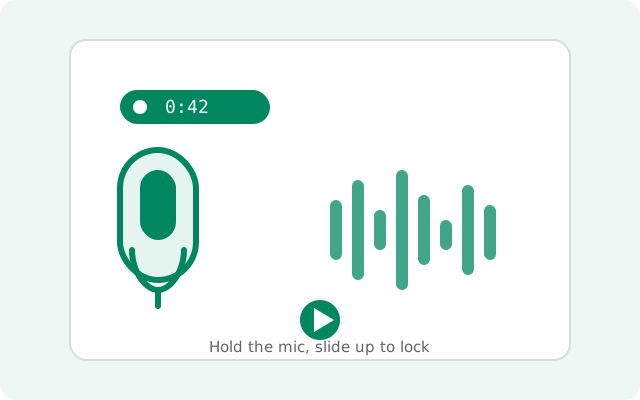
How to record a voice note
The microphone button sits to the right of the message box in every chat. Recording is one gesture:
Open the chat
Open the one-to-one or group chat where the voice note should go.
Press and hold the mic
Touch the microphone icon and keep your finger down. A timer starts counting. That is your recording running.
Talk normally
Hold the phone the way you would on a call. Speak at your normal volume; the mic is close enough.
Release to send
Lift your finger and the voice note sends immediately. That is the part to remember: releasing = sending.
Because release means send, do not start recording until you know what you want to say. If you need thinking time mid-recording, use lock mode below instead of holding your breath.
Hands-free recording with lock mode
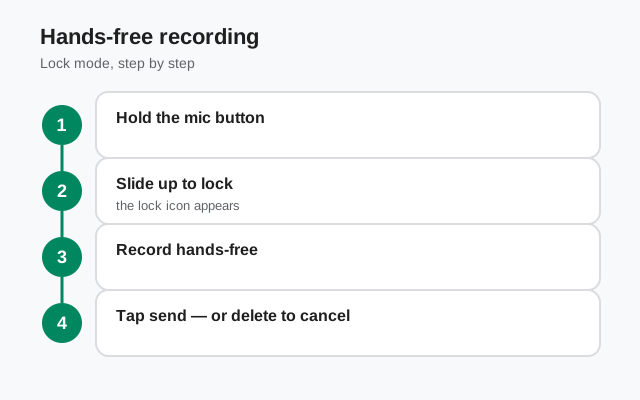
For anything longer than a few seconds, lock mode is the better way. While holding the mic button, slide your finger upward toward the lock icon that appears. The recording locks in place and keeps going with your finger off the screen.
In lock mode you get real controls: you can watch the timer, and you choose when to send by tapping the send button, or discard the whole thing with the trash icon. This is how you record a two-minute update without your thumb cramping. It is also how you avoid the classic accident of releasing early and sending half a sentence.
How to cancel before it sends
Changed your mind mid-recording? You can throw the take away:
- In lock mode: tap the trash or delete icon. The recording is discarded and nothing is sent.
- While holding the button: slide your finger over to the trash icon before you release. Releasing over the trash cancels instead of sending.
Once the note is sent, canceling is no longer an option. You would need to delete the message, which has its own limits. When in doubt, discard and re-record; it takes ten seconds.
Listening: play, pause, and speakers
Playing a voice note is simple: tap it once to start, tap again to pause, tap again to resume. A progress bar shows how far through you are, so you can scrub back to the part you missed.
Sound comes out of your phone's speaker by default. On many phones, lifting the phone to your ear during playback switches the audio to the earpiece, the same way calls work. Handy for listening to something private in a public place. If you use earphones or a Bluetooth headset, playback routes there like any other audio.
One thing to plan around: voice notes are audio only. If the other person is in a meeting, on a noisy bus, or out of earbuds, they cannot skim your message the way they could skim text. For anything time-sensitive, send the key points as text too.
How long can a voice note be?
Signal does not cut your recording off after a few seconds. You can keep talking and the timer keeps counting. There is no need to split a story into five separate notes unless you want to.
That said, length has practical costs. A longer recording is a bigger file: it takes longer to upload on your side and longer to download on theirs. On a slow or metered connection, a five-minute voice note can sit "sending" for a while. As a rule of thumb, under a minute is instant, a few minutes is fine on Wi-Fi, and anything past that is worth asking yourself whether a call would be quicker.
Voice notes and your data plan
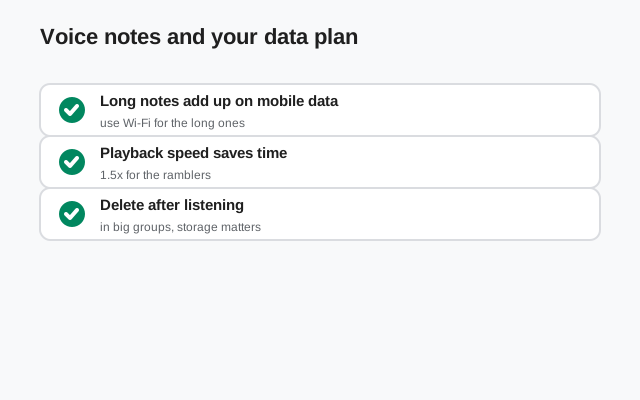
Voice notes use mobile data like any media message: uploading when you send, downloading when the other person plays. A short note is tiny; a long one is not. Two things that help on limited data:
- Record on Wi-Fi when you can. The upload happens at send time, so being on Wi-Fi when you hit send is what counts.
- Keep them short on mobile data. A 30-second update costs a fraction of a 5-minute monologue.
Signal compresses audio sensibly, so quality stays clear without the file sizes of raw recordings. You do not need to think about formats or bitrates. Just length.
Privacy: what a voice note reveals
Technically, voice notes get the same protection as everything else in Signal: end-to-end encryption. Only you and the recipient can hear the audio; nobody in the middle can listen in. That part is solid.
The privacy questions that remain are human, not technical:
- Your voice is identifiable. A voice note proves it is you talking. Do not send one if you need the message to be deniable or anonymous.
- Audio can be replayed and shared. The recipient can play your note for other people, or record it with another device. Assume anything you say could be heard by more ears than the one you sent it to.
- In groups, everyone hears it. A voice note in a group chat goes to every member. For something meant for one person, keep it in the one-to-one chat.
- Timers still apply. In a chat with a disappearing-message timer, voice notes vanish on the same schedule as text. But the human caveats above still apply while the note exists.
When to send a voice note (and when not to)
Voice notes are a tool, not a default. Here is how the three options compare:
| Situation | Best choice |
|---|---|
| Quick fact or address | Text: searchable, skimmable, no playback needed |
| Story, tone, or emotion matters | Voice note: tone of voice carries what text cannot |
| Long explanation, both free now | Call: faster than a 10-minute monologue; see the voice calls guide |
| Something private in a noisy place | Text: the other person may not be able to listen |
| Group announcement | Text first, voice note as a follow-up: not everyone can play audio immediately |
| Proof of how something sounds | Voice note: pronunciation, a strange noise, a song idea |
The golden rule: a voice note should be easier for the listener, not just easier for you. Keep them short, say the point early, and your friends will actually play them. For everything visual instead, view-once photos and videos cover the ephemeral side in the Signal features hub.
FAQ
How do I record a voice message on Signal?
Press and hold the microphone button next to the message box and talk. Slide up to the lock icon for hands-free recording, then tap send.
How do I cancel a voice note before sending it?
While recording in lock mode, tap the trash or delete icon to discard the recording. If you are holding the button, slide your finger to the trash before releasing.
How long can a Signal voice message be?
Signal does not cut you off quickly; you can record long messages. Keep them short on slow connections since longer notes use more data.
Do voice messages disappear with message timers?
Yes. In a chat with a disappearing-message timer, voice notes disappear like every other message.
Can the other person read my voice note as text?
Plan on them listening. Send the key points as text too if they might not be able to play audio right now.
Are Signal voice messages encrypted?
Yes. Voice notes are end-to-end encrypted like all Signal messages; only you and the recipient can hear them.
Keep reading
- view-once photos and videos: ephemeral media beyond voice notes
- message timers: how timers treat voice notes
- voice calls guide: when a call beats a long voice note
- stickers guide: packs, installs, and making your own
- voice messages won't record or play: the fix guide