
How Signal View-Once Media Works: Photos That Vanish After One View
Published: October 7, 2026 · Updated: October 8, 2026
View-once media is for the moment you want to show something, not share it: a document preview, a funny picture, a one-time look. The recipient gets one opening, then the media is gone from the chat. This guide covers the send flow, what the recipient sees and cannot do, the honest limits, when to use it, and how it compares to disappearing messages.
from Signal's official site — file hosted by Signal, not by us
Send a view-once photo or video
Sending view-once media is a small variation on sending normal media:
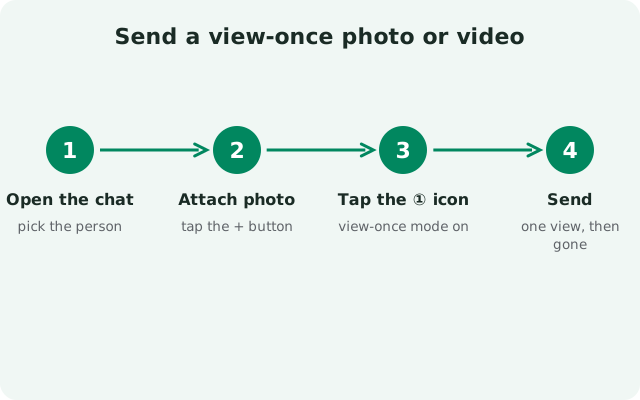
Open the chat and attach media
Tap the attach button and pick a photo or video from your gallery, or take one with the camera.
Tap the "1" toggle
In the media preview screen, look for the view-once toggle. It shows a "1" in a circle. Tap it to switch this message to view-once mode.
Check the indicator
The preview shows the view-once badge so you know this send is single-view. If you change your mind, tap the toggle again to switch back to a normal send.
Send
Hit send. The message goes out as view-once; you will see the badge on your copy too.
The toggle is per message, not per chat. Turning it on for one photo does not change how your next photo sends. Every view-once send is a deliberate choice, which is exactly the point.
What the recipient sees
On the recipient's side, a view-once message looks different from normal media:
- The chat shows a blurred or placeholder message with the view-once indicator: the media is not visible until opened.
- Tapping it opens the photo or video once. While it is open, the recipient can look at it, but the normal media toolbar (save, share, forward) is not available.
- Closing the viewer (or navigating away) ends the viewing. The media disappears from the chat and cannot be opened again.
- If the recipient never opens it, it simply sits there as an unviewed view-once message. They are not forced to open it.
After viewing, the chat keeps a record that a view-once message was sent and opened, but the media itself is gone. That record is useful: it tells you the recipient actually looked at it, which is more confirmation than a normal photo send gives you.
What counts as one view
"One view" ends sooner than some people expect, so here is exactly what closes it:
- Closing the media viewer: tapping back or the close button ends the view immediately.
- Leaving the app: switching to another app or going to the home screen while the media is open counts as closing it.
- Locking the phone: if the screen locks while the photo is open, the view is over.
- Letting it sit: there is no countdown forcing the recipient to look now; they can open it whenever they are ready, but the first opening is the only opening.
For videos, opening the video starts the single view. There is no replay button afterward. If the recipient wants to actually watch it, they should do it in that first opening, in one go.
What the recipient cannot do
Signal deliberately removes the usual media options on view-once messages:
- No saving. There is no save-to-gallery or download button on a view-once message.
- No forwarding. The forward option is disabled; the media cannot be passed along to another chat from inside Signal.
- No re-opening. Once closed, the media is gone from the chat for good. The recipient cannot tap it again.
- No preview in notifications. The media content does not show in notification previews the way normal photos might.
These restrictions make casual saving and forwarding inconvenient, which is their real purpose: they stop the easy, thoughtless spread of a photo. They do not make capture impossible, as the next section explains honestly.
The honest limits
View-once controls what the app allows. It cannot control what the person does outside the app. Be clear-eyed about this:
- Screenshots work. Signal does not block or detect screenshots of view-once media. While the photo is open, the recipient can screenshot it.
- A second device beats everything. A photo of the screen taken with another phone captures the media no matter what the app does.
- Screen recording. On many phones, the recipient can record the screen while the media is open.
The honest way to think about view-once: it raises the effort bar from zero to something. A friend who would have absent-mindedly forwarded your photo probably will not bother photographing their screen. Someone determined to keep it will keep it. Send accordingly: never treat view-once as a guarantee.
When to use view-once
View-once shines in specific situations:
- Showing, not sharing: "look at this funny thing" photos you want seen once and forgotten.
- Document previews: letting someone glance at a ticket, a booking, or a form without handing them a copy.
- Reducing clutter: memes and one-off pictures that do not deserve a permanent spot in the chat or the recipient's gallery.
- Gentle boundaries: signaling "this is for your eyes now" without needing a lecture about forwarding.
When not to use it: anything you actually need the recipient to keep (addresses, reference photos, instructions). For those, send normal media, or better yet use text they can search later. And if the whole chat should self-clean, the disappearing message timer covers everything, not just one photo. If media fails to send at all, our media send troubleshooting guide walks through the fixes.
View-once vs disappearing messages vs stories
Signal has three vanishing-content tools and they are not interchangeable:
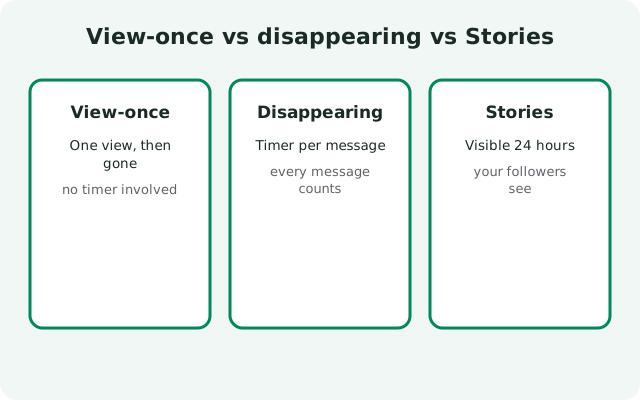
| Feature | What vanishes | Trigger | Best for |
|---|---|---|---|
| View-once media | One photo or video | Recipient opens it once | Single media you want seen, not kept |
| Disappearing messages | Everything in the chat | Timer you set (30s to 4 weeks) | Ongoing chats that should self-clean |
| Stories | A post to your audience | 24 hours after posting | Broadcasting an update to many people |
Use view-once for the single item, timers for the conversation, stories for the audience. Many people use all three: a default disappearing timer on chats, view-once for the occasional sensitive photo, and stories for daily updates. More privacy options live in the Signal features hub.
FAQ
How do I send a view-once photo in Signal?
Attach a photo or video, tap the "1" view-once toggle in the media preview screen, and send. The toggle is per message.
Can the recipient save a view-once photo?
No. Save, share, and forward are disabled on view-once messages, and the media cannot be re-opened after closing.
Can the recipient screenshot view-once media?
Yes. Signal does not block or detect screenshots of view-once media, and a second device can photograph the screen. Treat view-once as friction, not a guarantee.
What happens if the recipient never opens it?
It stays as an unviewed view-once message. They are never forced to open it.
Can I use view-once for text messages?
No. View-once is for photos and videos only. For text, use disappearing message timers instead.
Is view-once available in group chats?
Yes. You can send view-once media in group chats; every member can open it once, and the same restrictions apply.
Does the sender know when I open a view-once photo?
The chat keeps a record that the view-once message was opened, so the sender can see it was viewed. But the media itself is gone after that single view.
Can I turn a normal photo into view-once after sending?
No. The view-once choice happens before you send. If you already sent a normal photo, you can only delete it for everyone (which removes it from the chat, but anyone who already saw or saved it keeps their copy).
Keep reading
- disappearing message timers: timers for the whole chat
- how Signal stories work: 24-hour posts with audience controls
- how Signal stickers work: packs, installs and creating your own
- usernames without your number: chat without sharing your digits