
How Signal Stories Work: Posting, Privacy and Viewers
Published: October 7, 2026 · Updated: October 8, 2026
Stories are Signal's answer to status updates: short posts that live for a day and then vanish. They sit in their own tab, separate from your chats, and they follow the same privacy-first design as everything else in Signal. This guide covers creating stories, controlling who sees them, reading the viewer list, muting other people's stories, and deleting your own.
from Signal's official site — file hosted by Signal, not by us
What a Signal story actually is
A story is a temporary post that your contacts can watch for 24 hours, then it disappears on its own. Think of it like a status update that deletes itself. Stories live in a dedicated tab, so they never clutter your chat list, and they support photos, short videos, and text.
Three things make Signal stories different from most apps' stories. First, they are end-to-end encrypted, like every Signal message. Second, there are no ads, no analytics dashboards, and no "boost this story" buttons. Third, the audience controls are strict: you pick exactly who sees them, and nobody else can find them.
Stories are not public. Strangers cannot stumble on your story, and there is no public feed or explore page. If someone can see your story, it is because you let them, or because they are one of your Signal contacts and you have not restricted them.
Post a story: photo, video or text
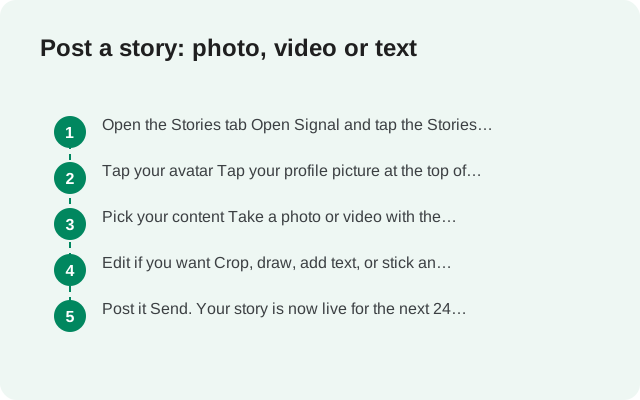
Posting a story takes under a minute. Here is the usual flow:
Open the Stories tab
Open Signal and tap the Stories tab at the bottom of the screen.
Tap your avatar
Tap your profile picture at the top of the Stories tab to start a new story.
Pick your content
Take a photo or video with the camera, pick one from your gallery, or switch to the text mode and type an update over a background color.
Edit if you want
Crop, draw, add text, or stick an emoji on it. Keep it simple: stories are meant to be quick.
Post it
Send. Your story is now live for the next 24 hours for the audience you set.
You can post more than one story at a time; they play back to back as a story sequence. There is no hard minimum quality requirement. A blurry photo posts the same as a sharp one.
Viewing stories and the viewer list
To watch stories, open the Stories tab. Stories from your contacts appear in a row at the top. Tap one to watch it; the app moves through each story in order. If you want to react or reply, you can do it right from the story viewer. Replies go into your normal one-to-one chat with that person.
As the poster, you can see who viewed your story. Open your own story and look for the viewer count or viewer list. A few honest details about this:
- Only you, the poster, can see the viewer list. Other viewers cannot see who else watched.
- The list shows people who actually opened your story, not everyone it was shown to.
- If someone views your story and then blocks you, the data stays sensible: they watched, and it is recorded.
There is no way to watch someone's story secretly. If you open it, the poster can see you opened it. That is the privacy bargain: you get a viewer list, and so does everyone else.
Who can see your stories
This is the control that matters most. Signal has three story types, and each one carries its own audience:
- My Story: your default story. Share it with all your Signal contacts, or choose some or all of them, including hiding it from specific people.
- Custom Story: a story you create with its own hand-picked audience list. People on the list just see the story; they are not told they are on a list.
- Group Story: shared to a pre-existing group chat. Everyone in the group can view and reply, even if they are not in your Signal contacts.
You can find these controls in the story settings inside the Stories tab. Take a minute to set them before your first post, because the default audience might be wider than you want.
One thing to know: because each story carries its own audience, you can run separate audiences at the same time: a Custom Story for family, another for friends, My Story for everyone else. When you post, you pick which story the post goes to. Separate audiences take one extra story, not a second Signal account.
For the strategy side (which audience to pick, and how to keep the list honest over time), see our story privacy guide: audience choice, the viewer list, and the honest limits.
Story privacy vs profile privacy
Story privacy controls who can see your stories: nothing else. Profile privacy (Settings > Privacy) controls who sees your photo, name, and about text. They are independent settings: changing one does not change the other, so set both deliberately. The full side-by-side comparison is in our story privacy guide.
Mute other people's stories
Some people post a lot. You can mute their stories so they stop showing up in your Stories tab, without unfriending, blocking, or leaving a trace:
- Open the Stories tab and find the person's story row.
- Long-press (or open their story options) and choose to mute their stories.
- Their stories disappear from your feed. They are not notified that you muted them.
- You can unmute any time from the same place. Nothing about the chat itself changes. Messages still come through normally.
Muting is per person. If you mute one contact's stories, everyone else's still show up as before. This is the right tool when someone's posting frequency annoys you but the friendship is fine.
Delete your story
Stories expire automatically after 24 hours, but you do not have to wait. If you post something by mistake, or change your mind, delete it:
- Open the Stories tab and tap your own story.
- Open the story options and choose delete.
- The story is removed from your audience's feeds. It does not come back after expiry because it is already gone.
Two honest caveats. First, deleting is not a time machine: if someone already saw your story before you deleted it, they saw it. Second, screenshots are possible: like every messaging app, Signal cannot stop someone from capturing your story with their phone's screenshot feature. Stories reduce exposure by expiring, but they do not make content screenshot-proof.
Story privacy checklist
Run through this list once and your stories are set up properly:
| Check | What to do |
|---|---|
| Audience set | Story settings: choose all contacts, a custom list, or hide-from list |
| Profile privacy separate | Settings > Privacy: confirm who sees your photo, name, and about text |
| Muted the oversharers | Mute stories from anyone who posts too much; they are never told |
| Know your viewers | Remember: anyone who opens your story is visible to you in the viewer list |
| Delete fast | Posted by mistake? Delete immediately: the story is gone but already-seen views count |
| Screenshots possible | Never post anything in a story you could not handle being captured |
If stories are not your thing at all, you can ignore the Stories tab entirely. Nothing about Signal's chats, calls, or privacy changes if you never post one. For everything else Signal can do beyond messaging, the Signal features hub collects the full set of guides on this site.
FAQ
How long do Signal stories last?
24 hours. After that they expire automatically and disappear from your audience's feeds.
Can I see who viewed my Signal story?
Yes. Only you, the poster, can see the viewer list. Other viewers cannot see who else watched your story.
Can someone watch my story without me knowing?
No. Anyone who opens your story appears in your viewer list.
Can I hide my story from one specific person?
Yes. In the story privacy settings you can share with all contacts except specific people you name.
Does deleting a story remove it for everyone?
Yes, it is removed from your audience's feeds. But anyone who already viewed it before you deleted it has seen it, and screenshots are still possible.
Are Signal stories encrypted?
Yes. Stories use the same end-to-end encryption as Signal messages.
Keep reading
- how Signal stickers work: packs, installs and creating your own
- disappearing message timers: per-chat timers and defaults
- view-once photos: send media that vanishes after one view
- usernames without your number: chat without sharing your digits
- stories not posting or loading: fix it step by step
- story privacy controls: audience strategy, viewer-list honesty and screenshot reality