
Installing the Signal APK on GrapheneOS
Published: October 7, 2026
Signal Foundationfrom Signal's official site — file hosted by Signal, not by us. signal.org/android/apk
GrapheneOS is the hardened, de-Googled Android: no Google Play Services in the base system, strong sandboxing, and per-app permission toggles that stock Android does not have. It is also one of the most natural homes for Signal: a privacy-first OS running a privacy-first messenger, with neither depending on Google.
The right APK here is Signal's website build (version 8.29.3, package org.thoughtcrime.securesms) from signal.org/android/apk: direct from Signal, self-updating, no store or Google account involved. This guide covers why that build is the fit, the GrapheneOS-specific install path, fingerprint verification, notifications without Play Services, and the two GrapheneOS settings worth knowing.
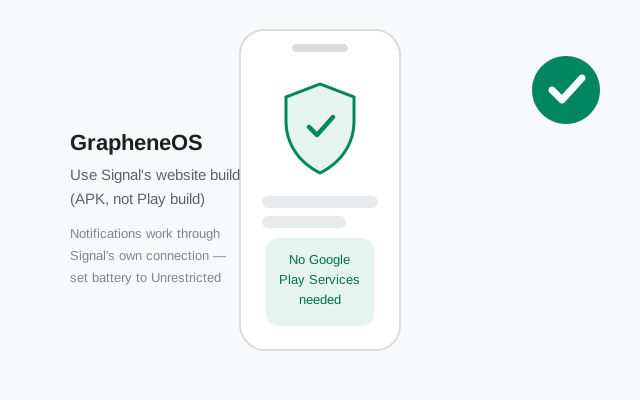
GrapheneOS's own documentation discusses installing apps outside the Play Store, including direct APKs. This guide follows that spirit: get the file from the publisher, verify it, install it.
Why the website build is the right one here
Three reasons the website build (not the Play build) is the right one on GrapheneOS:
- No store dependency. The website build updates itself. On a system designed to minimize Google contact, routing your messenger's updates through the Play Store would be a strange choice, even with GrapheneOS's sandboxed Play.
- It is built for exactly this. Signal publishes and maintains the website build for users without Play Services. The websocket fallback for notifications (below) exists because of users like you.
- Cleaner permission story. The website build asks for nothing Google-related. Combined with GrapheneOS's network and sensors toggles, you get a messenger whose every permission you can audit.
Could you use sandboxed Google Play on GrapheneOS and install the Play build? Yes. GrapheneOS supports sandboxed Play as an optional compatibility layer, and it works. But it reintroduces the Google connection you chose GrapheneOS to reduce, for zero feature gain in Signal itself. The website build is the coherent choice; the sandboxed-Play option is covered below for completeness, not as a recommendation.
Step-by-step install
Download with Vanadium
GrapheneOS ships the Vanadium browser. Open signal.org/android/apk in Vanadium and download the APK. Keep a copy. Without a store, your spare copy is your reinstall path.
Verify the fingerprint
GrapheneOS users tend to care about supply-chain integrity. Good. Compare the SHA-256 fingerprint on Signal's page with the download before installing (details in the verification section below).
Allow the install
Open the APK; GrapheneOS routes you to Settings → Apps → Special app access → Install unknown apps → allow for Vanadium (or your file manager) only. Path details in the next section.
Install and register
Tap Install, open Signal, enter your number and the SMS code. If you use a second profile for compartmentalization, decide now which profile Signal lives in (below).
Set up notifications
Without Play Services, choose your notification route (websocket fallback or sandboxed Play) per the notifications section. Do this before relying on the install.
Allow the install (GrapheneOS path)
The path on GrapheneOS follows AOSP with GrapheneOS's settings layout: Settings → Apps → Special app access → Install unknown apps → select Vanadium (or Files, if you transferred the APK) → allow.
GrapheneOS-specific notes:
- Per-profile installs. GrapheneOS supports multiple user profiles with strong isolation. Apps installed in one profile are invisible to others. Decide which profile gets Signal. Most people use the main/Owner profile. If you compartmentalize (e.g., a separate profile for messaging), install it there and register there; profiles do not share app data.
- Work with the Owner profile for the download. Download and verify in the profile where you will install. Moving APKs between profiles adds friction for no benefit.
- Switch it back off after. The toggle is only needed at install and update time. GrapheneOS's security model rewards minimal attack surface. Re-disable it when done.
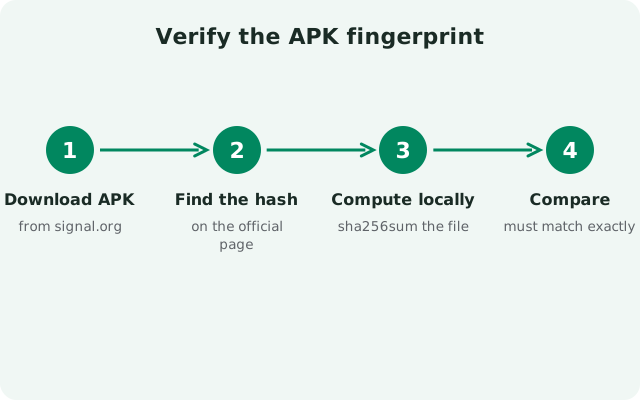
Verify the APK fingerprint
On GrapheneOS, verification is not paranoia. It is the workflow. Without Play Protect scanning downloads, the fingerprint check is your safety net:
- Read the fingerprint on Signal's page. Open signal.org/android/apk (in Vanadium, on the phone, or on a computer) and note the published SHA-256 fingerprint of the signing certificate.
- Check your file. On a computer:
apksigner verify --print-certson the APK and compare digests. On-device options exist via file-hash apps, but note the distinction: hashing the file (SHA-256 of the APK) is not the same as the certificate fingerprint Signal publishes. Compare certificate to certificate. - Character by character. Every character must match. One difference means a different signer. Delete the file and re-download.
Our verification guide and apksigner walkthrough cover the commands in full. Make this a habit for every sideloaded APK, not just Signal. On a de-Googled system, you are the app store's security team.
Notifications without Play Services: your options
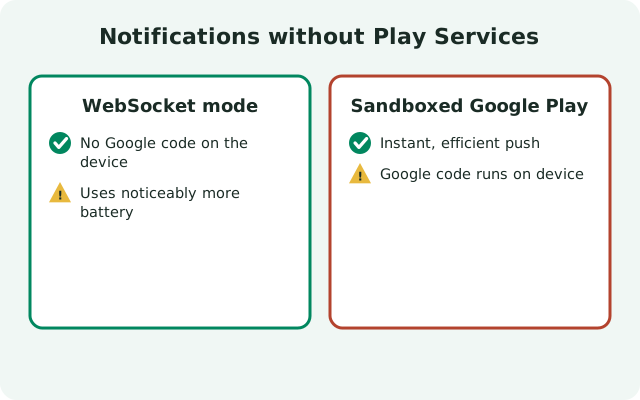
Without Play Services there is no Firebase Cloud Messaging. Your options, in order of coherence with GrapheneOS's philosophy:
| Websocket fallback (recommended) | Signal keeps its own persistent connection and delivers notifications itself. Enable it in Signal under Settings → Notifications (look for the fallback/background-connection option). Then exempt Signal from battery optimization: Settings → Apps → Signal → Battery → Unrestricted. Trade-off: slightly more battery use than push, and you must keep the exemption set. GrapheneOS's aggressive doze will otherwise pause the connection. |
|---|---|
| Sandboxed Google Play | Install GrapheneOS's sandboxed Play Services/Store/Firebase components, and Signal can use FCM push like stock. Works reliably. Cost: Google's push servers see your device's push metadata. The very connection GrapheneOS minimizes by default. Only choose this if you need Play for other apps anyway. |
The websocket route is genuinely good on GrapheneOS: with the battery exemption set, messages arrive in seconds, calls ring reliably, and nothing Google touches the path. Test it the hard way: reboot, do not open Signal, have someone message you. Seconds is a pass.
Whichever route you choose, also confirm: notification permission granted (Signal asks on first launch on Android 13+; check Settings → Apps → Signal → Notifications), and no user profile confusion. Notifications only arrive in the profile where Signal is installed and running.
Two GrapheneOS settings worth knowing
Two GrapheneOS settings that stock Android does not have, and how they interact with Signal:
1. The Network permission toggle
GrapheneOS lets you revoke an app's INTERNET permission entirely (Settings → Apps → Signal → Permissions → Network). This is a powerful tool, and a footgun. Do not revoke it for Signal. A messenger without network access cannot send or receive anything; it will just sit there, silently dead, and nothing in Signal's UI explains why. Leave Network allowed. The toggle is for apps that have no business phoning home, not for your messenger.
2. The Sensors permission toggle
GrapheneOS also gates sensor access (accelerometer, gyroscope, etc.) per app. Unlike Network, revoking Sensors for Signal is safe. Signal does not need motion sensors for messaging or calls. If you practice least-privilege, denying Sensors to Signal is a reasonable hardening step with no functional cost. (Camera and microphone remain separately controlled runtime permissions. Those you grant normally.)
Related hardening that does affect Signal: GrapheneOS's per-app exploit protection toggles (native code debugging, hardened allocator). Leave these at defaults for Signal. Disabling hardening "to fix" an app is almost never the right call, and Signal runs fine with full protections on.
What about sandboxed Google Play?
GrapheneOS offers sandboxed Google Play: Play Services, Play Store, and Services Framework running as ordinary sandboxed apps, without the privileged access they have on stock Android. Installed this way, Play cannot see your other apps' data or grant itself special powers; it is compatibility, not integration.
If you install it (mainly for other apps that demand Play), Signal's Play build becomes installable and FCM push works. But consider what you gain for Signal specifically: nothing. This build already self-updates and already handles notifications via websocket. Adding sandboxed Play for Signal trades away the clean no-Google setup for zero feature benefit.
The one scenario where it makes sense: you need sandboxed Play for banking or work apps anyway, and you prefer Play Store auto-updates for everything including Signal. That is a coherent choice. Just an unnecessary one if Signal is your only consideration. Our custom ROM guide discusses the same trade-off in the microG context.
Register and first-run setup
Registration is standard: phone number, SMS code (or voice-call code), done. Two GrapheneOS-adjacent notes:
- SMS autofill: GrapheneOS supports Android's SMS-retriever API, so automatic code detection generally works. But if it does not, typing the code manually takes ten seconds. Not worth debugging.
- Profiles and numbers: if Signal lives in a secondary user profile, register it there with the number you intend. Moving Signal between profiles later means reinstalling and re-registering. Profiles do not share app data, by design.
First-run setup then proceeds normally: profile name, optional PIN, contacts permission (GrapheneOS's contacts scope options let you limit which contacts Signal sees: a genuinely nice privacy control worth using), notification permission, and backup restore if you are migrating. The full screen-by-screen flow is in our first-run setup guide.
Welcome to the setup where your messenger and your OS finally agree on the threat model. Keep the website build updated (it prompts you itself; current build 8.29.3), keep the battery exemption set, and verify every APK you sideload.
Frequently asked questions
Why is the website build recommended for GrapheneOS?
It needs no Play Store, updates itself, and handles notifications via its own websocket fallback. Sandboxed Play works too, but adds a Google connection for zero Signal feature gain.
How do Signal notifications work on GrapheneOS without Play Services?
Through Signal's websocket fallback: enable it in Signal's notification settings and set battery usage to Unrestricted. Messages arrive in seconds. Alternatively, sandboxed Google Play enables FCM push.
Should I revoke Signal's Network permission on GrapheneOS?
No. Revoking the INTERNET permission breaks the messenger completely. It can't send or receive anything. Leave Network allowed; consider revoking Sensors instead, which Signal doesn't need.
How do I verify the Signal APK on GrapheneOS?
Compare the SHA-256 signing-certificate fingerprint published on signal.org/android/apk with your download (e.g. via apksigner verify --print-certs on a computer). Every character must match.