
Registration lock: your PIN against account takeover
Published: October 7, 2026 · Updated: October 8, 2026
Registration lock ties your Signal account to your Signal PIN: with it on, anyone who ends up with your phone number, through a SIM swap or a number reassignment, cannot re-register your Signal account without also knowing your PIN. It is Signal's answer to account takeover, and it is the single most important protection for people whose number is valuable or who face targeted attacks. There is one deliberate safety valve: if the PIN goes unused for about a week, the lock expires, so a forgotten PIN cannot lock you out of your own account forever. This guide explains the attack it stops, what changes with and without the PIN, and how to manage the lock.
If you take one action from this page, make it this: turn registration lock on and choose a PIN you will actually remember. Everything else below is the reasoning.
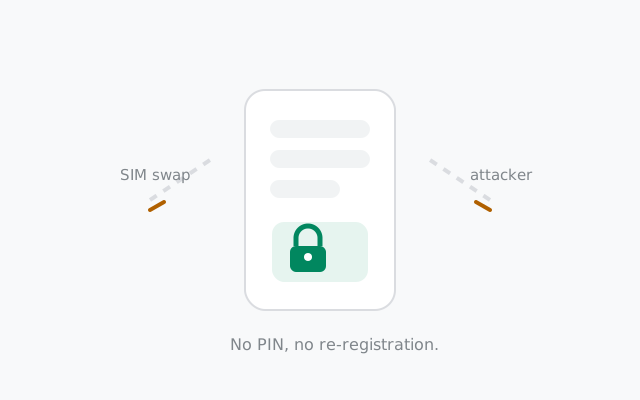
The attack it stops: SIM-swap takeover
Your Signal account is anchored to your phone number. Normally, whoever can receive SMS at your number can register Signal as you. That is how legitimate setup works, and it is also the attacker's path. In a SIM swap, the attacker convinces your mobile carrier to move your number to their SIM card: through social engineering of carrier support, a corrupt insider, or your old number being recycled to a stranger. Once they receive your SMS verification code, they can register Signal on their phone as you.
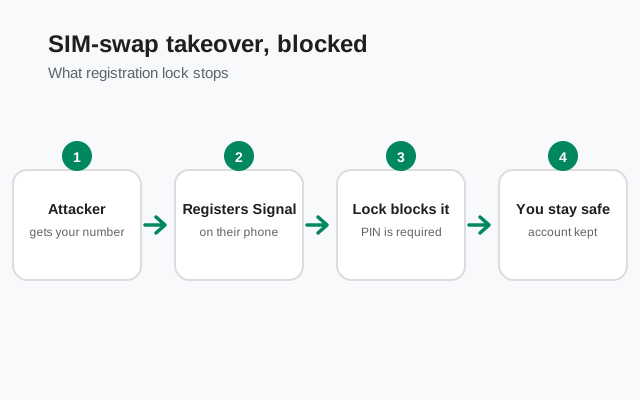
Without registration lock, that registration just works. The attacker's fresh install becomes "your" account: your contacts see the new registration, your groups get a new member device, and messages start flowing to the attacker's phone. Your own phone gets signed out. It is fast, it needs no malware on your device, and it is the most realistic way a Signal account gets taken over. Registration lock exists specifically to break this chain.
What registration lock actually does
With registration lock on, re-registering your number requires your Signal PIN in addition to the SMS verification code. The attacker has your number but not your PIN. Without the PIN, the registration is refused. Here is every scenario in one table:
| Scenario | Lock on, PIN known | Lock on, PIN unknown | Lock off |
|---|---|---|---|
| You reinstall Signal yourself | Enter PIN, you're back in minutes | Wait out the expiry (about 7 days of PIN inactivity), then register | SMS code only: fastest, least protected |
| SIM-swap attacker has your number | Blocked. SMS code alone is not enough; without your PIN the takeover fails. | Takeover succeeds. The account moves to the attacker's phone | |
| Your old number is recycled to a stranger | The stranger cannot claim your Signal account without the PIN. | The stranger can register Signal on your old number | |
| You forget the PIN | N/A | Expiry saves you: after about 7 days of the PIN going unused, the lock lifts and you can re-register | Nothing to forget, but nothing protecting you either |
The design tradeoff is visible in the table: the lock converts "instant takeover" into "attacker is stuck," and the price is that you need the PIN too when you legitimately reinstall. That price is exactly why the expiry valve exists.
from Signal's official site — file hosted by Signal, not by us
The PIN behind the lock
Your Signal PIN is the short code you created when you first set up Signal: the one Signal periodically asks you to confirm. It does double duty: it protects your account's cloud data (profile, settings, contacts backup) and, with registration lock on, it gates re-registration of your number. A PIN only works as a lock if the attacker cannot guess it, so "1234," your birth year, and the last digits of your phone number are all bad choices. Pick something you will remember but nobody could derive from you.
Two related things people confuse with the PIN. First, the account recovery key: current Signal versions use a long recovery key (64 characters) as the ultimate backup credential, replacing the older 30-digit numeric code from years ago. If you still have a 30-digit code written down somewhere, that is the retired legacy format. The current key is the long one, and it is what matters for recovery now. Second, your phone's lock screen PIN is a different thing entirely; it protects the device, not the Signal account.
If you have forgotten your Signal PIN, do not panic and do not start guessing wildly. Read our forgotten PIN guide first. And if Signal keeps nagging you to confirm the PIN, that is the reminder system doing its job (more below), not a bug. See PIN reminders explained.
The 7-day inactivity expiry
Registration lock is not permanent-if-forgotten by design. If your PIN goes unused for about a week, the lock expires on its own. After that, your number can be re-registered with just the SMS code again. That is how you recover if you genuinely forgot the PIN, and also why the lock is a delaying protection rather than an absolute one.
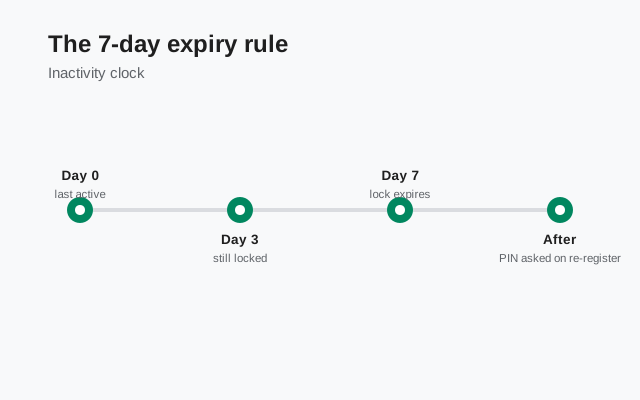
Think about what this means for the attacker: a SIM swap is usually a smash-and-grab. They want the account now, while the number is hot. A lock that forces them to sit on a stolen number for a week, unable to do anything with it, kills the economics of the attack. Most attackers move on. But it also means registration lock is not a substitute for a memorable PIN: if you forget the PIN, you are choosing the 7-day waiting room over instant recovery.
Practical consequence: use the PIN occasionally. Confirming it when Signal's reminders ask keeps the lock alive and keeps the code in your memory. A PIN you never touch is a PIN drifting toward expiry and toward being forgotten.
Turning it on and off
The lock lives in Signal's account settings on your phone:
Open Signal and go to Settings
Tap your profile area to open settings.
Open the Account section
Registration lock is an account-level protection, so it sits with the other account controls.
Toggle Registration Lock on
Signal will ask you to confirm your PIN. If you have not set a PIN yet, you will create one here. Choose it carefully, because this code is now your account's gatekeeper.
Verify it is on
Go back and check the toggle state. A protection you think is on but isn't is worse than none, because it changes your behavior.
Turning it off follows the same path, same section, same toggle, and Signal will ask for the PIN to confirm. Only turn it off deliberately and temporarily (for example, while troubleshooting a re-registration problem), and turn it back on immediately after. There is no good reason to leave it off permanently: it costs you nothing day-to-day and blocks the most realistic takeover attack.
PIN reminders keep it fresh
Signal periodically asks you to enter your PIN, not because something is wrong, but to keep the code in your memory. These reminders are the quiet hero of the whole system: a PIN you type every few weeks is a PIN you will have when you actually need it, and each confirmation resets the inactivity clock that leads to expiry. When a reminder pops up, type the PIN from memory instead of dismissing it; that ten-second habit is what keeps the lock meaningful.
If the reminders annoy you, resist the urge to disable them without a plan. The alternative is a PIN you forget, an expired lock, and a 7-day wait the next time you reinstall. If you are locked out right now, our locked-out walkthrough covers the recovery paths in order.
Frequently asked questions
What is Signal registration lock?
An account protection that requires your Signal PIN, in addition to the SMS code, to re-register your phone number. It blocks SIM-swap attackers from taking over your account with just your number.
What happens if I forget my Signal PIN?
The lock expires after about 7 days of the PIN going unused. After expiry you can re-register with just the SMS code. But you'll wait out those days first.
Does registration lock protect my messages?
It protects the account itself from takeover. Message encryption is separate and always on; the lock decides who is allowed to become 'you' on a new device.
Should I turn registration lock off?
No. Leave it on. It costs nothing day-to-day and blocks the most realistic account-takeover attack. Only disable it briefly for troubleshooting, then re-enable it.
Is the Signal PIN the same as my phone's PIN?
No. The Signal PIN protects your Signal account (and gates re-registration with the lock on). Your phone's lock-screen PIN protects the device. They are independent.
Keep reading
- Forgot your Signal PIN?: recovery paths without panicking
- PIN reminders explained: why Signal keeps asking and why you should comply
- Re-registering Signal: the full re-registration walkthrough
- Privacy guides hub: every privacy guide in one place