
Signal privacy: what protects you, and what does not
Published: October 7, 2026 · Updated: October 8, 2026
Signal is the reference point for private messaging. This hub explains why, honestly, including the limits. Every message, call, photo, and voice note you send is sealed with end-to-end encryption before it leaves your phone: only you and the person you are talking to can read it. Not Signal, not your internet provider, not a government with a court order served on Signal's servers. That is the core promise, and the guides below unpack how it works, what else Signal does to protect you, and, just as important, what it cannot protect you from.
The encryption itself is the open Signal Protocol, the most audited messaging protocol in existence. Signal's client code is open source under AGPLv3, and independent security firms have audited it repeatedly. The beginner's encryption explainer gives the plain-English version, the protocol guide goes deeper, and the audits guide lists the independent reviews. You do not have to take anyone's word for the cryptography. The design is public, and that openness is a privacy feature in itself.
Encryption protects content. Metadata (who talked to whom, when, for how long) is the other half of privacy, and it is where Signal goes further than almost anyone. The servers keep the minimum needed to run the service: your account data is a phone number (and increasingly, optionally, a username identity), a profile name and photo, and little else. Message contents are never stored. Contact lists are checked with private contact discovery so Signal learns as little as possible about your address book. And sealed sender hides the sender's identity from Signal's own servers on messages where both sides opt in. The sealed sender guide and the metadata guide walk through exactly what is and is not visible.
Then there is your phone number: historically Signal's most debated privacy topic. Registration uses a number, and for years the number was also your identity. That changed with usernames: you can now be found and messaged through a username, hide your number from everyone, and control who can discover you by number. The usernames privacy guide and the hide-your-number settings tour show the full setup. Combined with a registration lock PIN: which stops someone from re-registering your number on their device. The number becomes a credential, not an identity you hand out.
Settings are where most people leave privacy on the table. Signal ships with sane defaults, but the lockdown checklist goes further:
- Turn off typing indicators and read receipts to stop leaking presence.
- Set a default disappearing-message timer so new chats auto-expire.
- Enable screen lock and screen security on a shared device.
- Review story and profile-photo visibility.
- Verify safety numbers with the contacts who matter.
The full lockdown checklist is the single page to work through end to end. Most people finish it in fifteen minutes.
Now the honest limits, because a privacy guide that skips them is marketing. Disappearing messages do not stop screenshots or a second camera pointed at the screen. The limitations guide is blunt about this. Deleting a message for everyone cannot unsend what someone already saw or screenshotted. Link previews can leak your IP to the linked site unless you disable them. Voice calls can expose your IP to the other party unless you relay them. A stolen unlocked phone exposes everything on it, which is why screen lock and the registration PIN exist. And no app protects you from someone you choose to trust who turns out untrustworthy. Signal secures the channel, not the people. The "is Signal really private?" guide weighs all of this in one place, and the threat-model guide helps high-risk users decide whether Signal alone is enough for their situation.
For people in censored or monitored environments, Signal ships real anti-censorship tools: built-in censorship circumvention that disguises traffic, and proxy support for when the network blocks Signal outright. A VPN adds little on top of Signal's encryption for message content, but it can hide the fact that you use Signal from your internet provider. The VPN guide explains when it matters and when it does not.
How to use this hub: if you are new, read the encryption explainer and the honest assessment first. They frame everything else. Then run the lockdown checklist. After that, pick your situation from the sections below: identity and usernames, settings lockdown, trust and audits, or censorship tools. And if you are comparing Signal with other apps, the Signal vs WhatsApp and Signal vs Telegram comparisons cover the privacy angle head-on.
from Signal’s official site — file hosted by Signal, not by us. signal.org/android/apk
Start with the most-used guides
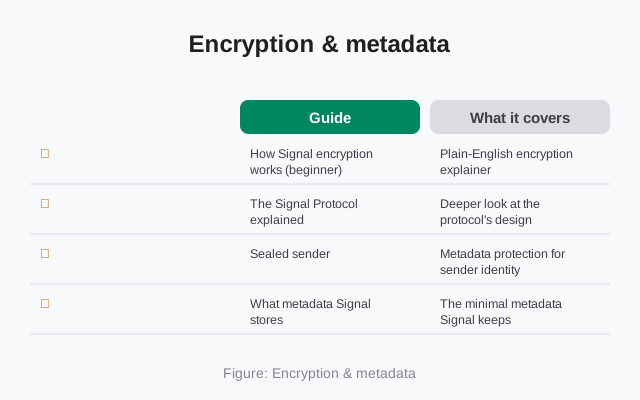
Encryption & metadata
How Signal protects content and what little it knows.
| Guide | What it covers |
|---|---|
| How Signal encryption works (beginner) | Plain-English encryption explainer |
| The Signal Protocol explained | Deeper look at the protocol's design |
| Sealed sender | Metadata protection for sender identity |
| What metadata Signal stores | The minimal metadata Signal keeps |
| Contact discovery | How Signal checks contacts privately |
| Signal has no last seen | Why there's no online-status tracking |
Your number & identity
Usernames, number hiding, and profile controls.
| Guide | What it covers |
|---|---|
| Usernames vs phone numbers | How usernames changed the privacy model |
| Hide your phone number | Full settings tour to hide your number |
| Who can find me by my number | Discovery controls explained |
| Profile privacy | Controlling who sees your profile |
| Story privacy controls | Story audience and privacy settings |
| Group privacy | Visibility rules inside groups |
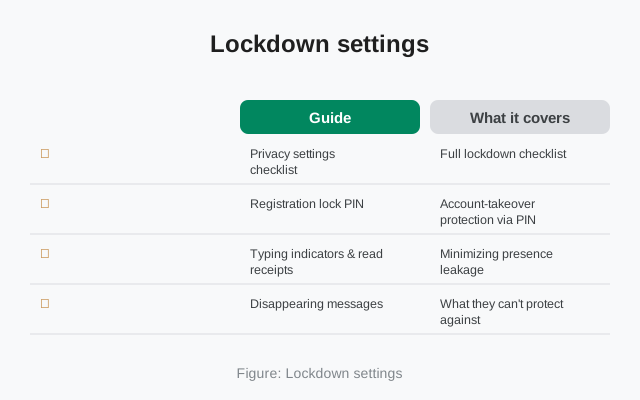
Lockdown settings
Every switch that tightens your privacy.
| Guide | What it covers |
|---|---|
| Privacy settings checklist | Full lockdown checklist |
| Registration lock PIN | Account-takeover protection via PIN |
| Typing indicators & read receipts | Minimizing presence leakage |
| Disappearing messages — limitations | What they can't protect against |
| Delete for everyone — limits | Honest limits of remote deletion |
| Screenshot risks | Screenshot realities on Android |
| Link previews & IP leaks | Preview privacy trade-offs |
| Call privacy — hide your IP | Relay calls and IP exposure |
| Signal on a shared device | Privacy on shared Android devices |
Trust, audits & law
Openness, audits, and what happens with legal pressure.
| Guide | What it covers |
|---|---|
| Is Signal really private | Balanced assessment with limits |
| Is Signal open source | Client code licensing and transparency |
| Signal's server code | Honest state of server-side transparency |
| Independent security audits | Third-party audits of Signal |
| Can police read Signal messages | Law-enforcement access reality |
| What WhatsApp collects that Signal doesn't | Data-collection comparison |
| Delete your Signal data | Account deletion and what remains |
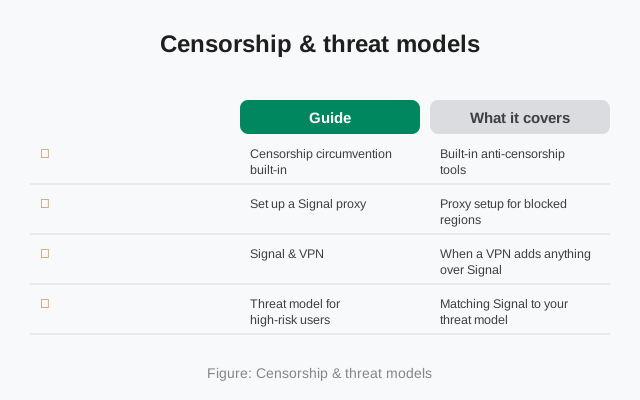
Censorship & threat models
Blocked networks, proxies, and high-risk use.
| Guide | What it covers |
|---|---|
| Censorship circumvention built-in | Built-in anti-censorship tools |
| Set up a Signal proxy | Proxy setup for blocked regions |
| Signal & VPN | When a VPN adds anything over Signal |
| Threat model for high-risk users | Matching Signal to your threat model |
How to choose the right guide
| Your situation | Start here | Why it fits |
|---|---|---|
| I want the big picture | /privacy/how-signal-encryption-works/ | Understand the protection model first |
| I want maximum privacy now | /privacy/signal-privacy-checklist/ | Every setting, one checklist |
| I want to hide my number | /privacy/hide-phone-number-signal/ | Usernames + discovery controls |
| I'm worried about screenshots | /privacy/signal-screenshots/ | Honest limits of disappearing media |
| Signal is blocked where I am | /privacy/signal-proxy-setup/ | Proxy setup for blocked regions |
| Can anyone read my messages? | /privacy/can-police-read-signal/ | What law enforcement can actually gnsCan Signal read my messages?No. End-to-end encryption means message content is sealed on your phone and only the recipient's device can open it. Signal's servers carry ciphertext they cannot decrypt. The encryption explainer shows how. What does Signal know about me?Very little: your number, profile name and photo, and when you last connected. Not your contacts, not your message contents, not who you talk to (with sealed sender enabled). Details in the metadata guide. Is disappearing messages enough to stay private?No: it deletes messages on devices, but cannot stop screenshots or someone photographing the screen. Read the limitations guide before trusting it with anything sensitive. Do I still need a phone number for Signal?Registration uses a number today, but usernames mean you never have to share it. A beta account system without phone numbers is in the works. The Signal Login guide tracks it. Related hubsThis hub covers Signal's privacy: the app itself. For verifying that the APK you install is the genuine one, see the safety hub. Grab the official build from the download page before changing any settings. SourcesOfficial references we check against: |