
Signal Usernames vs Phone Numbers: How the Privacy Model Changed
Published: October 7, 2026 · Updated: October 8, 2026
Signal usernames let you chat with people without ever revealing your phone number. Instead of handing out your number, you share a username like name.42, and the other person messages you through it while your number stays hidden. But the number has not gone away: you still register with one, and two settings decide who can see it and who can find you by it. This guide explains the new privacy model, the two settings that control everything, and a checklist to hide your number properly.
from Signal’s official site — file hosted by Signal, not by us
What changed when usernames arrived?
For most of Signal’s history, your phone number was your identity. To message someone, you needed their number. To be messaged, you handed out your number. Group chats showed numbers. Calls showed numbers. The number was the key to everything, which made it the most exposed piece of your identity.
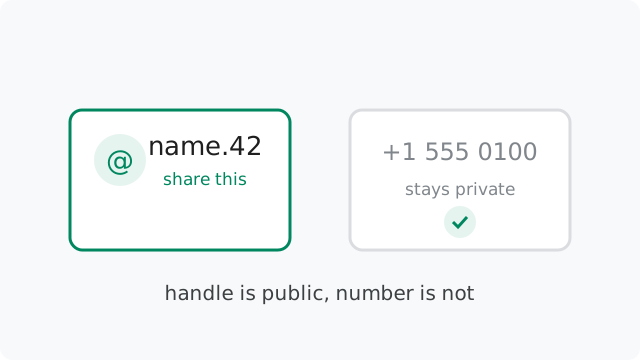
Usernames split that role in two. Your phone number is now the credential: it registers the account and signs you in. Your username is the handle: it is what you share, what people search for, and what appears when strangers message you. The credential stays private. The handle is public by choice. That single split is the biggest privacy-model change in Signal’s history.
Why does this matter? A phone number is hard to change and easy to abuse. It links to your carrier account, it can receive spam calls and texts, and in many countries it is tied to your real identity through SIM registration. A username is disposable: you can change it or delete it any time, and abandoning a compromised username costs you nothing. Moving daily contact onto usernames shrinks what a leaked or shared identifier can do to you.
How do usernames work?
A Signal username has two parts: a name you choose, followed by at least two digits, like name.42. The digits keep usernames unique without forcing you into awkward spellings. Many people can be “name”, but only one is “name.42”. You set yours in your Profile settings, and you can change it or delete it whenever you like.
Three distinctions keep people from getting confused. First, your username is not your profile name. The profile name is the display name shown in chats; the username is the handle people use to find you. Second, usernames are unique across all of Signal, like email addresses: if someone already took yours, you pick another. Third, sharing works two ways: you can type out the username, or generate a QR code or link that opens a chat with you directly.
To message someone by username, you open a new chat and type their full username, digits included. Signal shows you their profile so you can confirm you have the right person before the first message goes out. From that point on, the conversation works exactly like any other Signal chat: same encryption, same features, same safety numbers.
What still requires your phone number?
Honesty first: usernames did not remove the phone number from Signal. You still need a number to register an account and to sign in on a new device. The number remains the account’s anchor in Signal’s system, and there is no way to create an account today without one.
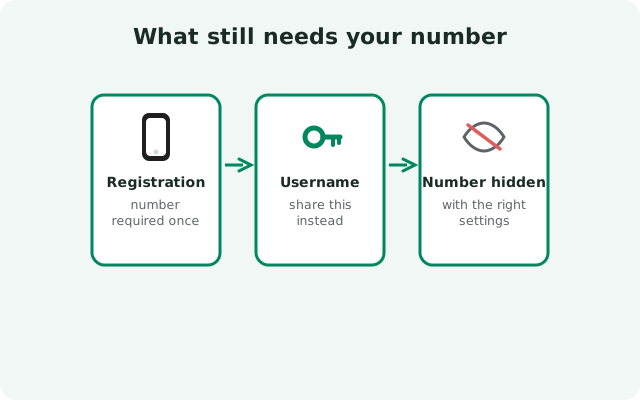
This surprises people who expected usernames to mean “no number at all.” Think of it in two layers. The registration layer still uses the number: proving you control a number is how Signal stops mass fake-account creation. The social layer, who can find you, who sees your number, how people reach you, is where usernames took over. You can now live entirely in the social layer on your username while the number sits quietly underneath, used only for sign-in.
Should you use a secondary or VoIP number to register? Some people do, to keep their primary number disconnected from the account. That is a legitimate choice, but know the trade-off: if you lose access to the registration number, account recovery gets harder. Whatever number you register with, the hiding checklist below keeps it out of daily circulation.
The two settings that control everything
Number visibility comes down to two toggles under Settings > Privacy > Phone Number. “Who can see my number” decides whether your number appears to people you chat with. “Who can find me by my number” decides whether anyone can discover you by typing your number into Signal’s search. The defaults, hidden but still searchable, are a deliberate compromise. The most private setup is both set to Nobody, with a username as your public way to be reached.
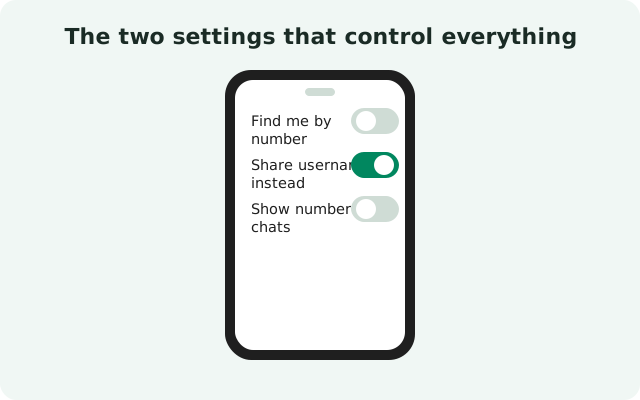
The full tour of these screens, the four combinations, what each one does in practice, and the order to change them in, lives in the full number-hiding settings tour. If the hands-on username part is what you need first, the usernames how-to covers creating, sharing, renaming, and removing a username step by step.
What each combination means
Two settings, two options each, four possible setups. Here is what each one does in practice.
| See my number | Find me by number | What happens |
|---|---|---|
| Nobody | Everybody | The default. Your number is hidden on your profile, but anyone with your number can look you up and message you. |
| Nobody | Nobody | Maximum privacy. Your number is invisible and unsearchable; people reach you only through your username. |
| Everybody | Everybody | Old-school mode. Anyone you chat with sees your number, and anyone with your number can find you. |
| Everybody | Nobody | Unusual mix. Your number shows in chats, but strangers cannot discover you by typing it in. |
For most privacy-minded users, the second row is the target: see = Nobody, find = Nobody, username shared selectively. Note the dependency the app enforces: if you set “find me” to Nobody, “see my number” must also be Nobody. The stricter setting implies the looser one.
Edge cases worth knowing
Three edge cases catch people out, so learn them now rather than discovering them later.
Contacts who already saved your number. If someone has your number in their phone’s contacts, hiding settings do not erase their knowledge. They know your number because you or someone else gave it to them, not because Signal showed it. The settings control what Signal reveals, not what people already know.
Chats merge when identities connect. If someone you previously chatted with by phone number later starts a chat with your username, Signal merges the conversations and they learn that the username belongs to the same person as the number. Usernames hide you from strangers, not from existing contacts.
Message requests from strangers still need your judgment. A hidden number does not mean a hidden you. Anyone with your username can send a message request, which you can accept, reject, or block. Treat an unexpected request with the same caution you would give an unknown caller: verify before trusting.
The number-hiding checklist
In short: set a username, confirm “Who can see my number” is Nobody, set “Who can find me by my number” to Nobody, share only the username going forward, and check that your groups and profile reveal nothing extra.
The complete version, every screen, the leak-audit order, and what to do if something still exposes you, is the full settings tour’s checklist. One last honest note: these settings control Signal only. If your number is plastered across your social media bios, a username fixes the Signal part. Privacy is a system, and Signal is one well-built component of it.
Frequently asked questions
Do I still need a phone number to use Signal?
Yes. Registration and sign-in require a phone number today. Usernames change how people find and contact you, not how accounts are created.
Can someone work out my number from my username?
No. Usernames are not linked to numbers in any visible way, and with the hiding settings on, nothing in the app reveals the number behind a username.
Can I change or delete my username?
Yes, any time, from your Profile settings. Usernames are designed to be disposable. Set one for an event and change it after, if you like.
If I hide my number, what do group members see?
They see your profile name and photo, not your number. Your number stays hidden in group chats and calls as long as your visibility settings are set to Nobody.
What is the difference between my username and my profile name?
The username (like name.42) is the unique handle people use to find you. The profile name is the display name shown in conversations. They are separate and serve different purposes.
Keep reading
- the complete settings walkthrough: phone number privacy settings
- creating and sharing a username: the hands-on how-to
- what Signal keeps about your account: the metadata guide
- hiding the sender too: sealed sender explained
- the encryption underneath it all: beginner’s encryption guide