
How Signal Encryption Works: The Plain-English Version
Published: October 7, 2026 · Updated: October 8, 2026
Signal encryption means your messages are locked on your phone before they ever reach the internet, and only the recipient’s phone holds the key to open them. Signal’s servers, your internet provider, and anyone listening in between see scrambled data they cannot read. This is called end-to-end encryption: the “ends” are the two devices, and everything in between is blind to the content. This guide explains what that means in practice, what the server actually sees, how two phones agree on secret keys without anyone else learning them, and how safety numbers let you double-check the whole setup.
from Signal’s official site — file hosted by Signal, not by us
What does “end-to-end encrypted” actually mean?
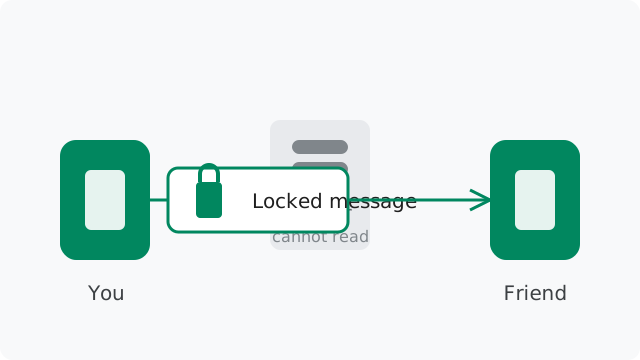
Think of a regular text message like a postcard. It travels through a chain of hands, and anyone along the way can read it. Now think of a Signal message like a letter sealed inside a lockbox, where only the recipient owns the key. Your phone puts the message in the box and locks it before it leaves. The locked box travels across the internet. When it arrives, the recipient’s phone opens it. Everyone who handled the box in between saw a locked box, nothing more.
That is the whole idea of end-to-end encryption. The “ends” are the two devices in the conversation. Encryption happens on your phone. Decryption happens on the other person’s phone. Nobody in the middle, not Signal, not your mobile carrier, not the owner of the Wi-Fi you are sitting on, has the key. Without the key, the scrambled data is useless noise.
Two details make this strong. First, the keys are created on your device and never leave it. You do not type in a password that Signal knows, and there is no master key sitting on a server somewhere. Second, this protection is on by default for everything: one-to-one chats, group chats, voice calls, video calls, photos, voice notes, and file attachments. You do not have to switch anything on.
Who can read your messages, and who cannot?
The short list of who can read your Signal messages has exactly two entries: you, and the person (or people) you sent them to. That is the promise, and it holds even against Signal itself. If someone broke into Signal’s servers tomorrow, they would find encrypted blobs, not conversations. There is nothing to steal that decrypts your chats, because the keys live on phones, not on servers.
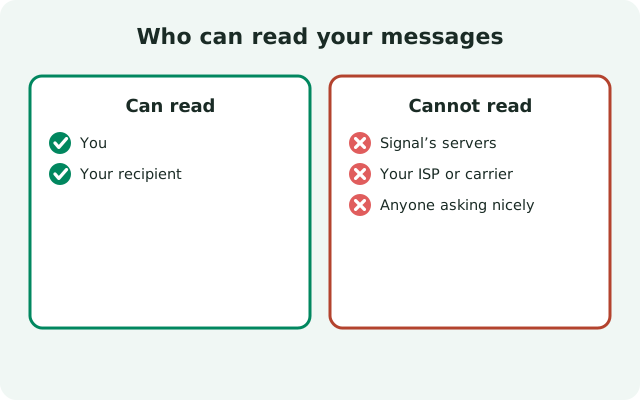
The list of who cannot read them is longer: Signal’s staff, your internet provider, your mobile carrier, anyone snooping on public Wi-Fi, and governments that serve legal orders on Signal’s servers. A court order can force a company to hand over what it has. It cannot force a company to hand over keys it never had.
There is one honest exception, and it is worth understanding. Encryption protects the channel between two devices. It does not control what the person on the other end does with the message. If your contact screenshots the chat, forwards it, or reads it aloud to someone in the room, encryption cannot stop that. Trust in the person is separate from trust in the app, and no encryption scheme fixes a conversation partner who shares what you said.
What does Signal’s server actually see?
Signal’s server is the delivery service. It has to know where each message should go, the same way a postal service needs an address. Here is the honest split between what it sees and what it does not.
| What the server sees | What the server never sees |
|---|---|
| Scrambled, encrypted message data | Your message text, photos, or voice notes |
| Which account a message should be delivered to | Your contacts list in readable form |
| Basic account facts: your number, profile name and photo | Who you talk to, if sealed sender is on |
| When your account last connected | The contents of your calls |
The encrypted blobs are the key point. Signal stores undelivered messages temporarily so they reach you when you come online, but they sit on the server as ciphertext. Signal cannot turn them back into words. For the full accounting of the small amount of data Signal does keep, see the guide on what metadata Signal stores.
How do two phones agree on secret keys?
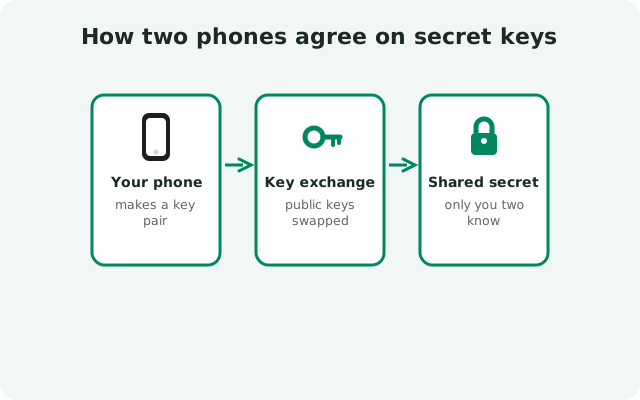
This is the part that sounds like magic until someone explains it plainly. Your phone and your contact’s phone need a shared secret to lock and unlock messages, but they have never met, and the only channel between them runs through a server that must never learn the secret. How do they agree on something in front of a watcher without the watcher learning it?
The public-key handshake
The trick is a public-key handshake. When you install Signal, your phone creates a pair of mathematically linked keys: a public one it can show the world, and a private one it never shares with anyone. Think of the public key as an open padlock you hand out freely, and the private key as the only key that opens it. Anyone can use your padlock to lock a box for you, but only you can open it.
When you message someone new, your app fetches their published public key material from Signal’s server and combines it with your own private keys. Your contact’s app does the mirror-image math with their private keys and your public ones. Both sides land on the same shared secret, yet no secret ever traveled across the network. The server passed along padlocks, and padlocks are useless to a watcher without the private keys.
It works even when the other person is offline
A nice detail: this works even when the other person is offline. Signal’s server holds a small stack of one-time public keys for each user, so your phone can start a secure conversation at 3 a.m. while the other person sleeps. Each one-time key is used once and then thrown away, so it can never be reused by an attacker.
Is Signal protected against quantum computers?
Today's encryption could, in theory, be broken by a powerful enough quantum computer in the future. Signal planned for that: in 2023 it upgraded the first handshake between two phones to PQXDH, which mixes the classic key agreement with a post-quantum algorithm (CRYSTALS-Kyber). An attacker recording your encrypted chats today would need to break both kinds of math to read them later — including math that quantum computers are not expected to crack.
The practical takeaway is simple: this protection is already on. There is nothing to enable and no setting to check. Every new Signal conversation starts with the quantum-resistant handshake automatically.
Why do the keys keep changing?
Agreeing on one secret key would already be good. Signal goes further: it never reuses a key for long. Every message you send gets encrypted with a fresh key, and the key used for the previous message is deleted from your phone.
Why does this matter? Imagine someone steals your phone and extracts today’s key. With a single fixed key, every message you ever sent would open. With Signal’s approach, the attacker gets today’s key and nothing else, because the keys for yesterday’s messages no longer exist anywhere. They were used once and destroyed. Security people call this forward secrecy: a compromise today does not reach backward into your past.
There is a second, deeper rotation on top of this. Every time the conversation goes back and forth, the two phones mix in fresh key material, so even a full break-in heals itself after a few exchanges. The Signal Protocol guide explains these two mechanisms, the per-message ratchet and the per-round-trip ratchet, in more depth.
What are safety numbers, and how do you use them?
Encryption has one quiet assumption: that the keys on the other end of the chat really belong to the person you think you are talking to. A safety number is how you check that assumption. It is a long numeric fingerprint derived from the encryption keys behind one conversation. If the fingerprint matches what your contact sees on their screen, nobody is sitting in the middle.
Checking is simple. Open a chat, view the contact’s safety number, and compare it with what they see. The strongest way is scanning each other’s QR code in person. If you are far apart, read the numbers aloud on a call, or compare them through another channel you already trust. If they match, mark the contact as verified in the app.
If a safety number changes, Signal warns you. Most of the time the reason is boring: your contact got a new phone or reinstalled the app, which generates new keys. The right move is to ask them before assuming the worst. The safety numbers walkthrough covers the exact taps and the judgment calls.
What encryption does not protect you from
Honest encryption guides list the limits. Here are the ones that actually trip people up.
| The belief | The reality |
|---|---|
| Nobody can ever read my messages. | The recipient can read them, screenshot them, or forward them. Encryption secures the channel, not the person. |
| My chats are safe because my phone is locked. | An unlocked phone in someone else’s hands shows everything. Use Signal’s screen lock and your phone’s lock together. |
| Deleting a chat deletes it everywhere. | Deleting on your phone only affects your phone. “Delete for everyone” cannot unsend a screenshot someone already took. |
| Backups weaken everything. | Signal’s Android backups are encrypted with a passphrase you choose. Keep that passphrase somewhere safe and private. |
| Encryption makes me invisible. | Your internet provider can still see that you connect to Signal’s servers. Content is hidden; the fact of using Signal is not. |
Malware deserves its own mention. If your phone itself is compromised, encryption cannot help. That means a malicious app with deep access, or spyware installed by someone with physical access. The attacker reads the messages on the screen before they are encrypted or after they are decrypted. This is true of every messaging app, and it is why device security is part of the privacy picture.
Signal vs SMS vs WhatsApp encryption
It helps to see where Signal sits next to the alternatives you might be comparing it with. Standard SMS has no encryption at all: your carrier stores and can read every text, and the messages travel in the open across carrier networks. Anyone choosing between SMS and Signal is choosing between a postcard and a lockbox.
WhatsApp is the more interesting comparison, because its message encryption genuinely uses the Signal Protocol: the same design described in this guide. Your WhatsApp chats are end-to-end encrypted in the same technical sense. The difference is what surrounds the encryption: WhatsApp collects far more metadata, ties into an advertising business, and its backups have historically been stored unencrypted in the cloud. The Signal vs WhatsApp comparison walks through the full difference, content and metadata both.
The bottom line for beginners: Signal’s encryption seals the content of your conversations between the devices in the chat. The keys change constantly, so old messages stay sealed even if a current key leaks. And safety numbers let you verify the person on the other end. Everything else Signal does, sealed sender, usernames, minimal metadata, builds on this foundation.
Frequently asked questions
Is encryption turned on by default in Signal?
Yes. Every chat, call, photo, and voice note is end-to-end encrypted automatically. There is no setting to enable and nothing to opt into.
Can Signal read my messages if the police ask?
No. Signal does not hold the decryption keys, so there is nothing to hand over. When authorities have demanded user data, Signal has been able to provide only basic account facts like registration and last-connection dates.
What happens if Signal’s servers are hacked?
An attacker would find encrypted message data they cannot decrypt, plus minimal account records. Your conversation contents are not sitting on the server in readable form, because the keys live only on devices.
Do voice and video calls get the same protection?
Yes. Calls use the same end-to-end encryption as messages. The call audio and video are encrypted on your phone and decrypted on the other person’s phone.
How can I check the encryption is real and not just a claim?
Two ways: the code is open source so anyone can inspect it, and safety numbers let you personally verify the keys behind any conversation by comparing them with your contact.
Keep reading
- the deeper design story: Signal Protocol explained
- verify your chats yourself: safety numbers walkthrough
- what the server actually keeps: the metadata guide
- keep your number out of it: usernames vs phone numbers