
Home / Privacy / Group privacy
Who Can See What Inside Your Signal Groups
Published: October 7, 2026 · Updated: October 8, 2026
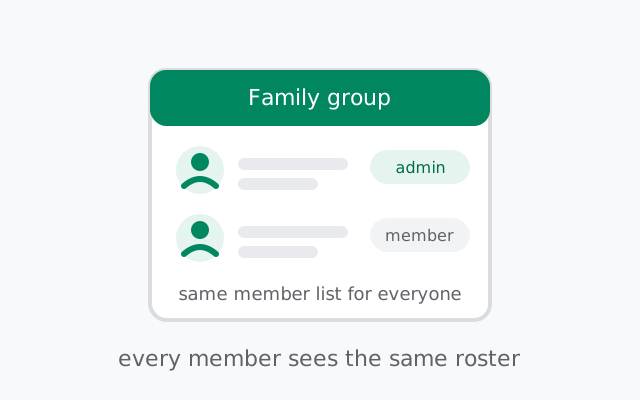
Inside a Signal group, every member sees the same member list: profile names and photos, and phone numbers depending on each person's number-visibility setting. Admins don't get a secret extra view of anything; they see exactly what members see. New members cannot read messages sent before they joined. And anyone holding an active invite link can join, which is why group privacy mostly comes down to who is in the group and how the link is shared.
from Signal's official site — file hosted by Signal, not by us
What every member sees
Join a Signal group and you get the full roster: every member's profile name and photo, an admin badge next to the admins, and each person's phone number, if that person allows it. There is no hidden membership tier. The person who created the group sees the same list as the person who joined yesterday.
What members see of each other, in short:
- Profile names and photos: visible to all members, governed by profile visibility settings.
- Phone numbers: visible only according to each member's own "who can see my number" setting. Your setting protects your number; you can't control anyone else's.
- Who the admins are: the admin badge is visible to everyone in the group.
- Group messages, obviously: everything sent while you're a member, by every member.
The design principle is symmetry: group privacy in Signal is about the boundary around the group (who's in, how they got in), not about different visibility levels inside it. One more detail worth knowing: when a member changes their profile name or photo, the group sees the update. Profiles in groups are live, not frozen at join time. So the name someone joined with isn't necessarily the name they show today. Our groups feature guide covers the mechanics; this page is about the visibility rules.
The number-visibility setting in groups
The single most important group-privacy setting isn't in the group at all. It's your number-visibility setting (Settings > Privacy > Phone Number). It decides who among the people you interact with can see your number:
- Share broadly: your number is visible to people you message and group members.
- Contacts only: only people in your address book see your number; other group members see your profile without it.
- Nobody: your number stays hidden from everyone except people who already have it. In groups, you appear as a profile and username with no number attached.
This is per-person, not per-group: the same setting applies in every group you're in. If you're in groups with strangers (a neighborhood group, a hobby server, a work channel), the restrictive end of this setting is doing real work. The hide-your-number guide walks through the full setup, and usernames are the cleanest way to be reachable in groups without exposing the number at all.
What admins can and cannot do
Admins run the group, but their visibility is the same as everyone else's. What admin powers actually cover:
- Can: add and remove members, promote or demote other admins, change the group name, photo, and description, create and manage invite links, and require approval for people joining via link.
- Cannot: read anyone's one-to-one chats, see a member's hidden phone number, recover messages that were deleted, or view messages from before a member joined. There is no admin dashboard with extra member data.
This is worth stating plainly because people assume otherwise: making someone an admin hands them management powers, not surveillance powers. The member list an admin sees is the same member list you see.
A word on admin approval in practice: when approval is required for link joins, requests land with the admins, who accept or decline each one. It's a small amount of ongoing work for an active group, but it's the only mechanism that keeps a shared link from becoming an open door. For groups where membership genuinely matters (family, work teams, anything sensitive), approval plus a reset link is the standard setup.
Invite links, honestly
An invite link is the weakest point of group privacy, and it's worth understanding exactly why. Anyone holding an active link can join the group. No approval needed unless you've turned approval on. Links get forwarded. They get posted in other chats. They get screenshotted. Every share widens the group beyond the people you chose.
Practical link hygiene:
- Turn the link off when the group is complete. A group that doesn't need new members shouldn't have an open door.
- Reset the link after sharing it widely. Resetting invalidates the old link instantly. Anyone holding the old one is cut off. Do this whenever a link has been forwarded further than you intended. Our invite link guide shows where the reset lives.
- Require admin approval for link joins. With approval on, a link only gets someone to the door. An admin still decides whether they come in.
- Prefer direct adds for sensitive groups. Adding members by number or username keeps the roster exactly the people you chose, with no link floating around.
New members start fresh
Someone who joins your group today cannot read what was sent last week. New members see the conversation from the moment they join. No pre-join history, no backlog, no "catch up on what you missed" archive. This is a genuine privacy property of Signal groups, and it means adding someone is a forward-looking decision only.
The mirror image, stated honestly: removing someone doesn't delete what they already saw. A removed member keeps every message, photo, and file from their time in the group. Disappearing timers (see our disappearing messages limitations guide) shrink this exposure, but the basic rule stands. Once someone has seen it, group membership can't take it back.
Who sees what: the full picture
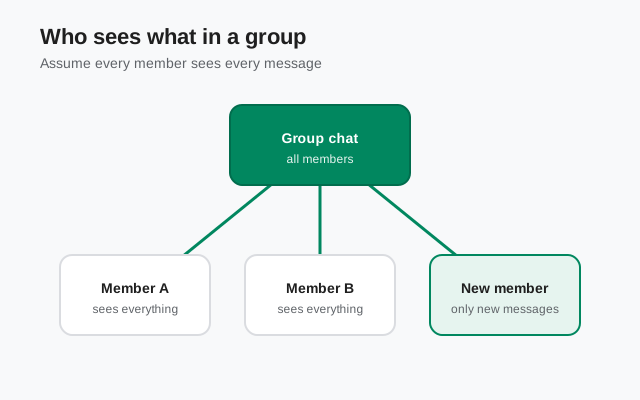
| Item | Regular members | Admins | New members (pre-join) |
|---|---|---|---|
| Member list | Yes | Yes. Same list | Only after joining |
| Profile names & photos | Yes | Yes | Only after joining |
| Phone numbers | Per each person's visibility setting | Same. No extra access | Only after joining |
| Messages sent after joining | Yes | Yes | Yes, from join time |
| Messages sent before joining | n/a | n/a | No |
| Other members' one-to-one chats | No | No | No |
Frequently asked questions
Can new members see old group messages?
No. New members see the conversation only from the moment they join. Messages sent before they joined are not visible to them. There is no pre-join history in Signal groups.
Can group admins see my phone number if I hide it?
No. Admins see the same member list as everyone else, and your number-visibility setting applies to them too. Admin powers cover group management, not member surveillance.
If I'm removed from a group, do my messages disappear?
Your messages stay visible to the remaining members. Removal stops you seeing new messages. It doesn't retract what you sent or what others already received.
Who can join with a group invite link?
Anyone holding an active link can join, unless you've enabled admin approval for link joins. Links can be forwarded, so reset the link whenever it has traveled further than you intended.
Can group members see my profile photo?
Yes. Profile names and photos are visible to all group members. Number visibility is the setting you control; profile visibility in groups is not separately restricted.
Can I hide who I am in a group?
Not fully. Members see your profile name and photo, and your number according to your visibility setting. A username plus restrictive number visibility is the closest Signal gets to pseudonymous group membership.
If I change my phone number, what do groups see?
Changing numbers is effectively a new account from the group's perspective. Your old membership doesn't carry over. You'll need to be re-added, and your old messages stay under the old identity.
Group hygiene checklist
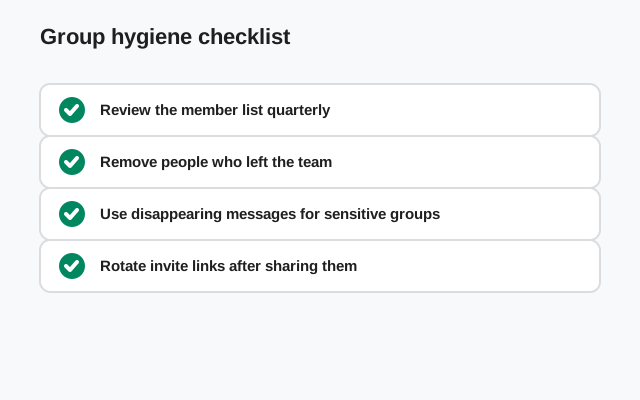
- Set your number visibility before joining stranger-heavy groups. Contacts-only or nobody keeps your number out of rosters you don't control.
- Audit the member list occasionally. Groups accumulate people. If someone shouldn't be there anymore, remove them. Sooner is better, since removal can't retract what they've seen.
- Reset the invite link after any wide sharing. Treat every forwarded link as compromised and mint a fresh one.
- Use disappearing timers in groups that discuss sensitive things. It doesn't fix screenshots, but it bounds how much a removed member or a lost phone carries away.
- Keep admin count small. Every admin can add members and change the link. Admin is a trust position. Hand it out like one.
When a group is the wrong container
Some conversations shouldn't be in groups at all. A sensitive one-to-one topic discussed in a 40-person group is exposed to 40 notification previews, 40 screenshot buttons, and 40 people's judgment about forwarding. If the audience doesn't need to be everyone, move it to a direct chat. Group privacy in Signal is good. The member list is symmetric and history doesn't leak backward, but the strongest privacy control is still a smaller audience. When in doubt, default to the direct chat and promote the conversation to a group only when it genuinely needs one.
Keep reading
- Signal groups: the full feature mechanics of groups
- Group invite links: creating, resetting, and disabling links
- Group admins: admin powers and how to manage them
- Hide your phone number: the setting that matters most in groups
- Disappearing messages limitations: what timers can't protect in groups
from Signal's official site — file hosted by Signal, not by us