
Signal Call Privacy: IP Hiding & Relay Call Options
Published: October 7, 2026 · Updated: October 8, 2026
Every Signal call, voice or video, one-to-one or group, is end-to-end encrypted: Signal's servers carry audio and video they cannot decrypt. But encryption covers content, not connection setup. In a normal one-to-one call, your phone connects directly to the other person's phone, and both sides learn each other's IP address, which can reveal your rough location. Always relay calls routes the call through Signal's server instead, keeping your IP hidden from the other person at a small quality cost.
from Signal's official site — file hosted by Signal, not by us
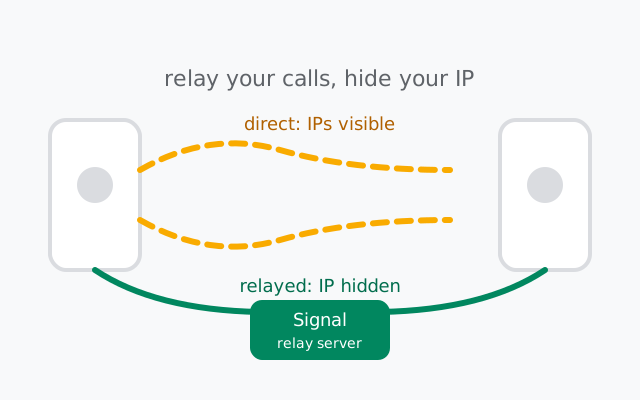
What's protected in a Signal call
The audio and video of every Signal call are end-to-end encrypted: voice calls, video calls, and group calls alike. The encryption is set up between the participants' devices, which means Signal's servers forward packets they cannot decrypt, your internet provider sees only encrypted traffic, and nobody in the middle can listen in. Our encryption explainer covers the underlying design.
That's the content. The connection is a separate question. It's where IP addresses enter the picture.
One honest boundary: the server routes the call, so it necessarily knows a call is happening between two accounts at a given time. That's the unavoidable minimum for connecting any call on any service. What it doesn't get is the content of the conversation. Encryption protects what you say; the sections below are about protecting where you're calling from.
How a direct call reveals your IP
By default, a one-to-one Signal call tries to connect your phone directly to the other person's phone. To build that direct path, the two phones exchange network addresses. That's simply how the internet finds devices. Your IP address goes to their phone; theirs comes to yours.
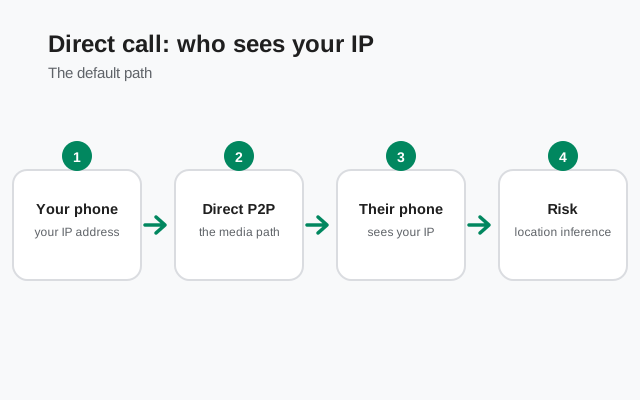
Why that matters: an IP address typically reveals your rough location (city or region level) and your internet provider. For calls with people you know and trust, this is usually a non-issue: they likely know where you live. For calls with strangers, new contacts, or anyone you'd rather not hand location clues to, it's a genuine privacy leak. This isn't a Signal bug; it's how direct internet connections work everywhere. But it's worth knowing it's happening, because nothing in the call screen tells you.
What exactly can someone do with your IP? The realistic version, not the movie version: look up the rough geographic area and the ISP and, combined with other information, narrow down where you are. They can't get your street address from an IP alone, and they can't listen to the encrypted call. The risk is location inference, and it matters most for people who have reasons to keep their location private: journalists protecting sources, people avoiding harassment, anyone calling from somewhere they'd rather not advertise.
Always relay calls: what changes
The setting lives at Settings > Privacy > Advanced > Always relay calls. Turning it on changes the call path completely:
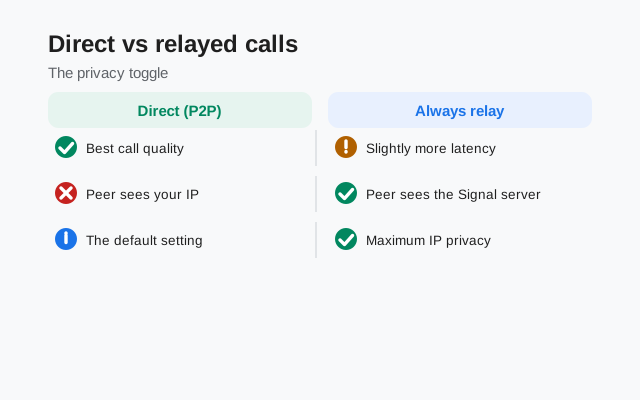
- Both phones connect to Signal's server instead of to each other. The server forwards the encrypted audio between them.
- The other person sees Signal's server IP, not yours. Your IP address never reaches their phone.
- Signal still can't hear the call. Relaying changes the route, not the encryption. The audio stays end-to-end encrypted, and the server forwards ciphertext it cannot decrypt.
The cost is modest but real: slightly higher latency (your audio takes a detour) and a bit less bandwidth headroom, which can matter on weak connections. Relay mode also helps calls connect through strict networks (offices, campuses, some mobile carriers) that block direct phone-to-phone connections. The relay calls guide covers the mechanics and the network side in detail.
Turning it on takes ten seconds:
Open Signal's settings
Tap your profile picture, then Settings.
Go to Privacy, then Advanced
The call settings live under Privacy > Advanced, alongside the other low-level toggles.
Enable "Always relay calls"
Flip the toggle. Every one-to-one call from now on routes through Signal's server. No per-call decision needed.
There's no visible indicator during a call, so if you're the careful type, toggle it and make a test call to a trusted contact, then leave it on and forget about it.
Calls that are always relayed
Here's the part many people miss: Signal automatically routes calls through the relay when the caller isn't in your contacts. If a stranger calls you, your IP was never exposed to them. The relay was already in play. The IP-exposure question therefore matters most for people who are in your contacts: acquaintances, colleagues, anyone whose number you've saved but whose trust you haven't fully weighed.
Two myths about call privacy
Myth 1: "My calls are encrypted, so they're anonymous." Encryption and anonymity are different things. Encryption hides what you say. It doesn't hide who you're talking to from the other participant, and in a direct call it doesn't hide your network address either. A fully encrypted call with a stranger still tells that stranger your IP.
Myth 2: "Relay mode makes my calls untraceable." Relay hides your IP from the other person. That's all it claims to do. Signal's server still routes the call, and your provider still sees encrypted traffic to Signal. Relay is a targeted fix for a specific leak (your IP reaching the other phone), not a cloak of invisibility. It's honest about its limits, which is why it's trustworthy.
Relay on or off: the decision
| Your situation | Setting | Why |
|---|---|---|
| Calls work fine; you call people you trust | Leave it off | Best quality, and IP exposure to trusted people is harmless |
| You care about hiding your IP / location | Turn it on | The only built-in way to keep your IP from call participants |
| Frequent calls with strangers or new contacts | Turn it on | Non-contacts are auto-relayed anyway; this covers the contacts you don't know well yet |
| Calls fail on specific networks | Try it on | Relay punches through networks that block direct connections |
| You're on a very weak connection | Try it off first | Direct calls have slightly lower latency when they work |
Frequently asked questions
Can Signal listen to my calls?
No. Call audio and video are end-to-end encrypted between the participants' devices. Signal's servers forward encrypted packets they cannot decrypt. Relaying a call changes the route, not who can hear it.
Does the other person see my IP on a Signal call?
On a normal one-to-one call, yes. The phones connect directly and exchange network addresses, so both sides learn each other's IP. Turn on Always relay calls (Settings > Privacy > Advanced) to route through Signal's server instead, hiding your IP from the other person.
Does Always relay calls hurt call quality?
Slightly. Routing through the server adds a little latency and reduces bandwidth headroom, which can matter on weak connections. Most people on decent networks won't notice a difference.
Are group calls relayed too?
Group calls already pass through Signal's server by design, so the direct-connection IP exposure described here is a one-to-one call issue. Relay mode mainly matters for your one-to-one calls.
Do I need a VPN for Signal calls to be private?
No. Call content is end-to-end encrypted with or without a VPN. A VPN only adds IP hiding from Signal and your provider. Always relay calls already hides your IP from the other participant with a single toggle.
Can my mobile carrier see that I'm on a Signal call?
Your carrier can see encrypted traffic going to Signal's servers during a call, but not who you're calling or what you're saying. Hiding the fact that you use Signal at all is what VPNs and proxies are for. See our censorship circumvention guide.
Does relay mode hide my phone number too?
No. Relay hides your IP address, not your identity. The other person still sees your profile and number according to your visibility settings. For number privacy, see our guide to hiding your phone number.
VPNs and Signal calls: what changes, what doesn't
A VPN hides your real IP address from everyone on the call, including Signal's server, whether or not relay mode is on. That's the one thing it adds. What it doesn't change: call content was already end-to-end encrypted, so a VPN adds no meaningful protection to what you say. And it doesn't hide call metadata like when calls happen from Signal itself.
Practically: if your concern is specifically "the other person shouldn't learn my IP," Always relay calls solves it inside the app with one toggle. A VPN is the heavier tool, useful if you also want to hide your Signal usage from your internet provider, which is a different question covered in our censorship circumvention guide. No brand recommendations here; any reputable VPN does the same job for this purpose.
A note on group calls
Group calls already pass through Signal's server. There's no direct phone-to-phone mesh exposing every member's IP to every other member. The IP-exposure question in this guide is specifically a one-to-one call issue. If most of your calling is in groups, relay mode changes little for you.
Keep reading
- Always relay calls: the mechanics and network side of relaying
- Signal voice calls: the full voice-calling feature guide
- Signal video calls: video calling features and settings
- Censorship circumvention: hiding Signal usage from your network
- How Signal encryption works: the encryption behind calls and messages
from Signal's official site — file hosted by Signal, not by us