
Signal Beta vs Stable: Which Should You Install?
Published: October 7, 2026 · Updated: October 8, 2026
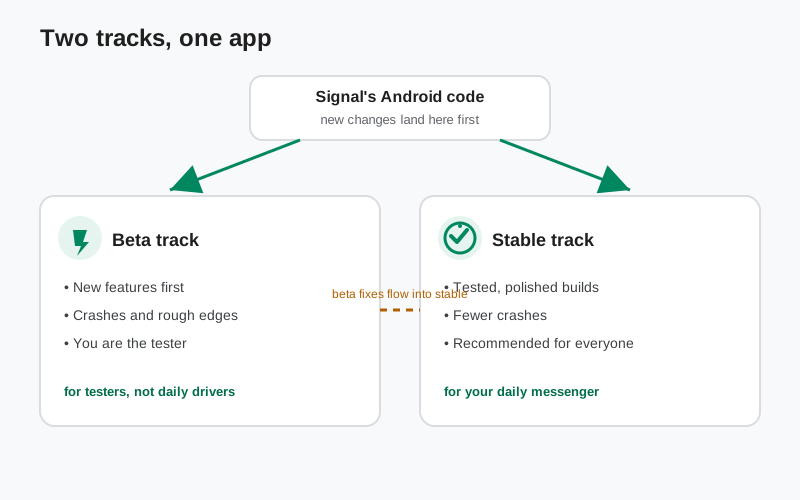
The two tracks, in plain words
Signal's Android app ships on two tracks. Stable is the build Signal recommends for everyone: it is the listing on the Play Store and the APK file on Signal's download page. Beta is the pre-release track: builds that are feature-complete but not finished being tested. You can spot them on the official GitHub releases page, where they are marked “Pre-release” above the stable ones.
Right now the two tracks carry different version numbers: 8.29.3 is the current stable website build, while the 8.30.x and newer pre-releases exist only as beta. That is normal. The beta is always one step ahead, because that is its job: it carries the next release while it is still being tested. Check which build is current right now whenever the numbers confuse you.
If you use the website APK from Signal's download page, you are on the stable track by definition. The beta is a Play Store path: you enroll through Signal's beta page and receive beta builds as updates through the Play Store. The other official beta route is the pre-release APKs on Signal's GitHub releases page: anything offered anywhere else is not official, and keeping that fact handy is the single best defense against fake “beta APK” downloads. The full beta program guide covers enrollment in detail.
The real differences that matter day to day
Marketing language says “early access.” Here is what that actually feels like on your phone:
- Crashes. Beta builds crash more often. Usually the app just closes and you reopen it; your account and messages survive. But crashes happen at annoying times, because real life is when you use a messenger. If a beta build keeps crashing, that is the beta doing its job. Badly for you, usefully for everyone else.
- Battery and speed. Unfinished code can be inefficient. A beta build may run your phone warmer or drain the battery faster than the stable build of the same week. If you notice it, report it. That is exactly the kind of thing beta testing exists to find.
- Features first, finished later. Beta testers try features well before everyone else. Signal Login, the option to register without a phone number, was beta-tested in 8.28 before most users ever saw it. But beta features are drafts: buttons move, behavior changes, and some experiments never ship. If you need a feature to work exactly as documented, wait for stable.
- Fixes flow one way. Bugs found in beta get fixed in the stable release. The beta line does not get its own long-term support. Once a version graduates to stable, the old beta is done.
- You are expected to report. Nobody will chase you, but the beta only works if testers report what breaks. Signal's GitHub issue tracker is the official channel.
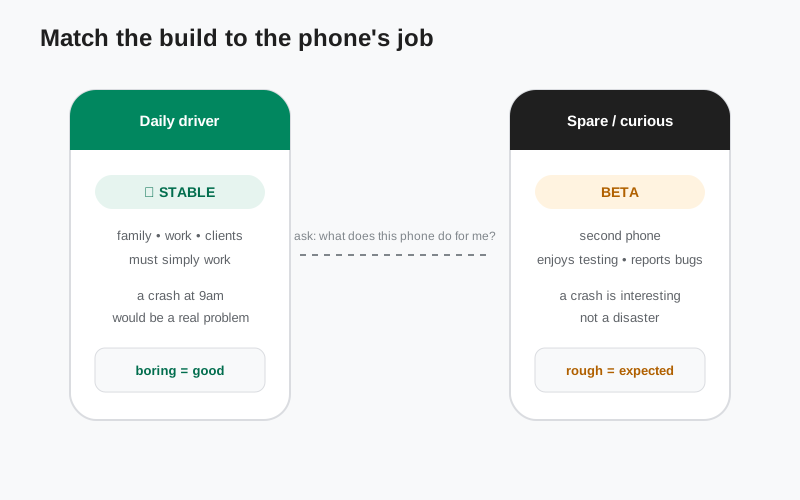
Who the beta is actually for
The beta is a great fit for a few specific people. If you recognize yourself, welcome in:
- The curious tester. You like seeing what is coming, you don't panic when an app misbehaves, and you actually file bug reports. This is the person the beta is built for.
- The second phone. Your spare or old phone runs beta Signal while your main phone stays on stable. Best of both worlds, and the safest setup of all.
- The tinkerer. You follow development, read release notes, maybe even read the code. The full version history is light reading for you. The beta is your natural habitat.
And it is a bad fit for:
- Anyone whose day breaks if Signal breaks. If this phone is your only phone and Signal is how clients, family, or sources reach you, stable is the answer. A crash during an important call is not a fun story.
- High-stakes communication. If you rely on Signal for safety-critical conversations (reporting, activism, anything where a missed message has real consequences), don't add avoidable risk. Stable is already privacy-strong; the beta adds nothing you need and removes reliability you do need.
- People who just want it to work. No shame in that. Most people should be on stable, including most people reading this guide.
How to join without getting burned
Join only through Signal's own beta page, which leads to the Play Store testing program. The step-by-step enrollment, the backup checklist, and the full risks run-through live in the Android beta program guide: that page is the canonical how-to, and this decision page does not repeat it.
Switching back to stable
Leaving the beta through the Play Store is straightforward. Open the same Play Store testing page, leave the program, and the Play Store will offer you the stable build again. Because the beta and stable Play builds share the same package name and signing key, installing stable over beta keeps your data, same as any ordinary update.
Two catches worth knowing. First, Android refuses to install an older version number over a newer one. If the beta you are running has a higher version number than the current stable, the Play Store handles the switch by doing a full reinstall of the stable build. That is common, since the beta line always runs ahead of stable. That reinstall wipes app data. That is why the backup step is not optional. Second, if you came from the website APK: the website build and the Play build are signed with different keys, so you cannot install one over the other at all. Switching channels means backup, uninstall, reinstall. The guide to moving between the website and Play builds walks through it.
A useful middle path: if you only want to follow what the beta is testing without installing it, watch the GitHub releases page. Every pre-release is listed with its notes. Reading along is free, instant, and risk-free.
The decision, in one table
| Your situation | Pick | Why |
|---|---|---|
| This is my only phone; Signal is my daily messenger | Stable | A crash here costs you real conversations. |
| I have a spare phone and enjoy testing | Beta | You get features first and your main phone stays safe. |
| Signal is how my clients or work reach me | Stable | Reliability is part of your job. |
| I want new features the moment they exist | Beta (spare phone if you can) | That is literally what the channel is for. |
| I rely on Signal for sensitive or safety-critical chats | Stable | The beta adds risk you don't need. |
| I use the website APK and have no Play Store | Stable | The beta is a Play Store path; the website file is stable-only. |
| I just want the app to work, zero fuss | Stable | This is most people, and that is fine. |
from Signal's official site, file hosted by Signal, not by us
Frequently asked questions
Can I run beta and stable on the same phone?
No. Both are the same app package (org.thoughtcrime.securesms), and Android will not install the same package twice. One phone, one channel. Pick, or use two phones.
Will the beta delete my messages?
Installing a beta build over your current app keeps your data. But beta software is the one thing you should not trust blindly. Keep a current backup so the question never matters.
Does the beta cost anything?
No. Joining and using the beta is free. (Individual beta features can have their own costs: the Signal Login beta asks a small one-time anti-spam fee. The beta channel itself is free.)
I'm on the website APK. Can I join the beta?
Not directly. The beta comes through the Play Store after enrollment, and the website build and Play build use different signing keys. To switch, you would back up, uninstall, and reinstall via Play. Or simply stay on stable. The website file is the stable release.
How long does a version stay in beta?
Until it is ready. Typically a few weeks of testing and fixes, then it graduates to stable and the next beta begins. There is no fixed calendar; how Signal's release rhythm works explains the pattern.
Related guides: the full beta program guide · which build is current right now · every version in order · what's in the 8.30 beta · how often Signal ships updates · the stable download guide · back up before switching channels · the beta APK install walkthrough