
Signal Message Reactions: Emoji How-To Guide
Published: October 7, 2026 · Updated: October 8, 2026
Reactions are the fastest reply in Signal: a thumbs-up, a heart, a laugh. No typing needed. This guide covers how to react, how to change or remove a reaction, who gets notified, how reactions behave in groups, and what happens to them when messages disappear.
from Signal's official site — file hosted by Signal, not by us
How to react to a message
Reactions work on any message: text, photos, voice notes, links. The gesture is the same everywhere:
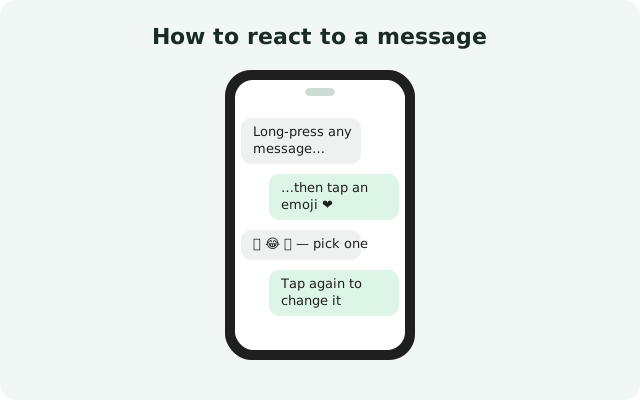
Long-press the message
Press and hold the message until a row of emoji appears above it.
Tap an emoji
Tap the one you want. It attaches to the message instantly and the other person is notified.
Your reaction shows up as a small emoji under the message, with a count if several people reacted the same way. Tapping the reaction area opens the full list of who reacted with what. Useful in groups where five people all hit thumbs-up.
Reactions work on your own messages too. People sometimes react to their own message to pin an emotion to it or to acknowledge something in a group without adding another message to the pile.
Change or remove your reaction
Picked the wrong emoji, or your mood changed? Both are easy to fix:
- Change it: long-press the message again and tap a different emoji. The new one replaces your old reaction. You only ever have one reaction per message.
- Remove it: tap the reaction shown under the message to open the reactors list, then tap your own reaction to take it back. The emoji disappears from the message.
There is no "reaction history" and no undo dance: change and remove are one tap each. If you removed a reaction by accident, just react again.
Who sees reactions
Reactions are as visible as the message they sit on. Who sees them depends on the chat:
| Chat type | Who sees your reaction |
|---|---|
| One-to-one chat | Only the other person, plus you of course |
| Group chat | Every member of the group can see who reacted with which emoji |
| Your own message | Whoever can see the message can see reactions on it |
In groups, the reactors list is public to the group. A heart reaction in a 200-person group is visible to all 200 people. That is usually fine. It is also why the next section exists.
Reactions do not bypass any privacy setting. If someone cannot see the message, they cannot see its reactions either. And like messages themselves, reactions are end-to-end encrypted in transit.
Reaction notifications
When you react to someone's message, they get a notification about it, typically showing which emoji you used and on which message. This is what makes reactions feel alive in a conversation instead of silent.
A few practical notes:
- In busy groups, every reaction can ping the sender. Reacting to ten messages in a row sends ten notifications. In a quiet one-to-one chat that is friendly; in a big group it can be a lot.
- You can manage them. If reaction pings annoy you, check Signal's notification settings, where reaction notifications can be toned down or turned off on your side.
- Removing a reaction takes the emoji off the message, but it does not unsend a notification the other person already saw.
Reactions and disappearing messages
A reaction is attached to its message. It is not a separate message of its own. That has one direct consequence: when the message disappears, its reactions disappear with it. In a chat with a disappearing-message timer, reacting does not rescue the message or extend its life.
The reverse is also worth knowing: you can react to a disappearing message while it is still there, and the reaction lives exactly as long as the message does. Nothing about reactions changes how timers work.
Which emoji to use when
There is no official dictionary, but reactions have settled into common meanings across chat apps. Here is the unofficial field guide:
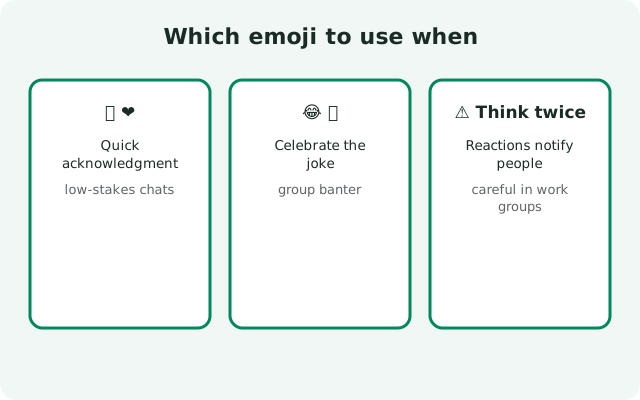
- Thumbs-up: agreed, ok, got it, will do. The workhorse: safe almost everywhere.
- Heart: thanks, love this, sending support. Warm but can feel personal in formal chats.
- Laughing face: that is funny. Just make sure the sender was joking.
- Surprised face: wow, I did not know that. Good for news and announcements.
- Sad face: sympathy, that is rough. Better than silence when someone shares bad news.
One reaction per message is the norm. Stacking three different emoji on one message reads as noise, not enthusiasm. And in professional chats, the thumbs-up alone carries 90% of what you need. It is the "acknowledged" of messaging.
Reactions on photos, voice notes, and links
Reactions are not text-only. You can long-press and react to photos, videos, voice notes, files, and shared links: anything that arrives as a message bubble.
This is quietly useful. Reacting to a photo says "saw it, love it" without a comment. Reacting to a voice note says "listened to the whole thing." The sender knows you did not just glance at the waveform. Reacting to a link says "noted, will read" without committing to a discussion about it.
The same visibility rules apply: a reaction on a photo in a group is visible to the whole group, and it disappears with the message under a timer. Media reactions are just reactions wearing a different outfit.
Reactions worth thinking twice about
Reactions are casual, but they still communicate. Three situations deserve a second thought:
- They confirm you saw it. A reaction is a read receipt with feeling. Reacting to a message you were "too busy" to answer tells the sender you saw it and chose an emoji over a reply.
- Groups remember. In a work or community group, your reactions are visible to everyone and they linger. A laughing emoji on the wrong message in a serious thread is hard to explain away, though you can always remove it.
- Emoji can misfire across cultures. A thumbs-up is agreement in most places and rude in a few. When chatting across cultures, words are safer than symbols.
Used well, reactions cut chat clutter enormously: a thumbs-up instead of "ok", a heart instead of "thanks!". For the times an emoji is not enough, the groups guide and stories guide cover the louder tools in the Signal features hub.
FAQ
How do I react to a message on Signal?
Press and hold (long-press) the message until an emoji row appears, then tap the emoji you want. Your reaction shows under the message.
How do I remove a reaction on Signal?
Tap the reaction displayed under the message to see who reacted, then tap your own reaction to remove it. Or long-press the message and change it.
Can I change my reaction to a different emoji?
Yes. Long-press the message again and pick a new emoji; it replaces your old reaction instead of adding a second one.
Do people get notified when I react to their message?
Yes, the sender is notified when someone reacts to their message. You can manage reaction notifications in the notification settings.
Can I react to messages in group chats?
Yes, and everyone in the group can see who reacted with which emoji.
Do reactions disappear with disappearing messages?
A reaction is attached to its message, so when the message disappears, its reactions go with it.
Can I see who reacted to a message?
Yes. Tap the reaction shown under the message to open the full list of who reacted and with which emoji.
Do reactions work on photos and voice notes?
Yes. You can react to any message type: text, photos, videos, voice notes, files, and links.
Keep reading
- groups guide: reactions in big group chats
- disappearing messages guide: what happens to reactions on timers
- stories guide: 24-hour posts with audience controls
- sticker packs guide: expressive extras for chats