
Molly on GrapheneOS: the Google-free messaging setup that works
Published: October 7, 2026 · Updated: October 8, 2026
Molly-FOSS is the build made for phones without Google services, which makes it the natural messaging pick on GrapheneOS. GrapheneOS is an Android-based operating system built for privacy and security, and it runs perfectly well with no Google apps or Play services installed. Standard Signal and standard Molly both need Google's push service for notifications, so on a Google-free phone their notifications break. Molly-FOSS removes that dependency and uses UnifiedPush instead, so messages arrive without Google ever touching the path. It is the privacy-maximum setup, and it asks a bit more of you than the normal app. This guide covers which build to install, how to get it from Molly's own F-Droid repository, and how notifications work without Google.
Why GrapheneOS and Molly-FOSS fit each other
GrapheneOS is a mobile operating system built on the Android Open Source Project, and privacy and security are its whole reason to exist. One of its core ideas is that Google Play services are optional, not mandatory. You can install a sandboxed version of Google Play on GrapheneOS if some app demands it. But you don't have to, and many GrapheneOS users choose exactly that: a phone with no Google account, no Play Store, and no Google apps.
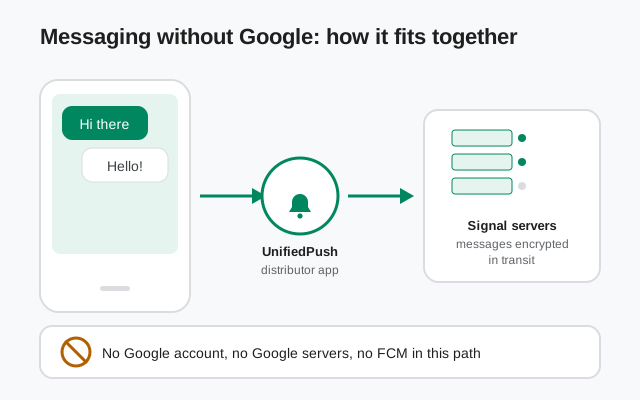
That choice breaks most messaging apps in one specific way: push notifications. On a regular Android phone, when a message arrives, Google's Firebase Cloud Messaging wakes the app up. Take Google out of the phone and that wake-up call has nowhere to come from. Official Signal has no answer for this situation. It assumes Google's push service is present, because on almost every phone it is.
Molly-FOSS is the answer. Molly is an independent fork of Signal. It is not official and not affiliated with Signal Foundation, and its FOSS build strips out the proprietary Google components, including the push library, replacing them with UnifiedPush, an open push standard. On GrapheneOS, Molly-FOSS gives you a full messenger on the Signal network with zero Google in the loop: no Google account, no Google servers, no proprietary Google code inside the app. If you want the broader story of the fork first, start with what Molly is.
The pairing is popular in privacy circles for a simple reason: both projects refuse the same deal. GrapheneOS refuses the deal that your operating system must include Google's services. Molly-FOSS refuses the deal that your messenger must include Google's push library. Put them together and neither side of the pair phones home to Google. But let's be clear about what you're signing up for: this is the advanced-user setup. There are more moving parts than a normal app install, and when something misbehaves (usually notifications), you're the one who fixes it. The rest of this guide walks through each part so there are no surprises.
Which build to install: FOSS, not standard
Molly ships in two builds, and on GrapheneOS the choice is already made for you. The FOSS build is the one that works without Google services. Standard Molly keeps Google's push library, which means on a Google-free phone it has no way to wake up for incoming messages. You'd get messages only when you open the app yourself. Here's the comparison:
| Molly-FOSS | Standard Molly | |
|---|---|---|
| Push without Google | Yes: UnifiedPush | No: needs Google's FCM |
| Proprietary Google code | None | Includes the FCM library |
| Works on GrapheneOS without Play | Yes | Only with sandboxed Google Play added |
| Get it from | molly.im or Molly's own F-Droid repo | molly.im |
| Best for | Google-free phones (GrapheneOS, Huawei, de-Googled ROMs) | Phones that already have Google services |
On GrapheneOS without Google services, install Molly-FOSS. Full stop. If you're still weighing the two builds in general, the FOSS vs standard comparison goes deeper. And one honest note: if you do run GrapheneOS with sandboxed Google Play installed, as some people do for banking apps, then standard Molly with FCM will give you slightly more reliable notifications. The FOSS build is the right call when Google is genuinely absent, not as a statement.
Installing from Molly's own F-Droid repo
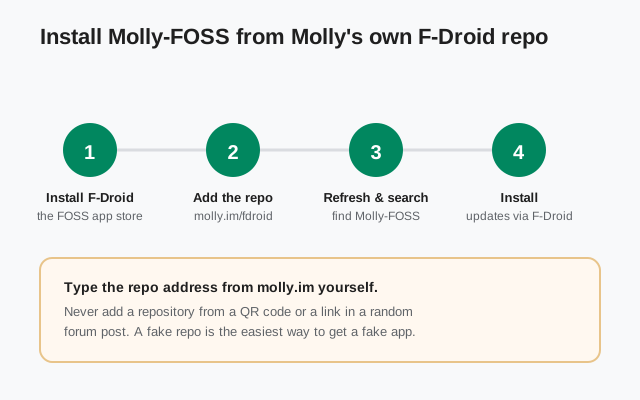
The cleanest way to get Molly-FOSS on GrapheneOS is through F-Droid, the app store for free and open-source Android software. Molly publishes its own F-Droid repository, which matters: instead of downloading APK files by hand every time there's an update, you add Molly's repo once and F-Droid handles updates like any other app. The safe Molly install walkthrough covers the general install path; here are the GrapheneOS-specific steps:
Step 1: install F-Droid. Download it from f-droid.org and install it on your GrapheneOS phone. This is the only APK you'll need to sideload by hand.
Step 2: add Molly's repository. In F-Droid, open Settings, then Repositories, and add https://molly.im/fdroid: that's Molly's own repo address, published on molly.im. Type it yourself from the site rather than trusting a QR code or link from a forum post. A fake repository is the easiest way to end up with a fake app.
Step 3: refresh and search. Let F-Droid refresh its repository list, then search for "Molly-FOSS". Make sure you're installing the FOSS build, not the standard one. The names look similar at a glance.
Step 4: install. Tap install and grant whatever permissions Molly asks for. That's it: from now on, updates arrive through F-Droid.
The alternative is downloading the APK directly from molly.im and installing it by hand. That works fine, but updates become your job: you have to check for new releases and install them yourself. Given that messaging apps update often, and security updates are the ones you least want to miss, the F-Droid repo route is worth the two extra minutes of setup. Either way, keep Molly current; the Molly update guide explains the options if you ever switch methods.
Notifications via UnifiedPush on GrapheneOS
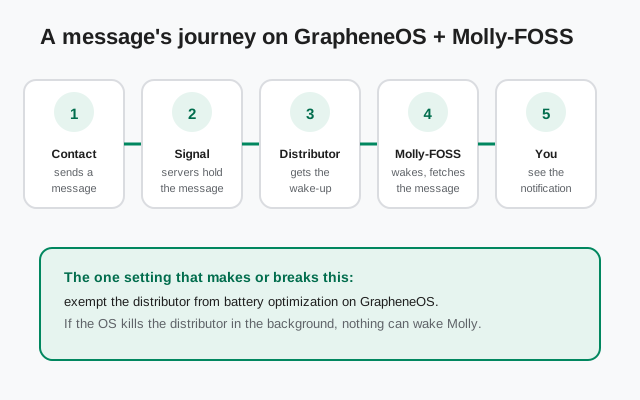
With no Google push service, something else has to hold the connection that wakes Molly when a message arrives. That something is UnifiedPush, an open standard for push notifications, and a small distributor app on your phone that implements it. The full explanation lives in our UnifiedPush guide; here's the GrapheneOS version in short.
Install a UnifiedPush distributor app first: one widely used example is ntfy, but any distributor that implements the UnifiedPush standard works, and Molly's own documentation on molly.im lists currently compatible options. The distributor holds a persistent connection and passes wake-up signals to Molly. Your message content never goes through the distributor. It only learns that something arrived. The message itself travels through Signal's servers, encrypted with the Signal protocol, exactly as always.
Then, in Molly-FOSS, open the notification or push settings and choose UnifiedPush, and register with your distributor. The step people skip, and then regret, is the battery exemption: on GrapheneOS, open the system settings, find the distributor app, and exempt it from battery optimization. GrapheneOS respects that exemption, which is one reason this setup is more reliable here than on stock phones whose manufacturers kill background apps regardless of your settings. If the OS kills the distributor in the background, nothing can wake Molly, and your symptom will be messages that arrive fine when you open the app but no notifications while the phone sleeps.
Finally, test with a real message before you rely on it: send yourself a message from another device while the phone's screen is off, and confirm the notification arrives within seconds. If it doesn't, the battery exemption is the culprit nine times out of ten. Keep the distributor updated like any other app. It's now part of your notification chain.
What changes compared to a normal phone
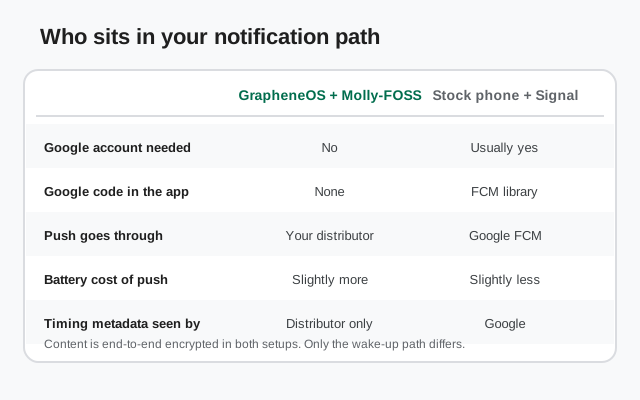
Day to day, Molly-FOSS on GrapheneOS feels like Signal. You register with your phone number, your chats are end-to-end encrypted with the Signal protocol, and you talk to everyone on the Signal network. The fork doesn't split the network. What changes is everything around the app:
No Google account, ever. Nothing in this setup asks you to sign in to Google, because there's nothing Google-shaped left to sign in to. Your phone, your messenger, and your push path are all Google-free.
Your notification metadata stays out of Google's hands. On a normal phone, Google's push servers learn the timing and frequency of your incoming messages: not content, but when you're being contacted. With UnifiedPush, that metadata goes to your distributor instead. It's still metadata, and you should pick a distributor you trust, but the circle of who sees it is much smaller and entirely your choice.
Slightly more battery use. A distributor holding its own connection costs a bit more power than sharing the system's single FCM connection. On modern phones the difference is modest (you won't halve your battery life), but it's real, especially in weak-signal areas where the radio works harder.
You own the maintenance. GrapheneOS updates, F-Droid updates, distributor updates, Molly updates: all separate, all yours to keep current. None of it is hard; there's just more of it than a Play Store phone where one store updates everything.
None of this is a reason to avoid the setup. It's the price of the privacy, stated plainly. GrapheneOS users chose the OS knowing exactly this tradeoff; Molly-FOSS is simply the messenger that matches the philosophy.
The honest tradeoffs
Let's close with the sentence most guides like this won't write: this setup is not for everyone, and that's fine. GrapheneOS plus Molly-FOSS is the privacy-maximum messaging setup on Android, and it is also the highest-maintenance one. You're running a distributor app, keeping a separate app store current, and debugging your own notifications when they stall. If your threat model is "I want private chats with zero fuss," a normal phone with official Signal is the better choice. It's simpler, its notifications just work, and the encryption of your messages is identical.
The people this setup is for are the ones who've decided, as a matter of principle or threat model, that Google doesn't belong on their phone at all, and who accept the maintenance as the cost. If that's you, Molly-FOSS on GrapheneOS delivers: a hardened OS, an independent FOSS messenger, and a notification path with no Google in it. Just go in with eyes open, exempt the distributor from battery optimization, and test notifications with a real message before you depend on them.
from Signal's official site — file hosted by Signal, not by us
Bottom line: on a Google-free GrapheneOS phone, Molly-FOSS isn't a compromise. It's the build the fork was made for. Install it from Molly's own F-Droid repo, set up UnifiedPush with a distributor you trust, exempt that distributor from battery optimization, and you get Signal-network messaging with no Google anywhere in the path. A little more maintenance, a lot less Google.
Frequently asked questions
Does Molly-FOSS work on GrapheneOS without any Google services?
Yes. That's exactly what the FOSS build is for. It replaces Google's push library with UnifiedPush, so notifications work with no Google account, no Google servers, and no proprietary Google code in the app.
Which Molly build should I install on GrapheneOS?
Molly-FOSS. Standard Molly needs Google's FCM for push notifications, which doesn't exist on a Google-free GrapheneOS phone. You'd only get messages when you open the app. FOSS is the build made for this setup.
How do notifications work without Google?
Through UnifiedPush: a small distributor app on your phone holds a persistent connection and wakes Molly when a message arrives. The distributor never sees message content, only the wake-up signal. You must exempt the distributor from battery optimization or notifications will stall.
Can I install Molly from F-Droid on GrapheneOS?
Yes. Molly publishes its own F-Droid repository at molly.im/fdroid. Add it in F-Droid's repository settings, refresh, and install Molly-FOSS. Updates then arrive through F-Droid like any other app.
Is GrapheneOS plus Molly-FOSS hard to maintain?
It's the advanced-user setup: you keep GrapheneOS, F-Droid, the distributor app, and Molly itself updated, and you troubleshoot notifications yourself if they stall. If you want zero-fuss messaging, a normal phone with official Signal is simpler. The message encryption is identical either way.
Keep reading
- Molly hub: the full map of fork guides
- UnifiedPush in detail: the Google-free notification standard
- FOSS or standard Molly: which build to pick
- Safe Molly install walkthrough: the general install path
- Molly backups: keep your chats safe when switching
- Signal on Huawei: the other big Google-free phone case