
Signal Group Polls: Create a Poll, Collect Votes, and See Results
Published: October 7, 2026 Updated: October 8, 2026
Signal added built-in polls to group chats, answering one of the most requested features from people switching over from other apps. Instead of asking “where should we meet?” and scrolling through forty replies, you post one poll and the answers organize themselves. This guide covers creating a poll, voting, changing your vote, who can see the votes, ending a poll, and when a poll beats a plain message.
from Signal's official site file hosted by Signal, not by us
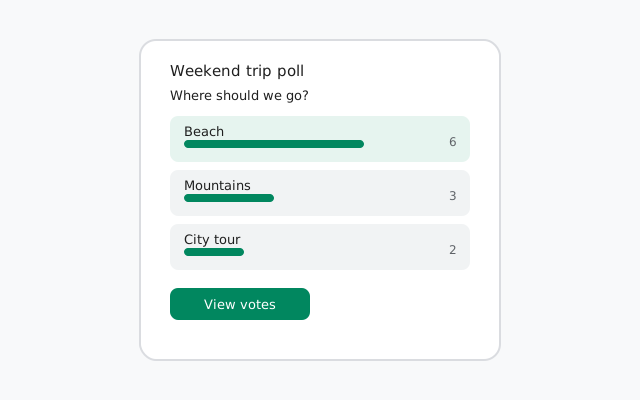
How to create a poll
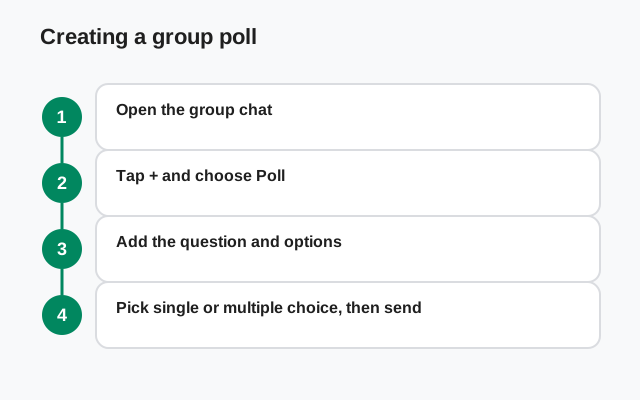
Polls live in group chats. Open the group where you want to ask the question:
Open the group chat
Polls are a group feature. Open the group conversation first.
Tap the + icon
Tap the + icon next to the message box (the same place you attach photos and files).
Choose Poll
Select Poll from the options. If you do not see it, update Signal. Polls need a recent version on every participant's device.
Write your question
Enter the poll question: the thing you actually want decided, like "Which day works for dinner?"
Add your options
Add the choices, one per option. You can add up to ten options, which covers almost every real decision. You can reorder options by dragging.
Pick the voting style
Choose whether members can pick one option or several (explained below).
Post it
Send the poll. It appears in the chat like a message, with the question and tappable options.
Single choice vs multiple choice
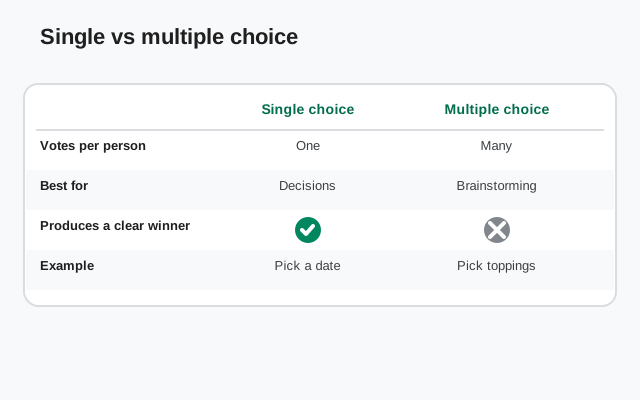
When you create the poll, you decide how members may vote. This one setting shapes the whole poll, so pick it with the question in mind:
- Single choice. Each member picks exactly one option. Use this for real decisions: where to eat, which movie to watch, who is driving. One person, one vote, one answer.
- Multiple choice. Members can tick several options. Use this for availability ("which days work for you?"), preferences ("which toppings?"), or brainstorming where people like more than one idea.
Get it wrong and the results get fuzzy. A "pick one" question with multiple voting lets one enthusiastic member stuff the ballot. Match the voting style to the question and the results will read themselves.
How voting works
Voting is as simple as the poll looks: tap an option and your vote is counted. The totals update live for everyone in the group, so you can watch the race as it happens. To see the detail behind the numbers, tap View votes on the poll. This shows how many votes each option has and, importantly, who voted for what (more on that below).
Votes are messages like any other in one important way: they are end-to-end encrypted. Only members of the group can see the poll and its votes. Signal itself cannot see who voted for what. The encryption covers polls exactly like it covers texts.
Can you change your vote?
Yes, while the poll is still open. Tap a different option and your vote moves to it. This is by design: plans change, new information arrives, and a poll that locks you in would be worse than no poll at all.
The honest etiquette note: because votes are visible (see below), people can see that you switched. In a casual group that is fine. In a group making a sensitive decision, think before you flip. The poll keeps a visible record of who voted for what.
Who can see the votes
This is the part to get right before you post anything sensitive: Signal poll votes are not anonymous. Anyone in the group can tap View votes and see exactly who voted for which option. The poll shows per-option voter lists, not just totals.
That transparency is a feature for group decisions: it stops ballot-stuffing and makes the result trustworthy. But it means polls are wrong for anything that needs a secret ballot. Do not use a poll for sensitive votes (personnel decisions, complaints, anything people might fear retaliation over). For those, take the conversation elsewhere.
- Who sees the poll: only members of the group. Not Signal, not outsiders.
- Who sees your vote: every member of the group, by name, per option.
- Who sees the final result: every member, via View votes / View results.
How to end a poll
A poll keeps collecting votes until it is ended. To close it, tap View votes on the poll and end it from there. This stops new votes and freezes the results. The final tally stays visible in the chat as a record of the decision.
Good habit: end polls once the decision is made. A poll left open for weeks collects stray votes that confuse latecomers ("wait, are we still deciding this?"). Close it, announce the winner in a follow-up message, and move on.
When a poll beats a plain message
| Situation | Best tool |
|---|---|
| Picking a date, place, or option from a short list | Poll: answers count themselves, no scrolling |
| Quick yes/no on a proposal | Poll (two options): cleaner than a flood of "yes" messages |
| Open-ended discussion ("what should we do about...") | Plain message: polls force choices; discussion needs words |
| Agreeing with a single message ("thanks", "happy birthday") | Reaction: see our reactions guide |
| A decision that must stay private | Neither: votes are visible to the group; talk it out privately |
The pattern is simple: polls are for choosing, messages are for discussing, reactions are for acknowledging. Groups that learn the difference stop drowning in "ok" and "+1" messages. Their decisions get faster, not just quieter.
Polls pair well with the rest of the group toolkit: plan the event in a poll, pin the details, and set disappearing messages for the chatter around it. Our groups guide ties it all together.
Poll ideas that work in real groups
If you have never run a poll before, here are the questions that groups actually ask. Each one is a template you can copy:
- "Which day works for dinner?": multiple choice, one option per day. The days with the most votes win.
- "Where should we eat?": single choice, three or four restaurants. Forces a decision instead of endless debate.
- "Who can drive on Saturday?": single choice with names as options. Public votes mean no one can dodge their turn.
- "Which movie tonight?": single choice, up to ten titles. The limit is generous enough for a real shortlist.
- "What should the group name be?": multiple choice brainstorming, then a single-choice runoff between the top two.
- "Rate the trip: again or never?": two-option polls make great icebreakers in new groups.
Notice the pattern: every good poll has a finite list of real options and a decision at the end. If there is no decision to make, you do not need a poll. You need a conversation.
What members on old Signal versions see
Polls need a recent Signal on every device that wants to vote. If someone in the group has not updated in a while, they will not see the interactive poll. Typically they see a placeholder or an unsupported-message notice instead of the voting buttons.
The fix is simple: ask them to update. On Android, the update comes from Signal's official APK page or the Play Store; on iPhone, from the App Store; on desktop, from Signal's download page. Once updated, the poll renders normally and they can vote. Votes cast before they updated still count.
This is the one real limitation of a new feature: in mixed-version groups, give people a day to update before you close the poll. Nobody should lose their vote to an old app.
Poll etiquette: small rules, better results
- One question per poll. "Where and when?" is two polls, not one. Combine them and the results are unreadable.
- Keep options short. Options are labels, not paragraphs. If an option needs explaining, explain it in a message and keep the option to a few words.
- Do not add joke options to serious polls. "Pizza" as an option in the office dinner poll is funny once and ruins the tally forever.
- Announce the outcome. When you end the poll, post the result in words: "Friday wins, 6 to 3." The poll shows the numbers; the message makes the decision official.
- Respect the visible vote. Votes are public to the group. Never pressure someone about their vote. The transparency is for trust, not for policing.
FAQ
How do I create a poll on Signal?
Open a group chat, tap the + icon next to the message box, choose Poll, enter your question and options, pick single or multiple choice, and post it.
How many options can a Signal poll have?
Up to ten options per poll, which covers almost every real group decision.
Are Signal poll votes anonymous?
No. Votes are visible to the group: anyone can tap View votes and see who voted for which option. Do not use polls for decisions that need a secret ballot.
Can I change my vote in a Signal poll?
Yes, while the poll is still open. Tap a different option and your vote moves to it. Other members can see that you changed it.
How do I end a poll on Signal?
Tap View votes on the poll and end it from there. This stops new votes and freezes the results, which stay visible in the chat.
Are Signal polls encrypted?
Yes. Polls and votes are end-to-end encrypted like messages. Only group members can see them; Signal itself cannot.
Keep reading
- the groups guide: everything about Signal group chats
- message reactions: the lightweight alternative to polls
- disappearing messages: keep group chatter from piling up
- group video calls: take the group decision face to face