
How to install the Signal APK on Motorola phones
Published: October 7, 2026 · Updated: October 8, 2026
Motorola phones are among the easiest for sideloading Signal. My UX and Hello UI stay close to stock Android, so there are no confusing renamed menus and no aggressive battery killers to fight. Download the official Signal APK from signal.org/android/apk (current website build 8.29.3), allow the install, and you are up and running in minutes. This guide covers the exact permission path, the one battery setting worth checking, and notes for Moto G, Edge, and Razr owners.
from Signal's official site — file hosted by Signal, not by us. signal.org/android/apk
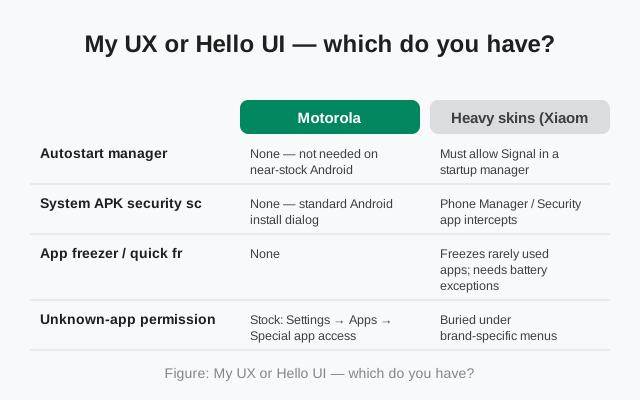
My UX or Hello UI: which do you have?
Motorola's software has had two names in recent years. My UX shipped on Motorola phones through Android 13; Hello UI is the newer name, appearing on phones running Android 14 and later. Underneath, both are near-stock Android with light Motorola additions (Moto gestures, Moto Display).
For installing Signal, the difference barely matters. The steps below are identical on both. The only reason to know which you have: if a menu name in this guide does not match your phone exactly, you are probably on the other one, and the setting is one tap away under a near-identical name. Check at Settings → About phone → Android version if you are curious.
| Your Motorola software | Based on | Install notes |
|---|---|---|
| My UX | Android 11–13 | Standard steps below; permission at Settings → Apps → Special app access. |
| Hello UI | Android 14+ | Identical steps; some menus renamed slightly (e.g. "Security" vs "Privacy"). |
Motorola also keeps its useful additions, Moto Display (peek notifications) and Moto Gestures, fully compatible with Signal. Moto Display will show incoming Signal messages on the sleeping screen like any other notification; if previews do not appear, check Moto app → Moto Display settings rather than Signal itself. None of Motorola's additions interfere with sideloading or with Signal's background connection.
Install steps
-
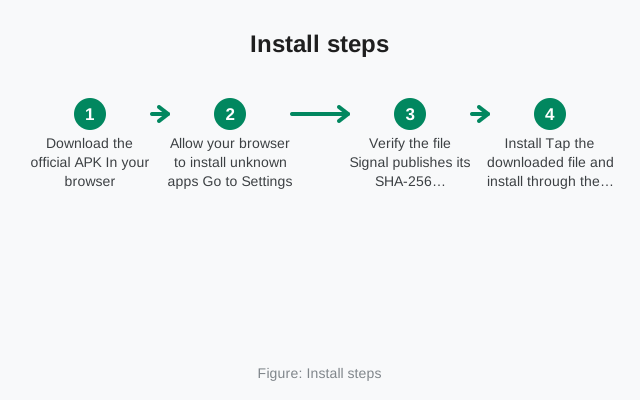
Download the official APK
Open signal.org/android/apk in Chrome (or your usual browser) and download the file. Current website build: 8.29.3, package
org.thoughtcrime.securesms. -
Allow installs from your browser
Open the downloaded file. Android will ask for the "Install unknown apps" permission. The exact Motorola path is below.
-
Verify the fingerprint
Compare Signal's published SHA-256 fingerprint against your file before installing. Our verification guide shows how on phone or computer.
-
Install and open Signal
Tap Install, then Open. "App not installed" almost always means a conflicting Signal build. See the fix.
-
Register
Enter your number, confirm the SMS code, set your PIN. Details below.
Prefer a file manager over the browser prompt? That works too. Download the APK, open your file manager, navigate to Downloads, and tap the file. Android shows the same permission screen, except the grant goes to your file manager instead of the browser. Either route is fine; the permission is per-app, so whichever app opens the file is the one you allow. One caution: the APK must live on internal storage to install. If you downloaded it to an SD card, move it to internal Downloads first. Android's installer cannot install directly from removable storage on most Motorola phones.
The unknown-app permission on Motorola
Because Motorola stays close to stock Android, the path is the standard one:
Settings → Apps → Special app access → Install unknown apps → select your browser (e.g. Chrome) → Allow from this source.
On some Motorola phones the same screen is reachable via Settings → Security → Install unknown apps. Both lead to the identical per-app list. If you open the APK file first, the system takes you there automatically; you just flip the toggle and go back to the installer.
Notifications: the one battery setting that matters
Good news: Motorola does not run the aggressive background-app killing you find on some other brands, so Signal notifications usually work out of the box. There is exactly one setting worth checking:
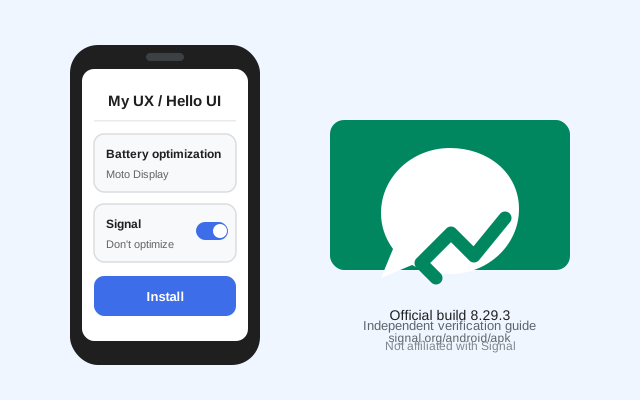
Settings → Battery → Battery optimization → find Signal → set to Don't optimize.
That exempts Signal from Android's background restrictions. Also confirm notifications are allowed at Settings → Apps → Signal → Notifications. If messages still arrive late with the screen off, run through our notification troubleshooting guide, but on Motorola this is rarely needed.
If you use more than one browser, remember the permission is per app: allowing Chrome does not allow Firefox. Whichever browser actually downloads and opens the file is the one that needs the grant. If you download in Chrome but tap the file in Files, grant it to your file manager instead. And if you ever factory-reset the phone, this permission resets too; it is a two-tap fix the next time you sideload anything. To confirm which Signal build you ended up with afterward, go to Settings → Apps → Signal and check the version at the bottom. The website build shows the plain version number (8.29.3), matching what signal.org publishes.
Moto G, Edge, and Razr: model notes
| Line | Notes for Signal |
|---|---|
| Moto G (G Play, G Power, G Stylus…) | Budget hardware, same software. The only real concern is free storage. Keep a few hundred MB free so the download and install both fit. The APK is the universal build, so there is no separate "G version" to hunt for. |
| Motorola Edge | No special considerations. Installs and runs like any stock-Android phone. |
| Motorola Razr (foldable) | Signal runs normally on the main display. The small cover screen shows notifications but is not designed for full chats. Open the phone for conversations. No separate APK needed. |
A note on eSIM models: several recent Motorola Edge and Razr phones support eSIM alongside (or instead of) a physical SIM. Signal registration does not care which kind your number lives on. The SMS code arrives the same way. Just make sure the eSIM profile is active and has signal before you request the code. And if you are moving from an old phone at the same time as switching to eSIM, do the Signal backup and restore first, while the old phone still works. Juggling a number transfer and a chat transfer simultaneously is how people lose message history.
Updates, registration, and extras
- Updates: the website build checks for updates itself and prompts you to install them. No Play Store needed. Details in our APK update guide.
- Registration: enter your number, wait for the SMS code (or request a voice call), set your profile and PIN. Stuck? See SMS code troubleshooting.
- First run: our first-run guide and security checklist cover the ten minutes that matter most.
- Check your version later: how to check which Signal version you have.
- Moving from another phone: back up first: the transfer walkthrough.
Frequently asked questions
Is it safe to install the Signal APK on a Motorola phone?
Yes, if the file comes from signal.org/android/apk and the SHA-256 fingerprint matches what Signal publishes. That combination proves the file came from Signal and was not modified. Our safety assessment covers the full picture.
Do I need the Play Store at all after sideloading?
No. The website build updates itself. You can even sideload onto a Motorola running a de-Googled ROM and never touch the Play Store.
Chrome says the file ‘may be harmful’. Should I worry?
Chrome warns about every APK download. It is a generic warning, not a verdict on this file. Keep the download only if it came from signal.org/android/apk and the fingerprint checks out; otherwise delete it.
Can I install the APK over the Play Store version of Signal?
No. The two builds use different signing keys, so Android refuses to install one over the other. Back up your chats, uninstall the Play version, then install the APK.
Does the Razr cover screen run Signal chats?
Not really. The cover screen shows message notifications and lets you quick-reply on some models, but full chats need the main display. Install and use Signal normally on the inner screen; treat the cover display as a notification window.
Can I move Signal to the SD card on my Moto G?
No, and you should not try. Android does not allow moving Signal's private data to adoptable storage reliably, and messengers kept on SD cards are a classic source of corrupt databases. Keep Signal on internal storage; use the SD card for photos and media instead.
Will Signal drain my Motorola's battery?
No more than any messenger. Signal is light on resources; if you notice unusual drain, check that battery optimization is off for Signal and see our battery notes above.
Next steps: download from the official Signal APK page, verify with our install verification guide, and read what sideloading safety actually depends on.